Dellネットワーキング |取り外し可能なファンユニットを搭載したスイッチのファンの基本的なトラブルシューティング
Summary: 取り外し可能なファン ユニットを搭載したすべてのDellスイッチ プラットフォームにおけるファンの問題に対する基本的なトラブルシューティング手順の概要について説明します。
This article applies to
This article does not apply to
This article is not tied to any specific product.
Not all product versions are identified in this article.
Instructions
Dellネットワーキング |取り外し可能なファン ユニットを搭載したスイッチのファンの基本的なトラブルシューティング:
- ファンの動作を示す視覚的および聴覚的な証拠を探します。
ビジュアル:
-
-
- 取り付けられているすべてのファンが確実に回転している。
- スイッチ自体には、1つ以上のモデル固有のLEDがあります。可能な場所は次のとおりです。
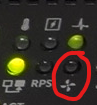
- ファンLEDインジケーター: ユニットの前面にある、照らされた4枚羽根の扇形アイコンまたは扇形アイコンでマークされたLED
- モデルによっては、LEDが緑色に点灯したり、消灯したりしても、正常に動作していることを示す場合があります。
- ほとんどのユニットは、黄色のLEDの点滅でファンの障害または障害を示します。
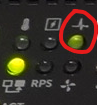
- システムLEDインジケーター: ユニットの前面にある心電図の形をしたアイコンまたはLEDが点灯している
- 黄色のシステム LED の点滅は、1 つのファンユニットの障害を含む、重要ではないシステムエラーを示します。
- 黄色(橙色)のシステムLEDの点灯は重大なシステム エラーを示します。これは、複数のファン ユニットの障害が原因である可能性もあります。
-
ファン ユニットLEDインジケーター: スイッチボックスの背面にあるLED(多くの場合、ファンユニット自体にあります)

- ファンLEDインジケーター: ユニットの前面にある、照らされた4枚羽根の扇形アイコンまたは扇形アイコンでマークされたLED
-
聴覚:
-
-
-
ファンの動作音が大きすぎる、またはまったく音が出ない場合は、ファンに問題がある可能性があります。
-
-
-
-
-
プラットフォームに適したコマンドを使用して、ファンの方向や速度など、コマンド ライン インターフェイス(CLI)を介してファンの動作ステータスを確認します。
- OS6:
console> show system fan Fans: Unit Description Status ---- ----------- ------ 1 Fan 1 OK 1 Fan 2 OK 1 Fan 3 OK - OS9:
DellEMC# show system Stack MAC : 34:17:eb:f2:xx:xx Reload Type : normal-reload [Next boot : normal-reload] -- Unit 1 -- Unit Type : Management Unit Status : online Next Boot : online Required Type : S4048-ON - 54-port TE/FG (SK-ON) Current Type : S4048-ON - 54-port TE/FG (SK-ON) Master priority : 14 Hardware Rev : 2.0 Num Ports : 72 Up Time : 33 min, 51 sec Dell Networking OS Version : 1-0 (0-5005) Jumbo Capable : yes POE capable : no FIPS Mode : disabled Burned In MAC : 34:17:eb:f2:94:c4 No Of MACs : 3 -- Power Supplies -- Unit Bay Status Type FanStatus FanSpeed(rpm) --------------------------------------------------------------------------- 1 1 up UNKNOWN up 10704 1 2 absent up 0 -- Fan Status -- Unit Bay TrayStatus Fan1 Speed Fan2 Speed ------------------------------------------------------------------------------------ 1 1 up up 10134 up 10031 1 2 up up 10031 up 10031 1 3 up up 10031 up 10031 Speed in RPM - OS10:
S4148U-1# show system brief Node Id : 1 MAC : e4:f0:04:c3:xx:xx -- Unit -- Unit Status ReqType CurType Version ---------------------------------------------------------------- 1 up S4148U S4148U 10.5.5.6 -- Power Supplies -- PSU-ID Status Type AirFlow Fan Speed(rpm) Status ---------------------------------------------------------------- 1 up AC NORMAL 1 13344 up 2 fail -- Fan Status -- FanTray Status AirFlow Fan Speed(rpm) Status ---------------------------------------------------------------- 1 up NORMAL 1 9590 up 2 9614 up 2 up NORMAL 1 9590 up 2 9614 up 3 up NORMAL 1 9614 up 2 9590 up 4 up NORMAL 1 9590 up 2 9590 up - ソニック:
E3248PXE-ON-U35# show platform fanstatus
-----------------------------------------------------------------------
Fan            Status         Speed (RPM)         Direction
-----------------------------------------------------------------------
FAN 1          OK             5698               exhaust
FAN 2          OK             5657               exhaust
FAN 3          OK             5674               exhaust
- OS6:
-
影響を受けるファン ユニットをスイッチ背面のスロットから取り外します。
-
ファン ユニットに損傷(へこみ、焼け跡、および同様の目に見える欠陥の兆候)がないか目視で確認します。
-
疑わしいファン ユニットを別の正常なファンと交換します。
-
スワップ後に新しいスロットで問題が発生する場合は、ファン ユニットに障害があります。
-
スワップ後も元のスロットで問題が解決しない場合は、ファン ユニット スロットに障害があります。
-
入れ替え後、両方のファン ユニットが正常に動作している場合は、OSとファームウェアをアップデートして既知のファームウェア関連の修正を適用します。
-
-
手順5で特定した障害のあるコンポーネントを交換する作業オーダーを作成して送信します。
Affected Products
Access Platforms, N Series, OS9, Enterprise SONiC Distribution, PowerSwitch S4048-ON, PowerSwitch S4810P, PowerSwitch S4810-ON, PowerSwitch S4820T, PowerSwitch S5000, PowerSwitch S6000, PowerSwitch S6000 ON, PowerSwitch E3200-ON Series
, PowerSwitch N2100 Series, PowerSwitch N2200-ON Series, PowerSwitch N3000 Series, Dell EMC PowerSwitch N3000E-ON Series, Dell EMC PowerSwitch N3100 Series, Dell EMC Networking N3200-ON, PowerSwitch N4000 Series, Dell Networking S3100 Series, PowerSwitch S3248T-ON, PowerSwitch S4048T-ON, PowerSwitch S4112F-ON/S4112T-ON, PowerSwitch S4128F-ON/S4128T-ON, PowerSwitch S4148F-ON/S4148T-ON/S4148FE-ON, PowerSwitch S4148U-ON, PowerSwitch S4248FB-ON /S4248FBL-ON, PowerSwitch S5048F-ON, PowerSwitch S5148F-ON, PowerSwitch S5212F-ON, PowerSwitch S5224F-ON, PowerSwitch S5232F-ON, PowerSwitch S5248F-ON, PowerSwitch S5296F-ON, PowerSwitch S5448F-ON, PowerSwitch S6010-ON, PowerSwitch S6100-ON, PowerSwitch Z9100-ON, PowerSwitch Z9264F-ON, PowerSwitch Z9332F-ON, PowerSwitch Z9432F-ON, PowerSwitch Z9864F-ON
...
Article Properties
Article Number: 000236921
Article Type: How To
Last Modified: 06 Aug 2025
Version: 6
Find answers to your questions from other Dell users
Support Services
Check if your device is covered by Support Services.