PowerFlex: MVM Cleanup and Space Reclamation
Summary: This article explains how to reclaim space on the Management Virtual Machine (MVMs).
Instructions
MVM Snapshots can be taken with the MVMs running. Apply these steps for all three MVMs
- Log in to vCenter
- For each MVM, perform the following steps
- Click the MVM --> Click Snapshots --> Click TAKE SNAPSHOT….
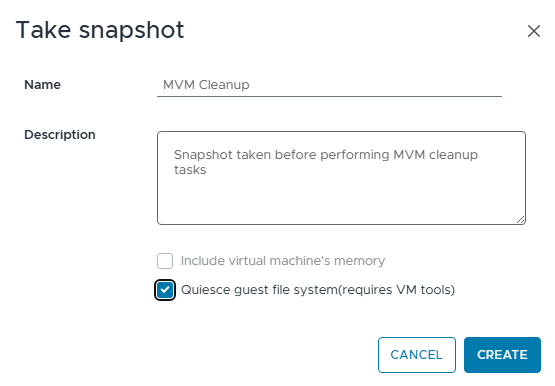
- Click CREATE
Cleanup Stale docker-registry PVCs
Steps
-
The following command lists the "docker-registry" pods and lists the MVM that is running the pod.
delladmin@pfmpn2:/opt/platform-provisioner> kubectl get pods -n powerflex -o wide | grep docker | grep -v sync
docker-registry-0                                             1/1     Running             0              16h    192.168.21.154   pfmpn3   <none>           <none>
docker-registry-1                                             1/1     Running             0              16h    192.168.23.40    pfmpn2   <none>           <none>
-
When you review the output of the configured Persistent Volume Claims for docker-registry, the PVC IDs are listed for the active PVCs. The PVC data is stored in
/opt/platform-provisioner/.Example:
delladmin@pfmpn2:~> kubectl get pvc -n powerflex | grep docker
docker-registry-data-docker-registry-0                                       Bound    pvc-648ed95b-0393-4c6d-b500-03a4b162dda5   20Gi       RWO            local-path                  46h
docker-registry-data-docker-registry-1                                       Bound    pvc-0f689062-a700-48ad-8d10-65b985477e1a   20Gi       RWO            local-path                  19d
-
When we look at the directory output above, you can see that there are two directories for "docker-registry-1." The current PVC ID for "docker registry 1" is "pvc-0f689062-a700-48ad-8d10-65b985477e1a." Since there are two directories listed for "docker-registry-1."
-
There is one stale directory that can be deleted to free up space. There can be many more depending on how many stale directories were left over time.
delladmin@pfmpn2:~> ls -al /opt/platform-provisioner/ | grep docker
drwxrwxrwx 1 root root    12 Jul 22 15:47 pvc-0f689062-a700-48ad-8d10-65b985477e1a_powerflex_docker-registry-data-docker-registry-1
drwxrwxrwx 1 root root    12 May 17 00:44 pvc-8a5f3651-dbd5-40a9-8252-51fd18539fc3_powerflex_docker-registry-data-docker-registry-1
-
The stale directory is consuming 60GB, and this directory can be deleted. The stale PVC ID is "pvc-8a5f3651-dbd5-40a9-8252-51fd18539fc3"
Space used before stale directory cleanup
delladmin@pfmpn2:~> df -h /dev/sda2
Filesystem      Size  Used Avail Use% Mounted on
/dev/sda2       600G  273G  326G  46% /
Example:
The stale directory is consuming 60GB of disk space.delladmin@pfmpn2:~> du -h --max-depth=1 /opt/platform-provisioner/pvc-8a5f3651-dbd5-40a9-8252-51fd18539fc3_powerflex_docker-registry-data-docker-registry-1 60G /opt/platform-provisioner/pvc-8a5f3651-dbd5-40a9-8252-51fd18539fc3_powerflex_docker-registry-data-docker-registry-1/docker 60G /opt/platform-provisioner/pvc-8a5f3651-dbd5-40a9-8252-51fd18539fc3_powerflex_docker-registry-data-docker-registry-1
-
Deleting the stale "docker-registry" directory
-
When the stale directory is deleted, it freed up 60GB.
delladmin@pfmpn2:/opt/platform-provisioner> sudo rm -rf pvc-8a5f3651-dbd5-40a9-8252-51fd18539fc3_powerflex_docker-registry-data-docker-registry-1
delladmin@pfmpn2:/opt/platform-provisioner> df -h /dev/sda2
Filesystem      Size  Used Avail Use% Mounted on
/dev/sda2       600G  213G  385G  36% /
Cleanup old IC/RCM Repository directories
-
Run the following command from any MVM to get the IC/RCM UUIDs and associated name. There can be only one IC/RCM set to default. Older IC/RCM compliance bundles can be removed.
Example:

Example:
Since there is only one IC/RCM added to Compliance Versions in the PFMP UI, in turn the database reports only one.delladmin@pfmpn2:/opt/platform/fileshare> kubectl exec -it -n powerflex $(kubectl get pods -n powerflex | grep -i asmm | awk '{print $1}') -- bash -c 'PGPASSWORD=$CONNECTION_USER_PASSWORD psql -h postgres-ha-pgbouncer -p 5432 -U asmmanageruser -d asm_manager -w -c "SELECT id,name FROM firmware_repository;"' id | name ----------------------------------+------------------------------- 402897a59688313b01968c2d859e4732 | Intelligent Catalog 46.382.00 (1 row) -
The compliance bundles are stored in
/opt/platform/fileshareon all three MVMs. Any UUID that is not associated with the current default Compliance Version in the PFMP UI can be deleted If you see compliance bundles with a .zip extension. Verify that there is no IC/RCM Synchronization in progress in the PFMP UI. -
If all bundles are in a state of Available. The .zip files can be deleted to free up space.
Example:
delladmin@pfmpn2:/opt/platform/fileshare> pwd
/opt/platform/fileshare
delladmin@pfmpn2:/opt/platform/fileshare> ls -al | grep 402897a59688313b01968c2d859e4732
drwxr-xr-x 1 delladmin users     14184 May 30 16:41 402897a59688313b01968c2d859e4732
Example:
-
This MVM pfmpn1 has a compliance bundle in .zip from an IC/RCM synchronization task that did not complete. This file can be deleted to free up space.
delladmin@pfmp452n1:/opt/platform/fileshare> ls -alh | grep 402897
drwxr-xr-x 1 delladmin users  14K May 30 16:41 402897a59688313b01968c2d859e4732
-rw-r--r-- 1 delladmin users  28G Jul 17 14:06 402897a59688313b01968c2d859e4732.zip

delladmin@pfmp452n1:/opt/platform/fileshare> sudo rm -rf /opt/platform/fileshare/402897a59688313b01968c2d859e4732.zip

Result
delladmin@pfmp452n1:/opt/platform/fileshare> ls -alh | grep 402897
drwxr-xr-x 1 delladmin users  14K May 30 16:41 402897a59688313b01968c2d859e4732
-
This example shows pfmpn3 contains an old IC/RCM compliance version directory which is no longer needed since there is only one IC/RCM Compliance version added in the PFMP UI.
delladmin@pfmp452n3:~> ls -al /opt/platform/fileshare/ | grep 402897
drwxr-xr-x 1 delladmin users     11798 Feb 13 17:16 4028979594e191650195014584d93692
drwxr-xr-x 1 delladmin users     14184 May 30 16:41 402897a59688313b01968c2d859e4732
-
Space consumed on disk for old IC/RCM
delladmin@pfmpn3:/opt/platform/fileshare/4028979594e191650195014584d93692> du -h --max-depth=1 .
1.3G    ./modified
47G     ./os
2.8M    ./rpm s
5.8M    ./slesrpms
15M     ./vibs70
53G     .
-
You can run the following command to identify the name of the IC/RCM associated with this old directory. Modify the command to include the UUID applicable to your environment.
delladmin@pfmp452n3:/opt/platform/fileshare/4028979594e191650195014584d93692> head /opt/platform/fileshare/4028979594e191650195014584d93692/catalog.xml | grep name
<Manifest baseLocation="" dateTime="2020-08-06T15:05:13" name="Intelligent Catalog 46.376.00" identifier="d70a21a1-116e-4a3c-95ec-52a24603b684" releaseID="MW3KN" version="1.28">
-
This old IC/RCM compliance directory is consuming 53GB since the current default IC/RCM version in this example is 46.382.00. If the old IC/RCM is not referenced in the UI, this directory can be deleted. If an IC/RCM is still listed in the UI, remove it from the UI first. Then check if the directory is cleaned up. If it is not, then you can manually delete the directory.
-
Cleaning up stale PVCs for docker and cleaning up old IC/RCM bundles should be all that is needed to get the MVM disk usage down to a health level.
Cleanup PFMP Upgrade directories
There are three directories that are created during PFMP upgrade. If you have successfully upgraded PFMP but may have had to manually complete an upgrade phase, the directories were not cleaned up. The directories may also fail to cleanup if there were ownership permission issues. The directories are in /opt/platform/fileshare on each MVM. The directory that provides the most space to reclaim is "PFMPUpgradeBundle"
Directory Names
- PFMPUpgradeBundle
- Platform
- Upgrade
delladmin@pfmp452n3:/opt/platform/fileshare> ls -alh /opt/platform/fileshare/ | grep -Ei 'upgrade|platform'
drwxr-xr-x 1 delladmin root   362 Jul 22 15:23 PFMPUpgradeBundle
drwxr-xr-x 1 delladmin users    0 Nov  7  2024 platform
drwxr-xr-x 1 delladmin root    92 Jul 22 15:23 Upgrade
Run the following commands to delete these directories.
sudo rm -rf /opt/platform/fileshare/PFMPUpgradeBundle
sudo rm -rf /opt/platform/fileshare/Upgrade
sudo rm -rf /opt/platform/fileshare/platform
Cleanup Large pod log files
-
If more space is needed, check and delete if needed:
-
On any PFMP (MVM) server that has space issues, Run the following find commands to check how large the log files are:
sudo find /opt/platform-provisioner -type d -name "pvc-*_*_logging-rsyslog-data-*" -exec ls -lh {} \; sudo find /opt/platform-provisioner -iname "docker-registry.stdout.log" -exec du -h {} \; sudo find /opt/platform-provisioner -iname "supportassist-vxflexappliance.stdout.log" -exec du -h {} \; sudo find /opt/platform-provisioner -iname "temporal-history.stdout.log" -exec du -h {} \; -
The following commands automatically remove these large log files:
Note: You do not have to run the delete commands below if the files are small in size < 300MB. If they are large, the size could range between 1GB and 100+GBsudo find /opt/platform-provisioner -type d -name "pvc-*_*_logging-rsyslog-data-*" -exec sh -c 'for log in "$1"/*.log; do [ -e "$log" ] && echo "clean" > "$log"; done' _ {} \; sudo find /opt/platform-provisioner -iname "docker-registry.stdout.log" -exec sh -c 'echo "clean" > "$1"' _ {} \; sudo find /opt/platform-provisioner -iname "supportassist-vxflexappliance.stdout.log" -exec sh -c 'echo "clean" > "$1"' _ {} \; sudo find /opt/platform-provisioner -iname "temporal-history.stdout.log" -exec sh -c 'echo "clean" > "$1"' _ {} \;
Validation
Verify that disk usage has reduced using the following command. When the cleanup is complete with only one compliance bundle, the usage can range from 35% to 55%.
df -h /dev/sda2

Ex.
delladmin@pfmpn2:/opt> df -h /dev/sda2
Filesystem      Size  Used Avail Use% Mounted on
/dev/sda2       600G  218G  381G  37% /

sudo du -h --max-depth=1 /opt

Ex.
delladmin@pfmpn2:/opt> sudo du -h --max-depth=1 /opt
45G     ./platform
146M    ./rke2
294M    ./cni
84G     ./platform-provisioner
129G    .
Run the following command and verify that all pods are in a Running state.
kubectl get pods -o wide -n powerflex
Monitor the PFMP cluster for 24 hours. Then the MVM snapshots can be deleted.
Additional Information
Also, the script below can be used for the PVC cleanup.
It is safe to use the script because it does not perform the deletes. It provides the commands needed to delete. However, it is an unsupported script by Dell; The recommendation is to use the manual method covered in this KB. Use of this script is unsupported.
How to create a script file on an MVM. This procedure would need to be repeated on the other two MVMs
#Create a blank filetouch /home/delladmin/dockerpvcclean.sh
#Give the file perform permissionchmod +x /home/dellamdin/dockerpvcclean.sh
#Use the following command to open the file with the vi editor
vi /home/delladmin/dockerpvcclean.sh
With the vi editor open, Go into insert mode by pressing the "i" key
#Copy the Script File Content at the end of this section.
Right click in the terminal to paste the content into the file.
#Save the file
{Press Esc to exit insert mode. Press {Shift}:
Then press wq
Then press Enter (This will write and quit the vi editor and return to the command prompt)
#Confirm the file contains the script contentscat /home/delladmin/dockerpvcclean.sh
#To perform the script, run the following commands.
sudo -s/home/delladmin/dockerpvcclean.sh
Script File Content
#!/bin/bash
# Set this node name
MYNODENAME=$(kubectl get node -o yaml |grep host |awk '{print $2}' |grep $(hostname))
echo "$MYNODENAME Free space on root partition:"
df -h /
#
DOCKER0PV=$(kubectl get pvc -n powerflex  docker-registry-data-docker-registry-0 -o json  | jq .spec.volumeName | sed 's/"//g')
DOCKER1PV=$(kubectl get pvc -n powerflex  docker-registry-data-docker-registry-1 -o json  | jq .spec.volumeName | sed 's/"//g')
echo Currently used docker-registry-0 PV is $DOCKER0PV
echo Currently used docker-registry-1 PV is $DOCKER1PV
#
# Show which hosts have the current running set of docker-registry pods
for DOCKPOD in $(kubectl get pods -A -o name | grep docker-registry | grep -v sync); do
REGHOST=$(kubectl get $DOCKPOD -n powerflex -o jsonpath='{.spec.nodeName}');
echo $REGHOST has $DOCKPOD;
done

#Check for the good/valid PV directories on this host
DOCKER0PVDIR=$(find /opt/platform-provisioner/ -type d -name $DOCKER0PV*)
DOCKER1PVDIR=$(find /opt/platform-provisioner/ -type d -name $DOCKER1PV*)
if [ -n "$DOCKER0PVDIR" ];
then
echo Keeping $DOCKER0PVDIR which is on this node
fi
if [ -n "$DOCKER1PVDIR" ];
then
echo Keeping $DOCKER1PVDIR which is on this node
fi

STALEDOCKERPVDIRS=$(find /opt/platform-provisioner/ -type d -name *docker-registry-data* | grep -v $DOCKER1PV | grep -v $DOCKER0PV; echo )

if [ -n "$STALEDOCKERPVDIRS" ];
then
echo ##################################
echo Found $(echo $STALEDOCKERPVDIRS | wc -w ) Stale PVs on $HOSTNAME;
  for CHECKSPACE in $(echo $STALEDOCKERPVDIRS); do
  echo
  echo $CHECKSPACE uses;
  du -hcs $CHECKSPACE;
  echo "#Please Run the following:"
  echo "rm -rf $CHECKSPACE"
  done
echo "A total of $(du -hcs $STALEDOCKERPVDIRS | grep total) can be saved"
else
        echo "Good news: No stale PVs related to docker-registry found!"
fi