NVP vProxy-Understanding VMware VM backup levels and sizes shown in NetWorker
Summary: This article provides a general overview of how VMware Virtual Machine (VM) backup levels and sizes that are reported in NetWorker when using the NetWorker VMware Protection (NVP) solution. ...
Instructions
NetWorker supports the following backup levels for VMware VMs:
- Full: The entire VM is backed up.
- Incremental: Only changes since previous full or incremental backups are written to disk. VMware Change Block Tracking (CBT) calculates incremental data.
- Skip: No backup is performed.
- Logs Only: Only to be used when performing Application Consistent SQL Transaction Log backups. See: NVP-vProxy: SQL VM "Logs Only" Backup Fails "save level is invalid"
The backup level is set in the backup action:
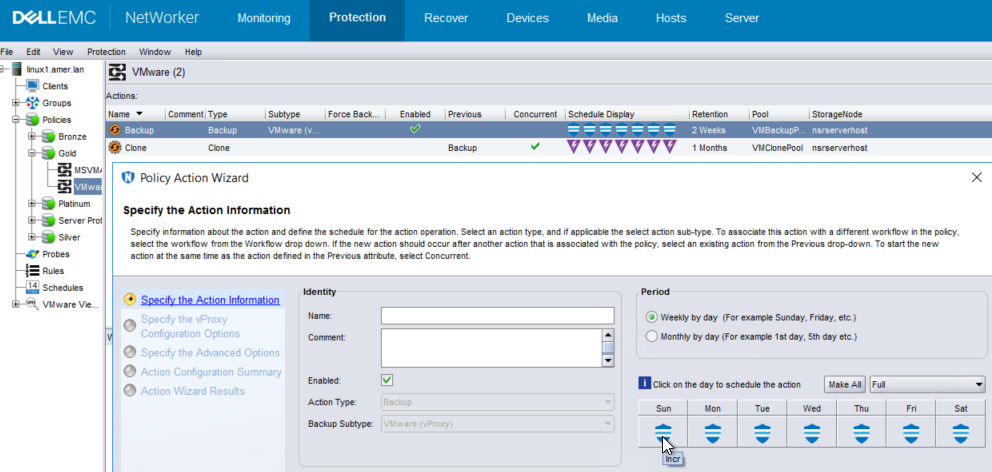
Size and Data Domain Aspects:
Virtual Synthetic Full:
NetWorker supports backups directly to a Data Domain disk device only; once there, data can be cloned to tape, Cloud Boost, or other supported devices. This also means that data must be cloned (copied) back to a Data Domain device to perform recoveries.
Since the backup is performed to Data Domain, the resulting backup on the target device is a new full backup regardless of the backup level performed. NetWorker uses Data Domain virtual synthetic technology to create a synthetic full backup. This means that any backup can be used for a full image restore if needed. Since all backups are "virtual synthetic full," NetWorker supports scheduling "forever incremental" backups for VMs. However, the first backup of any VM is performed as level full.
NVP vProxy: How often should full backups be run for VM backups with vProxy
Space Considerations:
The NetWorker VMware Protection (NVP) solution only supports direct backups to Data Domain devices. Incremental level backups use VMware Change Block Tracking (CBT) to calculate new blocks between the previous and current backups. Only new data is sent to the Data Domain. Data Domain deduplication is performed on the backup data once it is copied to the Data Domain file system. At source (VMware level) deduplication does not occur. When a backup is performed, the estimated space requirements do not consider deduplication. The post-CBT (pre-deduplication) size must be available on the storage media in order for the backup to succeed. The VM's changed blocks are calculated completely within VMware by CBT. Change block ratios on an incremental backup are shown in the VM backup session logs:
YYYY-MM-DDTHH:mm:SSZ INFO:   [@(#) Build number: 95] Queried CBT data relative to '52 6a 10 fd 58 e9 2a 2e-f1 0f f4 d5 2e 51 a7 cc/64', for 'Hard disk 1'.
YYYY-MM-DDTHH:mm:SSZ NOTICE: [@(#) Build number: 95] Blocks were realigned to 0 KB boundary.
YYYY-MM-DDTHH:mm:SSZ NOTICE: [@(#) Build number: 95] Used bytes = 106635853824, changed bytes = 1619329024, change rate = 001.52%.
YYYY-MM-DDTHH:mm:SSZ INFO:   [@(#) Build number: 95] File block exclusion: No objects to exclude from the backup
YYYY-MM-DDTHH:mm:SSZ NOTICE: [@(#) Build number: 95] No change detected in VM configuration.
YYYY-MM-DDTHH:mm:SSZ INFO:   [@(#) Build number: 95] Controller for disk Hard disk 1, (Disk Key 2000) is type SCSI, Hotadd supported.
YYYY-MM-DDTHH:mm:SSZ NOTICE: [@(#) Build number: 95] VM passed configuration checks.
...
...
YYYY-MM-DDTHH:mm:SSZ INFO:   [@(#) Build number: 95] DiskStats: Disk Label    |  Mode  | Bytes Moved |  Read Rate   |  Write Rate  |     Overhead  |   VDDK Wait   |   Total Time  | VM MORef  | VM Name
YYYY-MM-DDTHH:mm:SSZ INFO:   [@(#) Build number: 95] DiskStats: ------------- | ------ | ----------- | ------------ | ------------ | ------------- | ------------- | ------------- | --------- | ------------------------------
YYYY-MM-DDTHH:mm:SSZ INFO:   [@(#) Build number: 95] DiskStats: Hard disk 1   | hotadd |       2 GiB |     17 MiB/s |      7 MiB/s |       0:00:20 |        1.1 us |       0:12:14 | vm-4002   | win-client01.amer.lan
YYYY-MM-DDTHH:mm:SSZ INFO:   [@(#) Build number: 95] DiskStats: Total         |        |       2 GiB |     17 MiB/s |      7 MiB/s |       0:00:20 |        1.1 us |       0:12:14 | vm-4002   | win-client01.amer.lan
This output shows:
- The VM disk is
106635853824 bytesor99 GiB/106 GB. - VMware calculated a 1.52% change rate from the last backup. This amounts to
1619329024 bytesor1.5 GiB. - The backup session sends only the changed data to the DD. The backup session Disk Stats show
2 GiB(There is no decimal place so it rounds up to nearest whole number).
NetWorker User Interfaces and Commands Always Report Level Full:
VM backup levels appear as level "full" in NetWorker regardless of the backup level scheduled. For example, the NetWorker Management Console's (NMC) monitoring window shows:

The save set details as seen in the NetWorker server's media database (mm) show levels as full: mminfo -kvot
[root@nsr ~]# mminfo -kvot
 volume        type   client           date     time         size ssid      fl   lvl name
VMBackupPool.002 Data Domain vcsa.amer.lan 09/26/2024 09:00:10 PM 114 GB 3824550812 cr full vm:503ea434-0331-8ed6-8b19-b9cd408cce7a:vcsa.amer.lan
VMBackupPool.002 Data Domain vcsa.amer.lan 09/26/2024 09:00:11 PM 104 GB 3807773596 cr full vm:503ebedd-f10f-3109-3a01-ab59180c700a:vcsa.amer.lan
VMBackupPool.002 Data Domain vcsa.amer.lan 09/26/2024 09:00:12 PM 104 GB 3790996380 cr full vm:503e73d1-0586-cc5a-6748-fa3dc7d54047:vcsa.amer.lan
VMBackupPool.002 Data Domain vcsa.amer.lan 09/26/2024 09:00:13 PM 104 GB 3774219164 cr full vm:503ebd5c-db03-255f-b9c4-ec4bf6738647:vcsa.amer.lan
VMBackupPool.002 Data Domain vcsa.amer.lan 09/26/2024 09:00:14 PM 104 GB 3757441948 cr full vm:503e47a3-d13b-64cd-df1a-9184f0ffd45e:vcsa.amer.lan
As mentioned in Size and Data Domain Aspects, all VM backups are stored as Virtual Synthetic Full (VSF) backups on the Data Domain. The general "level" is always reported in NetWorker as a level "full" backup, even when a scheduled incremental is performed.
The only exception is Microsoft SQL transaction log backups, which report the backup level as txnlog:
[root@nsr ~]# mminfo -kvot -q vmname=win-sql01.amer.lan,level=txnlog
 volume        type   client           date     time         size ssid      fl   lvl name
...
VMBackupPool.002 Data Domain vcsa.amer.lan 04/11/2026 03:01:02 PM 228 KB 4074412655 cr txnlog vm:503ea434-0331-8ed6-8b19-b9cd408cce7a:vcsa.amer.lan
VMBackupPool.002 Data Domain vcsa.amer.lan 04/11/2026 03:15:09 PM 229 KB 4057636287 cr txnlog vm:503ea434-0331-8ed6-8b19-b9cd408cce7a:vcsa.amer.lan
VMBackupPool.002 Data Domain vcsa.amer.lan 04/11/2026 03:30:09 PM 229 KB 4040859971 cr txnlog vm:503ea434-0331-8ed6-8b19-b9cd408cce7a:vcsa.amer.lan
VMBackupPool.002 Data Domain vcsa.amer.lan 04/11/2026 03:45:09 PM 230 KB 4024083655 cr txnlog vm:503ea434-0331-8ed6-8b19-b9cd408cce7a:vcsa.amer.lan
The expanded mminfo details report the vm_backup_level performed as per the backup schedule:
mminfo -S -q ssid=SSID
For example:
[root@nsr ~]# mminfo -S -q ssid=3790996380
ssid=3790996380 savetime=09/26/2024 09:00:12 PM (1727398812) vcsa.amer.lan:vm:503e73d1-0586-cc5a-6748-fa3dc7d54047:vcsa.amer.lan
  level=full   sflags=vrF      size=107479425880 files=1          insert=09/26/2024
  create=09/26/2024 complete=09/26/2024 browse=10/03/2024 09:00:10 PM retent=10/03/2024 11:59:59 PM
  clientid=0bc290fc-00000004-6663510c-6663794c-00085000-592bbe56
         **backup start time: 1727398812;
              *backup_device: Data Domain;
                *backup_mode: VSS;
         *occupiedvmdiskutil: 16584376320;
         *policy action name: "backup: 1727398811";
                *policy name: "VMware Protection: 1727398811";
       *policy workflow name: "Full VM: 1727398811";
*policy_workflow_action_path: /VMware Protection/Full VM/backup;
             *proxy_hostname: nsr-vproxy01.amer.lan;
*ss data domain backup cloneid: 1727398811;
*ss data domain dedup statistics: "v1:1727398811:107438073630:53930194:52145905";
             *SSID directory: Yes;
            *totalvmdiskutil: 106648563712;
           *vcenter_hostname: vcsa.amer.lan;
            *vm_backup_level: incr;
                    *vm_info: \
...
...
VM Backup Size:
Regardless if nsrcapinfo or mminfo is used, the VM backups always display the full provisioned size of the VM in VMware. It does not reflect the amount of data backed up in an incremental backup. For example, a VM shows a provisioned space of 100 GB in VMware:
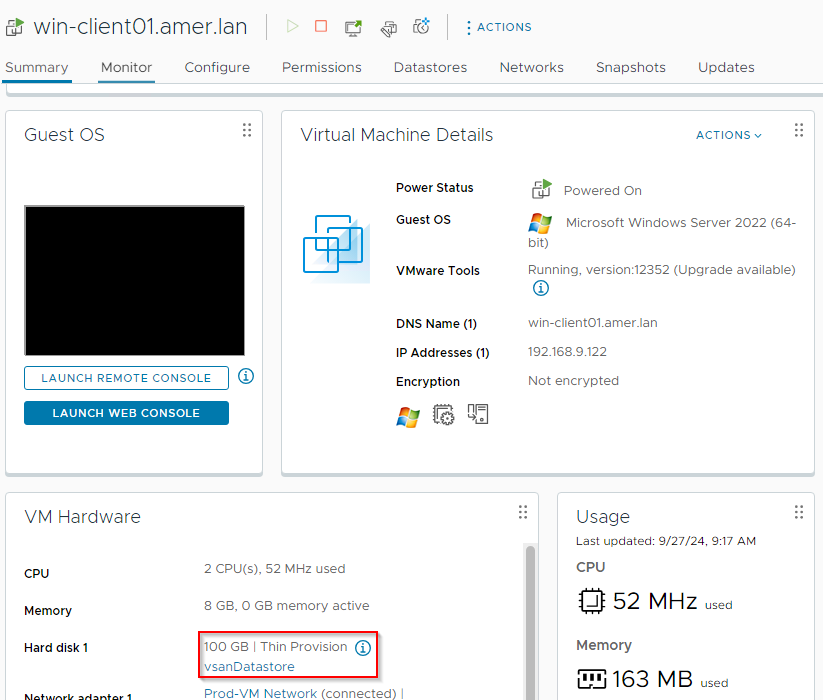
In NetWorker, there is a discrepancy in the size of the VM shown by nsrcapinfo or mminfo when compared to the size of the VM shown in VMware.
[root@nsr ~]# mminfo -kot -q vmname=win-client01.amer.lan
 volume        type   vm_name         date     time         size ssid      fl backup_size
VMBackupPool.001 Data Domain win-client01.amer.lan 09/23/2024 05:10:00 PM 104 GB 4260485415 cr 104 GB
VMBackupPool.002 Data Domain win-client01.amer.lan 09/23/2024 05:39:24 PM 104 GB 4210155532 cr 104 GB
VMBackupPool.002 Data Domain win-client01.amer.lan 09/23/2024 09:00:11 PM 104 GB 4109504283 cr 104 GB
VMBackupPool.002 Data Domain win-client01.amer.lan 09/24/2024 10:41:44 AM 104 GB 3941781417 cr 104 GB
VMBackupPool.002 Data Domain win-client01.amer.lan 09/24/2024 09:00:13 PM 104 GB 3807600797 cr 104 GB
VMBackupPool.002 Data Domain win-client01.amer.lan 09/25/2024 09:00:10 PM 104 GB 4143231516 cr 104 GB
VMBackupPool.002 Data Domain win-client01.amer.lan 09/26/2024 09:00:12 PM 104 GB 3790996380 cr 104 GB
The only exception is SQL transaction log backups, which show (txnlog):
In VMware, VM size is in binary kilo (1024 bytes); in NetWorker, it is shown in metric kilo (1000 bytes) from KiB. The binary kilo is in units of KiB, MiB, GiB, TiB and so forth. Metric kilo units are in KB, MB, GB, TB, and so forth.
The size matches what is reported in VMware when converting a VM save sets size in bytes to binary kilo.
Run the following mminfo command with an expanded sumsize column. The expanded sumsize column shows the provisioned size in bytes instead of the converted unit size.
mminfo -kot -q vmname=vm_name -r "savetime,ssid,sumsize(15)"
Example:
[root@nsr ~]# mminfo -kot -q vmname=win-client01.amer.lan -r "savetime,ssid,sumsize(15)"
  date   ssid                  size
...
09/26/2024 3790996380   107479425880
The unit shown in NetWorker is Bytes. Bytes must be converted to a binary kilo unit (GiB) to match VMware:
Size_in_Bytes / 1024 = KiB / 1024 = MiB / 1024 = GiB
Example:
107479425880 Bytes / 1024 = 104960376.83 KiB / 1024 = 102500.36 MiB / 1024 = 100.09 GiB
The size is a near 1:1 match between NetWorker and VMware once converted to binary kilo.
mminfo command can provide the "total provisioned size" of all disk drives and the "total space usage" of VM data/files during backups.
totalvmdiskutil- Shows the total provisioned size (in bytes) of all disks drives configured on the VMoccupiedvmdiskutil- Total space occupied (in bytes) by the data/files on the VM
mminfo -kot -r "vmname(20),ssid,savetime,totalvmdiskutil,occupiedvmdiskutil"
 vm_name            ssid         date totalvmdiskutil occupiedvmdiskutil
winclient02         4249867714 05/01/2023 96058994688 39817691136
linuxclient01       4233090498 05/01/2023 15435038720 8569937920
Data Saved Per Backup:
mminfo output:
mminfo report for a save set shows the "Changed Bytes" of each VMware Virtual Machine Disk (VMDK) on the VM. This represents the amount of data backed up in the save set specified.
- Get the Save Set ID (SSID) of a VM backup:
mminfo -kot -q vmname=VM_NAME
- Output the full
mminforeport for the save set:
mminfo -aS -q ssid=SSID
Example:
root@lnx-nwserv:~# mminfo -aS -q ssid=2463462732
....
  \"disks\": [
    {
      \"display-name\": \"Hard disk 1\",
      \"datastore\": \"esx01-datastore\",
      \"datastore-moref\": \"datastore-11\",
      \"disk-key\": 2000,
      \"size-kb\": 104857600,
      \"thin\": true,
      \"disk_mode\": \"persistent\",
      \"disk_stats\": {
        \"Statistics\": {
          \"ProvisionedBytes\": 107374182400,
          \"UsedBytes\": 28354609152,
          \"ChangedBytes\": 166723584,
          \"SecondsTaken\": 67
        },
        \"DDStatistics\": {
          \"PreClientCompBytes\": 122079139,
          \"PostClientCompBytes\": 35083803,
          \"TotalSegments\": 18984,
          \"RedundantSegments\": 4798
        },
        \"BaseFileName\": \"[esx01-datastore] win-client01/win-client01.vmdk\"\

      }
    },
    {
      \"display-name\": \"Hard disk 2\",
      \"datastore\": \"esx01-datastore\",
      \"datastore-moref\": \"datastore-11\",
      \"disk-key\": 2001,
      \"size-kb\": 15728640,
      \"thin\": true,
      \"disk_mode\": \"persistent\",
      \"disk_stats\": {
        \"Statistics\": {
          \"ProvisionedBytes\": 16106127360,
          \"UsedBytes\": 16087384064,
          \"ChangedBytes\": 589824,
          \"SecondsTaken\": 28
        },
        \"DDStatistics\": {
          \"PreClientCompBytes\": 219923,
          \"PostClientCompBytes\": 36245,
          \"TotalSegments\": 62,
          \"RedundantSegments\": 35
        },
        \"BaseFileName\": \"[esx01-datastore] win-client01/win-client01_1.vmdk\
\"
...
Session Logs:
2022-10-20T02:04:57Z INFO:   [@(#) Build number: 54] DiskStats: Disk Label    |  Mode  | Bytes Moved |  Read Rate   |  Write Rate  |     Overhead  |   VDDK Wait   |   Total Time  | VM MORef  | VM Name
2022-10-20T02:04:57Z INFO:   [@(#) Build number: 54] DiskStats: ------------- | ------ | ----------- | ------------ | ------------ | ------------- | ------------- | ------------- | --------- | ------------------------------
2022-10-20T02:04:57Z INFO:   [@(#) Build number: 54] DiskStats: Total | | 8 GiB | 107 MiB/s | 293 MiB/s | 0:00:37 | 0:00:19 | 0:03:44 | vm-7002 | winclient02
These logs are available on the NetWorker server under: /nsr/logs/polict/policy_name/workflow_name/
The session logs are also stored on the vProxy under: /opt/emc/vproxy/runtime/logs/recycle/vbackupd/
NOTE: The DiskStats are a rounded up value. The value shown is rounded up to the nearest next unit, in the above example this is GiB. The ChangedBytes information in the session logs or
mminfo output reports the exact number of bytes which were sent during the backup.
Operating system commands (grep/Select-String) can be used to list the Total DiskStats per VM backup session instead of reviewing log files one by one. The size shown can help determine the amount of data sent during the VM backup.
- NetWorker server policy logs follow
jobsdbrotation (72 hours default); after this time has passed, the backup logs are removed from the server. - vProxy backup session logs do not follow
jobsdbrotation and reside on the vProxy for weeks/months depending on vProxy activity and space usage. - This information also displays the throughput of the backup session.
Linux NetWorker server:
# grep -rnw "DiskStats: Total" /nsr/logs/policy/VMware/Image-Protection/ | grep -v "0 Bytes"
root@lnx-nwserv:~# grep -rnw "DiskStats: Total" /nsr/logs/policy/VMware/Image-Protection/ | grep -v "0 Bytes"
/nsr/logs/policy/VMware/Image-Protection/000020-lnx_client02-2024-2-5-11-32-42.log:662:2024-02-05T16:32:40Z INFO:   [@(#) Build number: 185] DiskStats: Total         |        |       8 GiB |    113 MiB/s |    244 MiB/s |       0:00:17 |       0:00:35 |       0:02:23 | vm-1010  | lnx-client02
/nsr/logs/policy/VMware/Image-Protection/000021-lnx_nwserv-2024-2-5-11-33-25.log:668:2024-02-05T16:33:22Z INFO:   [@(#) Build number: 185] DiskStats: Total         |        |      11 GiB |     72 MiB/s |    134 MiB/s |       0:00:17 |      157.0 ms |       0:03:06 | vm-4005| lnx-nwserv
/nsr/logs/policy/VMware/Image-Protection/000023-win_client01-2024-2-5-11-34-18.log:664:2024-02-05T16:34:14Z INFO:   [@(#) Build number: 185] DiskStats: Total         |        |      19 GiB |    104 MiB/s |    265 MiB/s |       0:00:17 |       0:00:18 |       0:03:58 | vm-1009  | win-client01
/nsr/logs/policy/VMware/Image-Protection/000022-win_sql01-2024-2-5-11-35-59.log:670:2024-02-05T16:35:58Z INFO:   [@(#) Build number: 185] DiskStats: Total         |        |      26 GiB |    104 MiB/s |    318 MiB/s |       0:00:17 |        1.8 us |       0:04:49 | vm-1012   | win-sql01
/nsr/logs/policy/VMware/Image-Protection/000024-lnx_client01-2024-2-5-11-44-12.log:663:2024-02-05T16:44:09Z INFO:   [@(#) Build number: 185] DiskStats: Total         |        |       8 GiB |    112 MiB/s |    359 MiB/s |       0:00:16 |       0:00:16 |       0:01:59 | vm-1008  | lnx-client01
/nsr/logs/policy/VMware/Image-Protection/000025-win_client02-2024-2-5-11-45-7.log:666:2024-02-05T16:45:05Z INFO:   [@(#) Build number: 185] DiskStats: Total         |        |      16 GiB |    112 MiB/s |    366 MiB/s |       0:00:16 |       71.2 ms |       0:02:55 | vm-1011 | win-client02
/nsr/logs/policy/VMware/Image-Protection/000026-win_sql02-2024-2-5-11-47-32.log:670:2024-02-05T16:47:27Z INFO:   [@(#) Build number: 185] DiskStats: Total         |        |      21 GiB |     92 MiB/s |    350 MiB/s |       0:00:17 |        1.3 us |       0:04:44 | vm-1013   | win-sql02
/nsr/logs/policy/VMware/Image-Protection/032065-lnx_client02-2024-2-5-23-2-13.log:665:2024-02-06T04:02:10Z INFO:   [@(#) Build number: 185] DiskStats: Total         |        |       5 GiB |     61 MiB/s |    338 MiB/s |       0:00:16 |      185.8 ms |       0:01:54 | vm-1010 | lnx-client02
/nsr/logs/policy/VMware/Image-Protection/032062-lnx_client01-2024-2-5-23-2-18.log:670:2024-02-06T04:02:15Z INFO:   [@(#) Build number: 185] DiskStats: Total         |        |       5 GiB |     61 MiB/s |    333 MiB/s |       0:00:17 |       88.2 ms |       0:01:59 | vm-1008 | lnx-client01
/nsr/logs/policy/VMware/Image-Protection/032066-lnx_nwserv-2024-2-5-23-2-44.log:666:2024-02-06T04:02:39Z INFO:   [@(#) Build number: 185] DiskStats: Total         |        |       5 GiB |     53 MiB/s |    326 MiB/s |       0:00:17 |       0:00:17 |       0:02:22 | vm-4005   | lnx-nwserv
/nsr/logs/policy/VMware/Image-Protection/032064-win_sql02-2024-2-5-23-5-29.log:672:2024-02-06T04:05:24Z INFO:   [@(#) Build number: 185] DiskStats: Total         |        |       9 GiB |     55 MiB/s |    217 MiB/s |       0:00:17 |       82.6 ms |       0:04:50 | vm-1013   |win-sql02
/nsr/logs/policy/VMware/Image-Protection/032067-win_sql01-2024-2-5-23-5-30.log:674:2024-02-06T04:05:24Z INFO:   [@(#) Build number: 185] DiskStats: Total         |        |       9 GiB |     52 MiB/s |    249 MiB/s |       0:00:17 |       0:00:33 |       0:05:07 | vm-1012   |win-sql01
/nsr/logs/policy/VMware/Image-Protection/032063-win_client02-2024-2-5-23-5-58.log:669:2024-02-06T04:05:56Z INFO:   [@(#) Build number: 185] DiskStats: Total         |        |      11 GiB |     57 MiB/s |    279 MiB/s |       0:00:17 |       0:00:17 |       0:05:22 | vm-1011 | win-client02
/nsr/logs/policy/VMware/Image-Protection/032068-win_client01-2024-2-5-23-6-9.log:672:2024-02-06T04:06:07Z INFO:   [@(#) Build number: 185] DiskStats: Total         |        |      12 GiB |     54 MiB/s |    226 MiB/s |       0:00:17 |        1.6 us |       0:04:56 | vm-1009| win-client01
/nsr/logs/policy/VMware/Image-Protection/096083-lnx_client01-2024-2-6-23-1-24.log:665:2024-02-07T04:01:19Z INFO:   [@(#) Build number: 39] DiskStats: Total         |        |       4 MiB |      4 MiB/s |    312 MiB/s |       0:00:17 |        957 ns |       0:01:04 | vm-1008| lnx-client01
/nsr/logs/policy/VMware/Image-Protection/096086-lnx_client02-2024-2-6-23-2-31.log:671:2024-02-07T04:02:29Z INFO:   [@(#) Build number: 39] DiskStats: Total         |        |       4 GiB |     52 MiB/s |    150 MiB/s |       0:00:16 |        1.2 us |       0:02:13 | vm-1010| lnx-client02
/nsr/logs/policy/VMware/Image-Protection/096084-win_client02-2024-2-6-23-3-11.log:668:2024-02-07T04:03:09Z INFO:   [@(#) Build number: 39] DiskStats: Total         |        |       3 GiB |     39 MiB/s |    216 MiB/s |       0:00:16 |       72.9 ms |       0:02:24 | vm-1011| win-client02
/nsr/logs/policy/VMware/Image-Protection/096088-win_sql01-2024-2-6-23-3-14.log:668:2024-02-07T04:03:12Z INFO:   [@(#) Build number: 39] DiskStats: Total         |        |       5 GiB |     55 MiB/s |    236 MiB/s |       0:00:17 |      141.7 ms |       0:02:39 | vm-1012   | win-sql01
/nsr/logs/policy/VMware/Image-Protection/096085-win_sql02-2024-2-6-23-3-16.log:666:2024-02-07T04:03:09Z INFO:   [@(#) Build number: 39] DiskStats: Total         |        |       3 GiB |     38 MiB/s |    233 MiB/s |       0:00:16 |       0:00:16 |       0:02:35 | vm-1013   | win-sql02
/nsr/logs/policy/VMware/Image-Protection/096089-win_client01-2024-2-6-23-3-38.log:668:2024-02-07T04:03:31Z INFO:   [@(#) Build number: 39] DiskStats: Total         |        |       3 GiB |     34 MiB/s |    214 MiB/s |       0:00:17 |        1.1 us |       0:02:24 | vm-1009| win-client01
/nsr/logs/policy/VMware/Image-Protection/096087-lnx_nwserv-2024-2-6-23-3-55.log:670:2024-02-07T04:03:50Z INFO:   [@(#) Build number: 39] DiskStats: Total         |        |       7 GiB |     53 MiB/s |    238 MiB/s |       0:00:17 |       0:00:17 |       0:03:18 | vm-4005   | lnx-nwserv
Windows NetWorker server (PowerShell):
Select-String -Path "C:\Program Files\EMC NetWorker\nsr\logs\policy\POLICY-NAME\WORKFLOW-NAME\*.log" -Pattern 'DiskStats: Total'
Example:
PS C:\Users\Administrator> Select-String -Path "C:\Program Files\EMC NetWorker\nsr\logs\policy\Gold\VMware\*.log" -Pattern 'DiskStats: Total'

C:\Program Files\EMC NetWorker\nsr\logs\policy\Gold\VMware\320072-winclient02-2023-2-27-19-5-37.log:767:2023-02-28T03:06:53Z INFO:   [@(#) Build number: 40] DiskStats: Total         |        |       8 GiB |     71 MiB/s |    219 MiB/s |       0:00:37 |        2.1 us |       0:05:01 | vm-7002   | winclient02
C:\Program Files\EMC NetWorker\nsr\logs\policy\Gold\VMware\320073-linuxclient01-2023-2-27-19-1-12.log:648:2023-02-28T03:02:27Z INFO:   [@(#) Build number: 40] DiskStats: Total         |        |     105 MiB |     11 MiB/s |     65 MiB/s |       0:00:18 |        1.4 us |       0:00:55 | vm-2002   | linuxclient01
C:\Program Files\EMC NetWorker\nsr\logs\policy\Gold\VMware\320392-winclient02-2023-2-28-19-4-44.log:766:2023-03-01T03:05:59Z INFO:   [@(#) Build number: 40] DiskStats: Total         |        |       7 GiB |     83 MiB/s |    241 MiB/s |       0:00:37 |        2.2 us |       0:04:05 | vm-7002   | winclient02
C:\Program Files\EMC NetWorker\nsr\logs\policy\Gold\VMware\320393-linuxclient01-2023-2-28-19-1-7.log:646:2023-03-01T03:02:24Z INFO:   [@(#) Build number: 40] DiskStats: Total         |        |      21 MiB |      7 MiB/s |     46 MiB/s |       0:00:18 |        996 ns |       0:00:49 | vm-2002   | linuxclient01
C:\Program Files\EMC NetWorker\nsr\logs\policy\Gold\VMware\320600-linuxclient01-2023-3-1-9-4-3.log:647:2023-03-01T17:05:17Z INFO:   [@(#) Build number: 40] DiskStats: Total         |        |      92 MiB |     11 MiB/s |     71 MiB/s |       0:00:18 |        1.4 us |       0:00:51 | vm-2002   | linuxclient01
C:\Program Files\EMC NetWorker\nsr\logs\policy\Gold\VMware\320605-linuxclient01-2023-3-1-9-10-41.log:646:2023-03-01T17:11:56Z INFO:   [@(#) Build number: 40] DiskStats: Total         |        |     960 KiB |     16 MiB/s |    188 MiB/s |       0:00:18 |        876 ns |       0:00:29 | vm-2002   | linuxclient01
C:\Program Files\EMC NetWorker\nsr\logs\policy\Gold\VMware\737498-winclient01-2022-10-17-19-1-0.log:637:2022-10-18T02:01:14Z INFO:   [@(#) Build number: 54] DiskStats: Total         |        |     0 Bytes |      0 MiB/s |      0 MiB/s |          0 ns |          0 ns |       0:00:03 | vm-5001   | winclient01
C:\Program Files\EMC NetWorker\nsr\logs\policy\Gold\VMware\737499-linuxclient01-2022-10-17-19-1-20.log:647:2022-10-18T02:01:36Z INFO:   [@(#) Build number: 54] DiskStats: Total         |        |     116 MiB |     12 MiB/s |     62 MiB/s |       0:00:18 |      247.1 ms |       0:00:59 | vm-2002   | linuxclient01
C:\Program Files\EMC NetWorker\nsr\logs\policy\Gold\VMware\737500-winclient02-2022-10-17-19-3-43.log:767:2022-10-18T02:04:00Z INFO:   [@(#) Build number: 54] DiskStats: Total         |        |       8 GiB |    122 MiB/s |    286 MiB/s |       0:00:37 |       0:00:18 |       0:03:24 | vm-7002   | winclient02
C:\Program Files\EMC NetWorker\nsr\logs\policy\Gold\VMware\737861-winclient01-2022-10-18-19-1-11.log:637:2022-10-19T02:01:25Z INFO:   [@(#) Build number: 54] DiskStats: Total         |        |     0 Bytes |      0 MiB/s |      0 MiB/s |          0 ns |          0 ns |       0:00:02 | vm-5001   | winclient01
C:\Program Files\EMC NetWorker\nsr\logs\policy\Gold\VMware\737862-linuxclient01-2022-10-18-19-1-8.log:646:2022-10-19T02:01:25Z INFO:   [@(#) Build number: 54] DiskStats: Total         |        |      28 MiB |      7 MiB/s |     49 MiB/s |       0:00:18 |      241.6 ms |       0:00:49 | vm-2002   | linuxclient01
C:\Program Files\EMC NetWorker\nsr\logs\policy\Gold\VMware\737863-winclient02-2022-10-18-19-3-47.log:765:2022-10-19T02:04:07Z INFO:   [@(#) Build number: 54] DiskStats: Total         |        |       8 GiB |    117 MiB/s |    296 MiB/s |       0:00:37 |       0:00:18 |       0:03:30 | vm-7002   | winclient02
C:\Program Files\EMC NetWorker\nsr\logs\policy\Gold\VMware\738211-winclient01-2022-10-19-19-0-59.log:637:2022-10-20T02:01:51Z INFO:   [@(#) Build number: 54] DiskStats: Total         |        |     0 Bytes |      0 MiB/s |      0 MiB/s |          0 ns |          0 ns |       0:00:03 | vm-5001   | winclient01
C:\Program Files\EMC NetWorker\nsr\logs\policy\Gold\VMware\738212-linuxclient01-2022-10-19-19-1-19.log:646:2022-10-20T02:02:09Z INFO:   [@(#) Build number: 54] DiskStats: Total         |        |      93 MiB |     10 MiB/s |     78 MiB/s |       0:00:19 |      536.2 ms |       0:00:57 | vm-2002   | linuxclient01
C:\Program Files\EMC NetWorker\nsr\logs\policy\Gold\VMware\738213-winclient02-2022-10-19-19-4-5.log:765:2022-10-20T02:04:57Z INFO:   [@(#) Build number: 54] DiskStats: Total         |        |       8 GiB |    107 MiB/s |    293 MiB/s |       0:00:37 |       0:00:19 |       0:03:44 | vm-7002   | winclient02
vProxy Appliance:
# grep -rnw "DiskStats: Total" /opt/emc/vproxy/runtime/logs/recycle/vbackupd/ | grep -v "0 Bytes"
vproxy01:~ # grep -rnw "DiskStats: Total" /opt/emc/vproxy/runtime/logs/recycle/vbackupd/ | grep -v "0 Bytes"
/opt/emc/vproxy/runtime/logs/recycle/vbackupd/20240205_1/BackupVmSessions-0e0d3479-5a7f-4bbf-badc-6613eed75184.log:664:2024-02-05T16:34:14Z INFO:   [@(#) Build number: 185] DiskStats: Total         |        |      19 GiB |    104 MiB/s |    265 MiB/s |       0:00:17 |       0:00:18 |       0:03:58 | vm-1009   | win-client01
/opt/emc/vproxy/runtime/logs/recycle/vbackupd/20240205_1/BackupVmSessions-d22ac361-80c5-4d5e-a3ba-73290bdf2c2a.log:670:2024-02-05T16:35:58Z INFO:   [@(#) Build number: 185] DiskStats: Total         |        |      26 GiB |    104 MiB/s |    318 MiB/s |       0:00:17 |        1.8 us |       0:04:49 | vm-1012   | win-sql01
/opt/emc/vproxy/runtime/logs/recycle/vbackupd/20240205_1/BackupVmSessions-2319829e-e2a6-4b83-b98a-08f4daa53d90.log:662:2024-02-05T16:32:40Z INFO:   [@(#) Build number: 185] DiskStats: Total         |        |       8 GiB |    113 MiB/s |    244 MiB/s |       0:00:17 |       0:00:35 |       0:02:23 | vm-1010   | lnx-client02
/opt/emc/vproxy/runtime/logs/recycle/vbackupd/20240205_1/BackupVmSessions-bb51e601-1ca6-4c8c-a08f-c8997459271f.log:668:2024-02-05T16:33:22Z INFO:   [@(#) Build number: 185] DiskStats: Total         |        |      11 GiB |     72 MiB/s |    134 MiB/s |       0:00:17 |      157.0 ms |       0:03:06 | vm-4005   | lnx-nwserv
/opt/emc/vproxy/runtime/logs/recycle/vbackupd/20240206_1/BackupVmSessions-f91c253f-0cca-4398-bb82-0d5adce5fc58.log:830:2024-02-06T09:03:03Z INFO:   [@(#) Build number: 185] DiskStats: Total         |        |     146 MiB |     10 MiB/s |    174 MiB/s |       0:00:17 |        2.2 us |       0:01:00 | vm-1012   | win-sql01
/opt/emc/vproxy/runtime/logs/recycle/vbackupd/20240206_1/BackupVmSessions-0dba89ea-d8e7-4184-946d-1ca8e43a9f0a.log:672:2024-02-06T04:06:07Z INFO:   [@(#) Build number: 185] DiskStats: Total         |        |      12 GiB |     54 MiB/s |    226 MiB/s |       0:00:17 |        1.6 us |       0:04:56 | vm-1009   | win-client01
/opt/emc/vproxy/runtime/logs/recycle/vbackupd/20240206_1/BackupVmSessions-2d4ab7ff-b523-42be-92f3-03b48a5ea42c.log:665:2024-02-06T04:02:10Z INFO:   [@(#) Build number: 185] DiskStats: Total         |        |       5 GiB |     61 MiB/s |    338 MiB/s |       0:00:16 |      185.8 ms |       0:01:54 | vm-1010   | lnx-client02
/opt/emc/vproxy/runtime/logs/recycle/vbackupd/20240206_1/BackupVmSessions-f2b57a78-9427-4da6-a0c0-b395b5baed78.log:666:2024-02-06T04:02:39Z INFO:   [@(#) Build number: 185] DiskStats: Total         |        |       5 GiB |     53 MiB/s |    326 MiB/s |       0:00:17 |       0:00:17 |       0:02:22 | vm-4005   | lnx-nwserv
/opt/emc/vproxy/runtime/logs/recycle/vbackupd/20240206_1/BackupVmSessions-a3a50143-4541-479b-8290-2fdb6de4b60b.log:674:2024-02-06T04:05:24Z INFO:   [@(#) Build number: 185] DiskStats: Total         |        |       9 GiB |     52 MiB/s |    249 MiB/s |       0:00:17 |       0:00:33 |       0:05:07 | vm-1012   | win-sql01
/opt/emc/vproxy/runtime/logs/recycle/vbackupd/20240207_1/BackupVmSessions-7bab71a7-6ed3-474e-894f-0d704e746627.log:670:2024-02-07T04:03:50Z INFO:   [@(#) Build number: 39] DiskStats: Total         |        |       7 GiB |     53 MiB/s |    238 MiB/s |       0:00:17 |       0:00:17 |       0:03:18 | vm-4005   | lnx-nwserv
/opt/emc/vproxy/runtime/logs/recycle/vbackupd/20240207_1/BackupVmSessions-e233c1d2-b792-431e-820f-a6915f56f86e.log:825:2024-02-07T09:01:57Z INFO:   [@(#) Build number: 39] DiskStats: Total         |        |      81 MiB |      8 MiB/s |    151 MiB/s |       0:00:17 |        5.1 us |       0:00:52 | vm-1012   | win-sql01
/opt/emc/vproxy/runtime/logs/recycle/vbackupd/20240207_1/BackupVmSessions-ab52e4b3-e28c-47c5-8402-8d19760b2172.log:668:2024-02-07T04:03:31Z INFO:   [@(#) Build number: 39] DiskStats: Total         |        |       3 GiB |     34 MiB/s |    214 MiB/s |       0:00:17 |        1.1 us |       0:02:24 | vm-1009   | win-client01
/opt/emc/vproxy/runtime/logs/recycle/vbackupd/20240207_1/BackupVmSessions-300b8139-6340-4578-a282-a5a3616f2c6d.log:668:2024-02-07T04:03:12Z INFO:   [@(#) Build number: 39] DiskStats: Total         |        |       5 GiB |     55 MiB/s |    236 MiB/s |       0:00:17 |      141.7 ms |       0:02:39 | vm-1012   | win-sql01
/opt/emc/vproxy/runtime/logs/recycle/vbackupd/20240207_1/BackupVmSessions-53ad630b-2585-44d2-a9fa-e66bc14abe1f.log:671:2024-02-07T04:02:29Z INFO:   [@(#) Build number: 39] DiskStats: Total         |        |       4 GiB |     52 MiB/s |    150 MiB/s |       0:00:16 |        1.2 us |       0:02:13 | vm-1010   | lnx-client02
Additional Information
nsrcapinfo:
NVP vProxy: nsrcapinfo is reporting the provisioned size of VMs
Data Domain SS deduplication statistics:
The expanded save set details display the Data Domain statistics for the save set:
mminfo -S -q ssid=ssid
mminfo -S -q ssid=3720041881
ssid=3720041881 savetime=12/16/2021 10:04:55 AM (1639667095) vcenter67.emclab.local:vm:50272f26-fc0c-0ea9-5c8e-bd6c90e7ec48:vcenter67.emclab.local
  level=full   sflags=vrF      size=42991639100  files=1          insert=12/16/2021
  create=12/16/2021 complete=12/16/2021 browse=12/23/2021 10:04:53 AM retent=12/23/2021 11:59:59 PM
  clientid=962f7c00-00000004-5f0741a9-5f074d91-00085000-585ebb56
         **backup start time: 1639667095;
              *backup_device: Data Domain;
                *backup_mode: VSS;
         *policy action name: "backup: 1639667097";
                *policy name: "VMware: 1639667097";
       *policy workflow name: "VC67_Manual: 1639667097";
*policy_workflow_action_path: /VMware/VC67_Manual/backup;
             *proxy_hostname: nvpvproxy1.emclab.local;
*ss data domain backup cloneid: 1639667097;
*ss data domain dedup statistics: "v1:1639667097:42949704234:26758:15517";
             *SSID directory: Yes;
           *vcenter_hostname: vcenter67.emclab.local;
            *vm_backup_level: incr;
                    *vm_info: \
...
The "ss data domain deduplication statistics" line shows the following: "save time (epoch): save set size (bytes): Post deduplication (bytes): Post compression (bytes)"
The "vm_backup_level" line shows the backup level performed. If there is a clone copy of the saveset which resides on another Data Domain, you see two "ss data domain deduplication statistics" lines.
For additional information, see related documentation:
- NetWorker and VMware Integration Guide on Dell NetWorker Product Page
- NetWorker: NVP vProxy Troubleshooting VM Backup and Restore Performance and Throughput
- NetWorker NVP vProxy: Confirm that a VM save set resides on the Data Domain file system
- NetWorker: How to read Data Domain statistics for a NetWorker save set