Secure Connect Gateway: Extending the /var/lib/docker Disk Space Using Logical Volume
Summary: The /var/lib/docker directory is where the local system stores the logs of the SCG. The SCG user interface container services operate on this directory. If it is fully used, this could render the user interface of the SCG inaccessible. ...
Symptoms

Cause
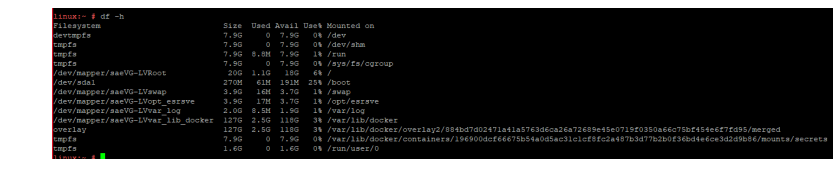
This is caused by the storage /dev/mapper/scgVG-LVvar_lib_docker being nearly full making the SCG user interface container saede-app not able to run its services.
Note that the old versions of the Secure Remote Services or upgraded to SCG appliances have /dev/mapper/esrsVG-LVvar_lib_docker or /dev/mapper/saeVG-LVvar_lib_docker instead of /dev/mapper/scgVG-LVvar_lib_docker.
Resolution
1. Using the VSphere client, access the VM and ensure you Power-Off the VM before modifying any settings:

2. Right click the VM and choose "Edit Settings" option:
- In the Edit Settings pane, increase Disk Size and click "OK" button.

3. Power on the VM and Verify the modified settings.
- Verifying increase in DISK size:
- Run command: fdisk -l

4. Creating new partition with the using below command
- Run command: fdisk /dev/sda

5. Physical Volume creation use by the Logical Volume Manager(LVM)
- Run: pvcreate "partition name"

- To check: pvdisplay or pvs
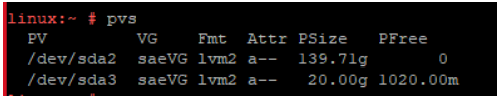
6. Volume Group Extend
- Ex: vgextend "name" "partition name" instead of saeVG , you have to use esrsVG
- Note that if SCG appliance is installed instead of upgraded from SRS, the volume group name will be scgVG not saeVG.

- To check: vgdisplay or vgs
- Note that if SCG appliance is installed instead of upgraded from SRS, the volume group name will be scgVG not saeVG.

7. Extending LV size Ex: lvextend -L+19GB "LV path" for lvextend command needs to use the path /dev/mapper/esrsVG-LVvar_lib_esrsve
- Note that if SCG appliance is installed instead of upgraded from SRS, the volume group name will be /dev/mapper/scgVG-LVvar_lib_docker not /dev/mapper/saeVG-LVvar_lib_docker .

- To check before resize LV: df -h

8. Resize the LV
- Note that if SCG appliance is installed instead of upgraded from SRS, the volume group name will be /dev/mapper/scgVG-LVvar_lib_docker not /dev/mapper/saeVG-LVvar_lib_docker .

- To check: lvdisplay

- To check after resize LV: df -h or lsblk