PowerFlex 3.0: Error when Appling license due to wrong capacity
Summary: ScaleIO: While applying for a license getting Error: MDM failed command. Status: The current system configuration exceeds the license entitlements.
Symptoms
scli --set_license --license_file /tmp/12c129xxxxx_235243_.lic
Error: MDM failed command. Status: The current system configuration exceeds the license entitlements.
Cause
Check the MDM trace logs when the license was applied. User could get the extra capacity which must be in licensing.
cat /opt/emc/scaleio/mdm/logs/trc.* | grep "license"

07/12 00:28:42.977087 0x7f974cbedeb0:mosEventLog_PostInternal:00590: New event added. Message: "Command set_license received, User: 'admin'. [1916995]". Additional info: "" Severity: Info
07/12 00:28:43.003511 0x7f974cbedeb0:tgtMgr_ValidateLicenseCapacity:10156: Capacity license exceeded. Allowed: 2355200GB Used: 2445380
07/12 00:28:43.003514 0x7f974cbedeb0:mdmObj_SetLicense:01637: Used capacity exceeds new license by 90180
Resolution
To find the license capacity to be applied, see the size in the brackets as highlighted below. Users may also see the MDM trace logs as suggested above.
The user must add the capacity seen against 'decreased capacity', which is seen when the customer uses the UI and "Set Device Capacity Limit" for SDS devices. Here the total capacity required would be 2388 + 0 TB.
scli --query_all
SDS Summary:
...
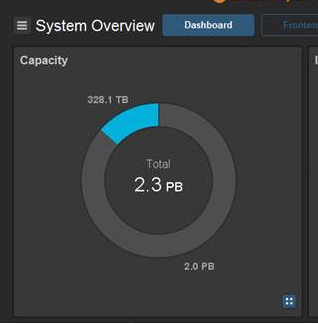
        2.3 PB (2388 TB) total capacity
        0 Bytes decreased capacity
NOTE: The licensing portal generates the license in TBs and not in GB. Decimals are also not allowed. So in the case if the 2445380 GB = 2,388.06640625 TB In this case, we must request for 2,389 TB.
Additional Information
ScaleIO UI would show the total size here as 2.3 TB. After looking at it, the user would request for a 2.3 TB license. But the UI and CLI takes only up to one decimal place.