PowerFlex:重建和重新平衡影响前端 IO 工作负载性能
Summary: 重建和重新平衡影响前端 IO 工作负载。
Symptoms
当重建或重新平衡开始时,前端应用程序 IOPS 可能会急剧下降。
- SDS 节点或磁盘出现故障,导致开始重建。
- 已将 SDS 节点或磁盘添加到群集或存储池,导致开始重新平衡。
- 从群集或存储池中删除 SDS 节点或磁盘,从而开始重新平衡。
- 重建/重新平衡开始后,前端 IOPS 急剧下降(最高为预期 IOPS 的 50% 或更多)。
影响
如果执行重建或重新平衡的速度和资源增加,则会减少创建 ScaleIO 所需的每个数据块的两个完整副本所需的时间。但是,SDC 的吞吐量和 IOPS 可能会受到影响,最终用户可能会注意到应用程序缓慢,甚至可能出现 IO 错误。在进行更改之前,应了解这些更改可能对前端 IO 产生的影响。
Cause
重建和重新平衡使用的磁盘和可能的网络资源与 SDC 使用的磁盘和网络资源相同,因此会占用磁盘和网络中的带宽。默认情况下,重建和重新平衡也使用两个 SDS 线程,定义为并行度参数。
SDS 创建了这些线程,如果超过两个线程的默认值,则需要额外的 CPU 和内存。这会导致 SDS 在重建/重新平衡上花费比预期更多的 CPU 时间和资源,从而导致用于处理前端 IO 的 CPU 时间和资源更少。
Resolution
这里有几件事需要检查。以下参数可能会影响重建和重新平衡:
1- SDS 网络限制:这限制了每个 SDS 用于列出的各种类别的 I/O 方式。所有类别中的默认值为“Unlimited”。
A-From scli:
scli --set_sds_network_limits (--protection_domain_id  | --protection_domain_name ) [--rebuild_limit ] [--rebalance_limit ][--overall_limit ] [--i_am_sure]

Example, setting the rebuild limit to 100 MB/s:
scli --set_sds_network_limits --protection_domain_name pd1 --rebuild_limit 100
B-From UI:
转至保护域列表,选择有问题的保护域,然后从“修改”列表中选择“网络限制”。
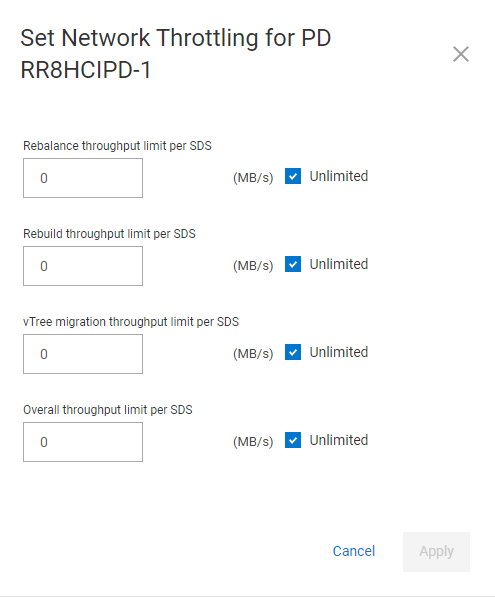
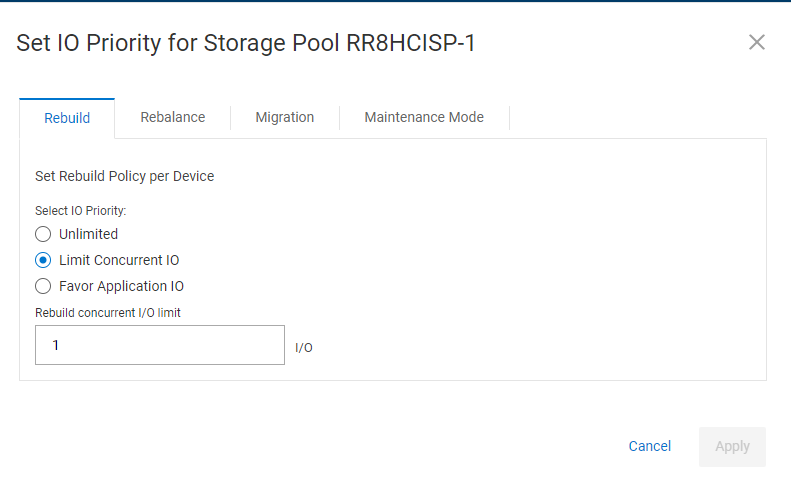
2- 存储池 I/O 优先级此设置针对每个存储池,将更改重建或重新平衡的 IO 优先级,并且会影响系统性能。对于重建和重新平衡,默认值为“Limit Concurrent IO”,设置为 1。
A-From scli:
scli --set_rebuild_policy ((( protection_domain_id  | --protection_domain_name ) --storage_pool_name ) | --storage_pool_id ) --policy  [Options][--i_am_sure]

scli --set_rebalance_policy ((( protection_domain_id  | --protection_domain_name ) --storage_pool_name ) | --storage_pool_id ) --policy  [Options][--i_am_sure]
策略可以是以下选项之一:no_limit、limit_concurrent_io、favor_application_io dynamic_bandwidth_throttling
如果对策略使用除“no_limit”以外的任何内容,则需要使用命令 OPTIONS。有关这些设置的更多参考,请参阅 PowerFlex 文档。
B-From UI:转至Storage Pool列表,选择有问题的存储池,然后从修改列表中选择“I/O Priority”。
3- 并发重建和重新平衡活动。此处的默认设置为 2。
A- 此参数只能从 scli 更改:
scli --set_rebuild_rebalance_parallelism (((--protection_domain_id  | --protection_domain_name ) --storage_pool_name ) | --storage_pool_id ) (--limit )

Example, setting the limit to 5:
scli --set_rebuild_rebalance_parallelism --protection_domain_name pd1 --storage_pool_name HDD_POOL --limit 5
提醒:如果您在命令中使用 storage_pool_id 参数,则无需指定保护域 ID 或名称以及存储池名称。除非 ScaleIO 支持人员指定,否则请将此参数保留为 2。增加此设置会比网络限制和 I/O 优先级设置更快地对前端 IO 产生负面影响。