Så här tvingar du fram en Dell Encryption-rensning i Windows
Summary: I den här artikeln beskrivs hur du tvingar fram en krypteringsrensning på en slutpunkt med Dell Encryption Enterprise (tidigare Dell Data Protection | Enterprise Edition) eller Dell Encryption Personal (tidigare Dell Data Protection | Personlig utgåva). ...
This article applies to
This article does not apply to
This article is not tied to any specific product.
Not all product versions are identified in this article.
Symptoms
Berörda produkter:
- Dell Encryption Enterprise
- Dells dataskydd | Företag
- Dell Encryption Personal
- Dell Data Protection | Personal Edition
Berörda operativsystem:
- Windows
Cause
Gäller ej
Resolution
Dell Encryption Enterprise och Dell Encryption Personal kan använda Windows systemavsökning (WSProbe.exe) för att tvinga fram en rensning av hela maskinen för att säkerställa överensstämmelse med den senaste krypteringspolicyn.
Varning! Krypteringsrensningar kan orsaka en viss prestandaförsämring. Dell Technologies rekommenderar att du endast kör
WSProbe.exe efter behov.
Så här kör du WSProbe.exe:
- Gå till
C:\Program Files\Dell\Dell Data Protection\Encryption.
Obs!
- Katalogen kan vara annorlunda om den ändras under installationen.
WSProbe.exefinns endast i version 7.3 och senare av programvaran. För tidigare versioner kontaktar du Dell Data Security ProSupport.
- Dubbelklicka
WSProbe.exe.
Obs! Om du använder CLI ska enhetsbokstaven anges (t.ex.ample,
WSProbe.exe C:\).
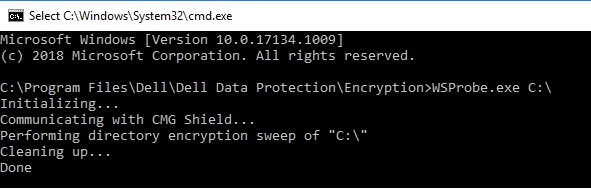
Bild 1: (Endast på engelska) Typ WSProbe.exe C:\
Om du vill kontakta support, se Dell Data Security telefonnummer till internationell support.
Gå till TechDirect för att skapa en begäran om teknisk support online.
Om du vill ha mer information och resurser kan du gå med i Dell Security Community-forumet.
Affected Products
Dell EncryptionArticle Properties
Article Number: 000130499
Article Type: Solution
Last Modified: 03 Apr 2024
Version: 11
Find answers to your questions from other Dell users
Support Services
Check if your device is covered by Support Services.