在 Alienware 筆記型電腦上安裝 Youku 應用程式時,系統會顯示警告訊息
Summary: 本文提供 Alienware 筆記型電腦在安裝 Youku 應用程式時顯示警告訊息的相關資訊。
This article applies to
This article does not apply to
This article is not tied to any specific product.
Not all product versions are identified in this article.
Symptoms
受影響的平台:
- Alienware x14 R2
- Alienware x16 R1
- Alienware x16 R2
隨即會顯示驅動程式與 AliPaladin64.sys,同時在 Alienware 筆記型電腦上安裝 Youku。

Cause
記憶體完整性遭到封鎖 AliPaladin64.sys 這是優酷安裝的一部分。
Resolution
因應措施:
- 按下 「關閉 」,安裝會繼續。
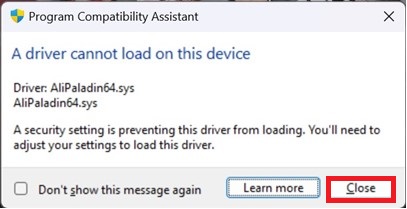
- 按一下 Windows 開始按鈕,在搜尋方塊中輸入 核心隔離 ,並 關閉記憶體完整性 再安裝優酷 (需要重新開機)。

Affected Products
Alienware x14 R2, Alienware x16 R1, Alienware x16 R2Article Properties
Article Number: 000223190
Article Type: Solution
Last Modified: 02 Jul 2025
Version: 6
Find answers to your questions from other Dell users
Support Services
Check if your device is covered by Support Services.