Dell Unity: File System Quotas
Summary: Dell Unity includes full quota support to allow administrators to place limits on the amount of space that can be consumed to regulate storage consumption. These are supported on Server Message Block (SMB), Network File System (NFS), and multiprotocol file systems. ...
Instructions
Quotas
Dell Unity includes full quota support to allow administrators to place limits on the amount of space that can be consumed from a user of a file system or directory, or a directory itself to regulate storage consumption. These simple but flexible quotas are supported on SMB, NFS, and multiprotocol file systems and can easily be configured through any of the available management interfaces. Due to the targeted use case of VMware file datastores, quotas are not available for this resource type.
Quotas Types
Dell Unity supports file system user quotas, quota trees, and quota tree user quotas. All three types of quotas can coexist on the same file system and may be used in conjunction to achieve finer grained control over storage usage.
Quota Limits
All quotas consist of three major parameters which determine the amount of space that may be used in a file system in a certain scenario and define the behavior of the file system or directory when a limit is being approached or exceeded. Each of these is configured during quota creation or inherited from the default settings for all quotas. These parameters and their maximums are:
- Soft limit (GB) > unlimited
- Grace period (time) > unlimited starting in UnityOS 5.1
- Hard limit (GB) > unlimited
Quota Policies
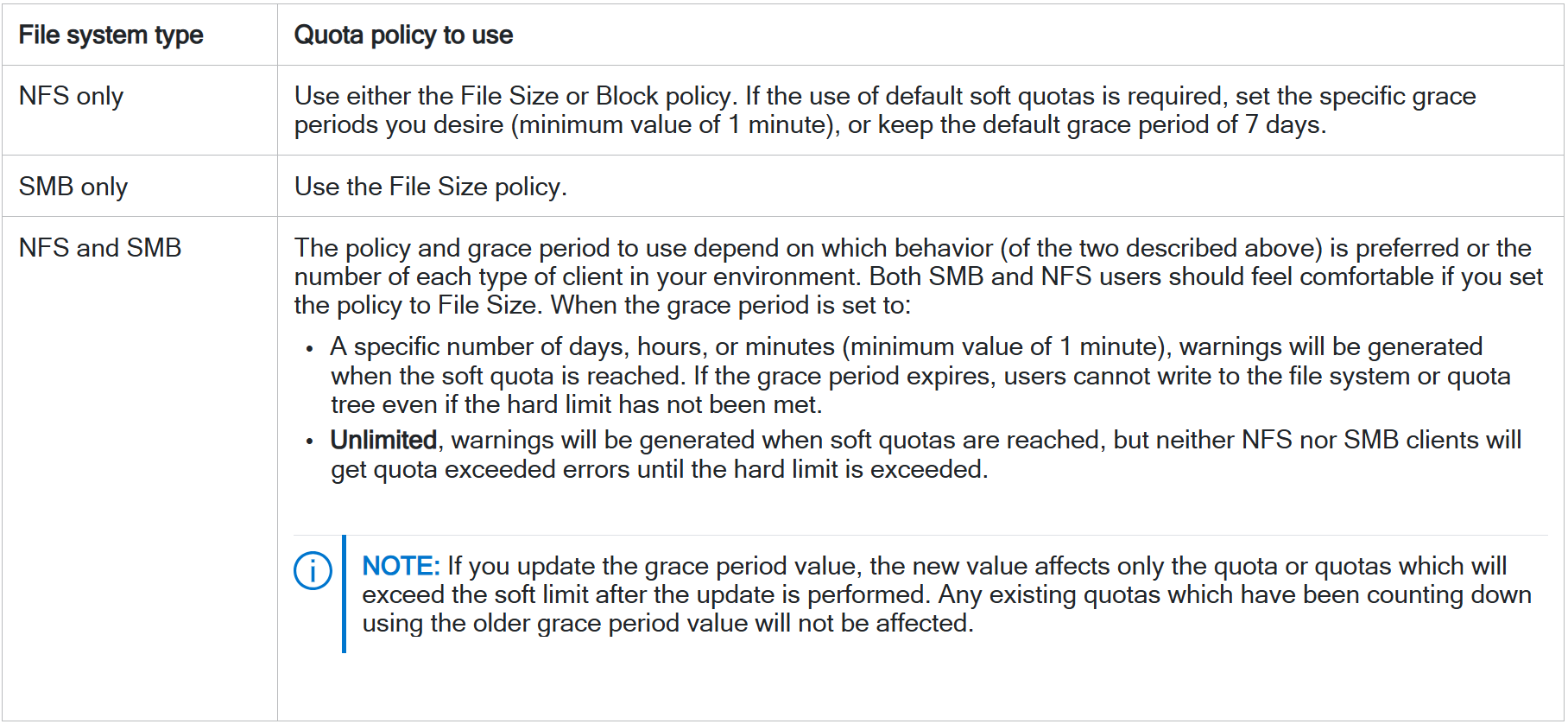
Before enabling and defining quotas, ensure that the file system is configured to use the quota policy that best suits the client environment:
- File Size policy (default): Calculates drive usage in terms of logical file sizes, and ignores the size of directories and symbolic links. Use this policy where file sizes are critical to quotas, such as where user usage is based on the size of the files created, and exceeding the size limit is unacceptable.
- Blocks policy: Calculates drive usage in terms of file system blocks (8 KB units), and includes drive usage by directories and symbolic links in the calculations. With this policy, any operation resulting in allocating or removing blocks, such as creating, expanding, or deleting a directory; writing or deleting files; or creating or deleting symbolic links changes block usage. Block usage depends solely on the number of bytes added to or removed from the file.
- NOTE: When using the Blocks policy, a user can create a sparse file whose size is larger than the file size, but that uses fewer blocks on the drive.
- Blocks policy: Calculates drive usage in terms of file system blocks (8 KB units), and includes drive usage by directories and symbolic links in the calculations. With this policy, any operation resulting in allocating or removing blocks, such as creating, expanding, or deleting a directory; writing or deleting files; or creating or deleting symbolic links changes block usage. Block usage depends solely on the number of bytes added to or removed from the file.