ECS: ECS SNMP tuzaklarını yapılandırma (İngilizce)
Summary: SNMP Tuzakları, ECS'deki yaşam döngüsü düğümlerinden herhangi biri tarafından oluşturulur. Aşağıdaki KB, etkin yaşam döngüsü düğümünü tanımlama ve bir tuzak olayı oluşturmak için bir test uyarısı oluşturma gösterilmektedir. ...
This article applies to
This article does not apply to
This article is not tied to any specific product.
Not all product versions are identified in this article.
Instructions
SNMP Tuzakları, ECS'deki yaşam döngüsü düğümlerinden herhangi biri tarafından oluşturulur. Aşağıdaki KB, etkin yaşam döngüsü düğümünü tanımlama ve bir tuzak olayı oluşturmak için bir test uyarısı oluşturma gösterilmektedir.
SNMP tuzak gönderimlerini yapılandırmak ve yeniden oluşturmak için:
Not: Yaşam döngüsü sunucusu düğümlerinden herhangi biri, topluluk olarak senkronize olduklarından ve tüm düğümlerde düğüm ve kaynakların durumu hakkında güncellenecek yapı aracıları bulunduğundan bir tuzak tetiklenebilir.
ECS 3.1 Yönetici Rehberi Tuzaklar hakkında ek bilgiler:
ECS 3.7 Yönetim Rehberi (dell.com) (Sayfa 149-155)
Çoğu izleme çözümünde OID çevirisi için MIB gerekir:
https://dl.dell.com/downloads/DL79351_ECS-MIB.mib
SNMP tuzak gönderimlerini yapılandırmak ve yeniden oluşturmak için:
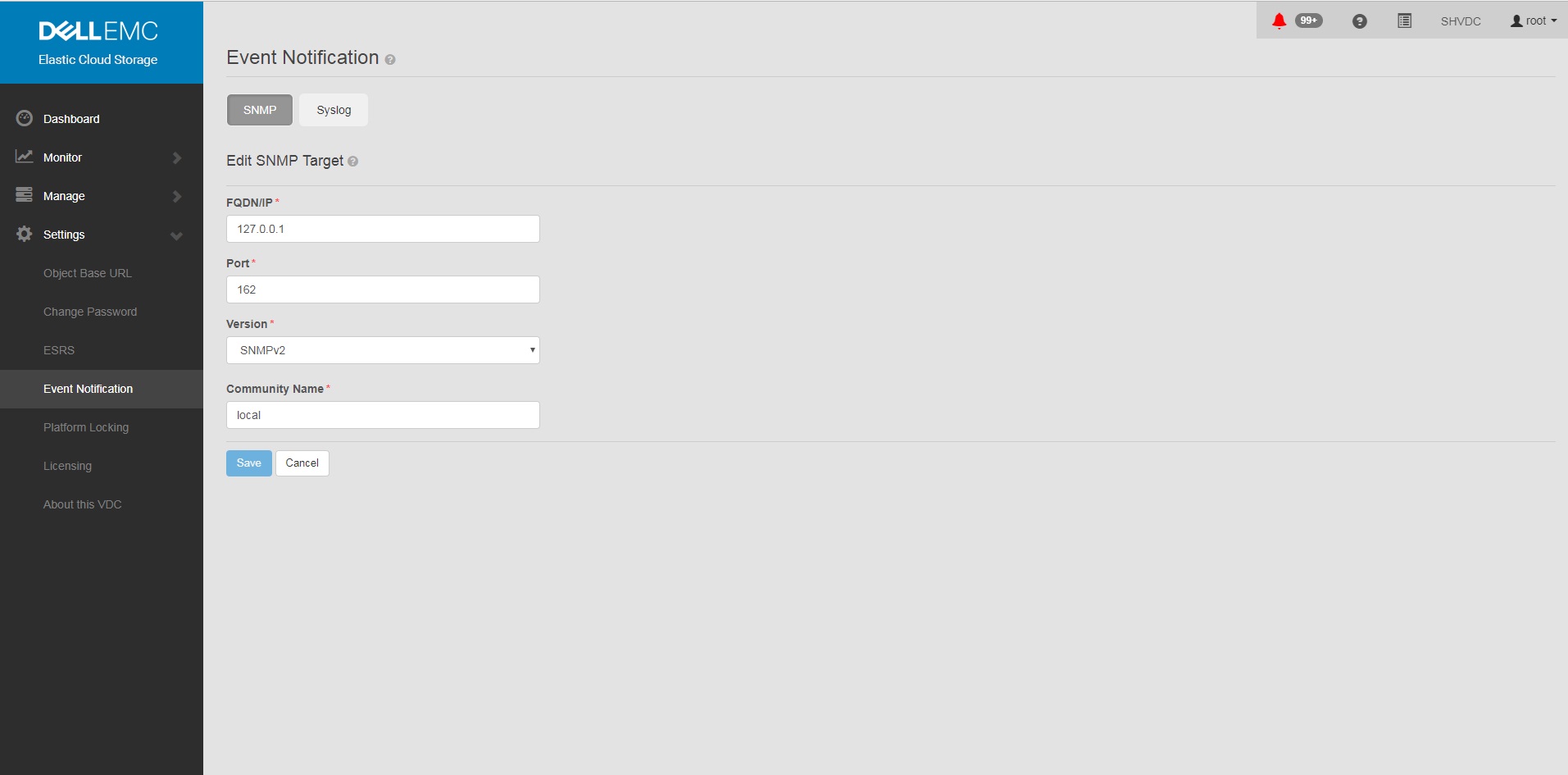
- SNMP yi GUI de <tuzak alıcı adresine> ayarlayın
a. GUI
ayarları b. Olay Bildirimi
c. SNMP
seçin d. New Target
FQDN/IP = <trap receiver address>
Port= 162
Version= SNMPv2
Community Name= <community string>
Save
ayarları b. Olay Bildirimi
c. SNMP
seçin d. New Target
FQDN/IP = <trap receiver address>
Port= 162
Version= SNMPv2
Community Name= <community string>
Save
Example:
- Kullanıcı arayüzüne bir tuzak yapılandırması ekledikten sonra yapılandırmanın ECS'de ayarlandığını doğrulayın.
Komut:
Example:
# sudo /opt/emc/caspian/fabric/cli/bin/fcli-internal lifecycle alert.snmpconfiguration
Example:
Node 1:~ # sudo /opt/emc/caspian/fabric/cli/bin/fcli-internal lifecycle alert.snmpconfiguration
{
  "status": "OK",
  "etag": 73523,
  "snmp_configuration": {
    "engine_id": "80001370010A20A9799527B54B",
    "snmp_targets": [{
      "version": "v2",
      "port": 162,
      "hostname": "127.0.0.1",
      "community": "local",
      "username": "",
      "target_id": "816bd926-147e-4309-bf69-492eea94fc7a",
      "authentication_protocol": "",
      "privacy_protocol": ""
    }]
  }
}
- Bir uyarı ve SNMP tuzağı oluşturmak için test uyarısı komutunu çalıştırın.
Komut (Doğru kullanıcı adı ve parolayı değiştirmeniz gerekeceğini unutmayın):
Example:
# TOKEN=$(curl -iks https://localhost:4443/login -u '<User:Password>' | grep X-SDS-AUTH-TOKEN);echo $TOKEN;curl -ks -H "$TOKEN" -H "Content-Type: application/json" -d '{"user_str": "ECS Test Alert", "contact": "ecsadmin@company.com"}' https://localhost:4443/vdc/callhome/alert | xmllint --format -;curl -vk -H "$TOKEN" "https://localhost:4443/logout"
Example:
admin@provo:~> TOKEN=$(curl -iks https://localhost:4443/login -u 'root:ChangeMe' | grep X-SDS-AUTH-TOKEN);echo $TOKEN;curl -ks -H "$TOKEN" -H "Content-Type: application/json" -d '{"user_str": "ECS Test Alert", "contact": "ecsadmin@company.com"}' https://localhost:4443/vdc/callhome/alert | xmllint --format -;curl -vk -H "$TOKEN" "https://localhost:4443/logout"
X-SDS-AUTH-TOKEN: BAAcSWx4M3IvY0p6VFBCTUtTaE9zdmFVSVFZNFdNPQMAjAQASHVybjpzdG9yYWdlb3M6VmlydHVhbERhdGFDZW50ZXJEYXRhOmZkYzJhMDg2LTQzMGEtNGU3ZC04ZmNiLTU2MDA3ZDFmOWU4NgIADTE1NTM1NDgzNjk5ODEDAC51cm46VG9rZW46YzQ3ZmUwYzYtZjg3Ni00OTE5LWJkMWYtZDgyMjYwN2I2MmIwAgAC0A8=
<?xml version="1.0" encoding="UTF-8" standalone="yes"?>
<alert>
  <acknowledged>false</acknowledged>
  <type>Notify</type>
  <description>ECS Test Alert: ecsadmin@company.com</description>
  <id>urn:storageos:Alert:bbb02b69-0169-1355-a40a-c1f3512e51cd</id>
  <namespace/>
  <severity>INFO</severity>
  <symptomCode>999</symptomCode>
  <timestamp>2019-03-26T20:27:58</timestamp>
</alert>
* SSL connection using TLSv1.2 / ECDHE-RSA-AES256-GCM-SHA384
* Server certificate:
*        subject: CN=localhost
*        start date: 2018-02-28 10:53:28 GMT
*        expire date: 2028-02-26 10:53:28 GMT
*        issuer: CN=localhost
*        SSL certificate verify result: self signed certificate (18), continuing anyway.
* SSLv2, Unknown (23):
> GET /logout HTTP/1.1
> User-Agent: curl/7.37.0
> Host: localhost:4443
> Accept: */*
> X-SDS-AUTH-TOKEN: BAAcSWx4M3IvY0p6VFBCTUtTaE9zdmFVSVFZNFdNPQMAjAQASHVybjpzdG9yYWdlb3M6VmlydHVhbERhdGFDZW50ZXJEYXRhOmZkYzJhMDg2LTQzMGEtNGU3ZC04ZmNiLTU2MDA3ZDFmOWU4NgIADTE1NTM1NDgzNjk5ODEDAC51cm46VG9rZW46YzQ3ZmUwYzYtZjg3Ni00OTE5LWJkMWYtZDgyMjYwN2I2MmIwAgAC0A8=
>
* SSLv2, Unknown (23):
< HTTP/1.1 200 OK
< Date: Tue, 26 Mar 2019 20:27:58 GMT
< Content-Type: application/xml
< Content-Length: 95
< Connection: keep-alive
<
* Connection #0 to host localhost left intact
<?xml version="1.0" encoding="UTF-8" standalone="yes"?><LoggedOut><user>root</user></LoggedOut>
- Günlük girişi en son tarihe sahip olacağından, tuzağın kümedeki başka bir yaşam döngüsü düğümünden çıkıp çıkmadığını görmek için aşağıdaki komutu çalıştırın.
Komut:
Örnek (Düğüm 3'ün tuzak gönderimini günlüğe kaydettiğini unutmayın):
# domulti 'grep -i snmp /opt/emc/caspian/fabric/agent/services/fabric/lifecycle/log/lifecycle.log'
Örnek (Düğüm 3'ün tuzak gönderimini günlüğe kaydettiğini unutmayın):
admin@provo:~> domulti 'grep -i snmp /opt/emc/caspian/fabric/agent/services/fabric/lifecycle/log/lifecycle.log | grep 2017-12-11'
192.168.219.1
========================================

192.168.219.2
========================================

192.168.219.3
========================================
2017-12-11 18:10:48,849 1419726792 [qtp1183213894-166677] DEBUG com.emc.caspian.fabric.lifecycle.alert.snmp.TrapSenderV2::<init> (line: 51)  - 36827218-dcc3-4d44-b843-1fdcedc3899c Created trap sender SnmpV2CTarget[hostname=127.0.0.1, port=162, version=v2]
2017-12-11 18:10:48,856 1419726799 [qtp1183213894-166677] DEBUG com.emc.caspian.fabric.lifecycle.alert.snmp.TrapSenderV2::sendTrap (line: 85)  - 36827218-dcc3-4d44-b843-1fdcedc3899c Sent trap: pdu TRAP[requestID=143015719, errorStatus=Success(0), errorIndex=0, VBS[1.3.6.1.2.1.1.3.0 = 113 days, 3:54:55.25; 1.3.6.1.6.3.1.1.4.1.0 = 1.3.6.1.4.1.1139.102.1.1; 1.3.6.1.4.1.1139.102.0.1.1 = Mon Dec 11 18:10:48 UTC 2017; 1.3.6.1.4.1.1139.102.0.1.2 = Info; 1.3.6.1.4.1.1139.102.0.1.3 = 999; 1.3.6.1.4.1.1139.102.0.1.4 = ECS Test Alert: ecsadmin@company.com]], target: CommunityTarget[address=127.0.0.1/162,version=1,timeout=5000,retries=2,securityLevel=1,securityModel=1,securityName=local,preferredTransports=null], snmp: org.snmp4j.Snmp@6e6f15f3, transport: org.snmp4j.transport.DefaultUdpTransportMapping@122299ef
2017-12-11 18:10:48,857 1419726800 [qtp1183213894-166677] INFO com.emc.caspian.fabric.lifecycle.alert.snmp.SnmpAgent::sendAlert (line: 400)  - 36827218-dcc3-4d44-b843-1fdcedc3899c Sent alert Event[symptomCode=999, category=CONFIGURATION, severity=INFO, status=UNKNOWN, component=Object, componentId=, subComponent=Notify, subComponentId=, callHome=true, firstTime=1513015848814, lastTime=1513015848814, count=0, eventData=, description=ECS Test Alert: ecsadmin@company.com, channel=ALL] to SNMP target: SnmpV2CTarget[hostname=127.0.0.1, port=162, version=v2]

192.168.219.4
========================================
grep: /opt/emc/caspian/fabric/agent/services/fabric/lifecycle/log/lifecycle.log: No such file or directory
- İkinci bir PuTTY penceresinde, en son günlüklerde yeniden bulunan düğüme SSH işlemi yapın ve aşağıdakileri çalıştırın.
Komut:
# tcpdump udp -i any port 162
- Birincil pencerenizde bir test tuzağı oluşturmak için aşağıdaki komutu çalıştırın:
Komut (Doğru kullanıcı adı ve parolayı değiştirmeniz gerekeceğini unutmayın):
Example:
# TOKEN=$(curl -iks https://localhost:4443/login -u '<User:Password>' | grep X-SDS-AUTH-TOKEN);echo $TOKEN;curl -ks -H "$TOKEN" -H "Content-Type: application/json" -d '{"user_str": "ECS Test Alert", "contact": "ecsadmin@company.com"}' https://localhost:4443/vdc/callhome/alert | xmllint --format -;curl -vk -H "$TOKEN" "https://localhost:4443/logout"
Example:
admin@provo:~> TOKEN=$(curl -iks https://localhost:4443/login -u 'root:ChangeMe' | grep X-SDS-AUTH-TOKEN);echo $TOKEN;curl -ks -H "$TOKEN" -H "Content-Type: application/json" -d '{"user_str": "ECS Test Alert", "contact": "ecsadmin@company.com"}' https://localhost:4443/vdc/callhome/alert | xmllint --format -;curl -vk -H "$TOKEN" "https://localhost:4443/logout"
X-SDS-AUTH-TOKEN: BAAcUWtmaTU0OEo0M21EYW1oSHVLa2dacFUyVTFjPQMAjAQASHVybjpzdG9yYWdlb3M6VmlydHVhbERhdGFDZW50ZXJEYXRhOjI1ZTU1NDY3LWNiMTMtNGM5NC05NGZjLWMzNjBjYjRhNjExYgIADTE1MTI4OTA0NjExODQDAC51cm46VG9rZW46MTYzNzA2ZTgtNTI1Zi00NjgwLWJkYmItZjYyYWM0MjQ1YzViAgAC0A8=
<?xml version="1.0" encoding="UTF-8" standalone="yes"?>
<alert>
  <acknowledged>false</acknowledged>
  <type>Notify</type>
  <description>ECS Test Alert: ecsadmin@company.com</description>
  <id>urn:storageos:Alert:46c9fdf1-0160-13fc-b8df-7c7be33092f3</id>
  <namespace/>
  <severity>INFO</severity>
  <symptomCode>999</symptomCode>
  <timestamp>2017-12-11T18:15:31</timestamp>
</alert>
- İkinci pencerede, yaşam döngüsü düğümünden tuzak ateşlendiğini görmeniz gerekir. Tuzak görünmüyorsa yanıt veren zookeeper düğümü değişmiş olabileceğinden 4. adımda günlükleri yeniden kontrol edin.
Örnek (Bu durumda, düğüm 3'ü tuzağın oluşturulduğu sırada tuzak gönderen düğüm olarak tanımladığımızı unutmayın):
admin@murray:~> tcpdump udp -i any port 162
tcpdump: verbose output suppressed, use -v or -vv for full protocol decode
listening on any, link-type LINUX_SLL (Linux cooked), capture size 262144 bytes
18:15:37.050102 IP localhost.33530 > localhost.snmptrap:  C="local" V2Trap(198)  system.sysUpTime.0=977758344 S:1.1.4.1.0=E:1139.102.1.1 E:1139.102.0.1.1="Mon Dec 11 18:15:37 UTC 2017" E:1139.102.0.1.2="Info" E:1139.102.0.1.3="999" E:1139.102.0.1.4="ECS Test Alert: ecsadmin@company.com"
Not: Yaşam döngüsü sunucusu düğümlerinden herhangi biri, topluluk olarak senkronize olduklarından ve tüm düğümlerde düğüm ve kaynakların durumu hakkında güncellenecek yapı aracıları bulunduğundan bir tuzak tetiklenebilir.
ECS 3.1 Yönetici Rehberi Tuzaklar hakkında ek bilgiler:
ECS 3.7 Yönetim Rehberi (dell.com) (Sayfa 149-155)
Çoğu izleme çözümünde OID çevirisi için MIB gerekir:
https://dl.dell.com/downloads/DL79351_ECS-MIB.mib
Affected Products
ECS ApplianceProducts
ECS Appliance Hardware Gen1 U-Series, ECS Appliance Software with Encryption, ECS Appliance Software without EncryptionArticle Properties
Article Number: 000019915
Article Type: How To
Last Modified: 18 Jan 2023
Version: 3
Find answers to your questions from other Dell users
Support Services
Check if your device is covered by Support Services.