vCenter에서 프록시의 전원이 꺼져 있기 때문에 Avamar VM 이미지 백업이 "프록시 없음"으로 실패함
Summary: vCenter에서 프록시의 전원이 꺼져 있기 때문에 Avamar VM 이미지 백업이 "프록시 없음"으로 실패합니다.
This article applies to
This article does not apply to
This article is not tied to any specific product.
Not all product versions are identified in this article.
Symptoms
Avamar UI의 Activity Monitor에 'No Proxy'가 표시됩니다.
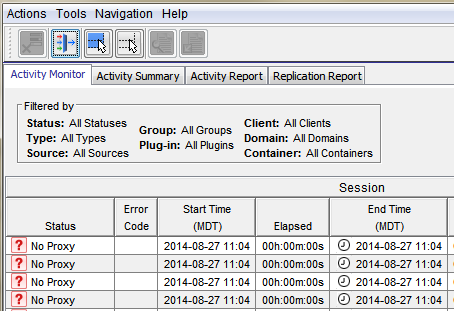
필요 시 VMware 이미지 백업이 실패하고 다음
범주가 표시됩니다. 애플리케이션
심각도: 프로세스
요약: 가상 머신 백업 또는 복원을 시작하지 못했습니다.
이벤트 정보:
이벤트 코드: 30931
범주: 애플리케이션
심각도: 프로세스
요약: 가상 머신 백업 또는 복원을 시작하지 못했습니다.
그룹 백업 요청이 시작되는 경우.

Cause
프록시의 전원이 vCenter에서 꺼집니다.
Resolution
- vCenter를 열고 프록시의 전원이 꺼져 있는지 확인합니다.
- 프록시의 전원이 꺼진 경우 프록시의 전원을 켭니다.
Additional Information
다음 문서에서는 일반 "프록시 없음" 오류가 동일한 문제에 대해 설명합니다.
- 클라이언트의 VMDK를 보유한 데이터 저장소를 보호하도록 구성된 프록시 서버가 없기 때문에 Avamar VM 이미지 백업이 "프록시 없음"으로 실패함
- vCenter 연결 중단으로 인해 Avamar VM 이미지 백업이 "프록시 없음" 오류와 함께 실패함
- VM에 하드 디스크가 없기 때문에 Avamar VM 이미지 백업이 "프록시 없음" 오류와 함께 실패함
- vCenter에서 프록시의 전원이 꺼져 있기 때문에 Avamar VM 이미지 백업이 "프록시 없음" 오류와 함께 실패함
- 프록시가 DNS에서 해결되지 않아 Avamar VM 이미지 백업이 실패하고 "프록시 없음" 오류가 발생함
Affected Products
AvamarProducts
AvamarArticle Properties
Article Number: 000033569
Article Type: Solution
Last Modified: 05 Feb 2025
Version: 4
Find answers to your questions from other Dell users
Support Services
Check if your device is covered by Support Services.