CloudIQ: CloudIQ Collector is showing with a status of "Missing" on gateway
Summary: The CloudIQ Collector shows with a "Status" of "Missing" on its gateway.
This article applies to
This article does not apply to
This article is not tied to any specific product.
Not all product versions are identified in this article.
Symptoms
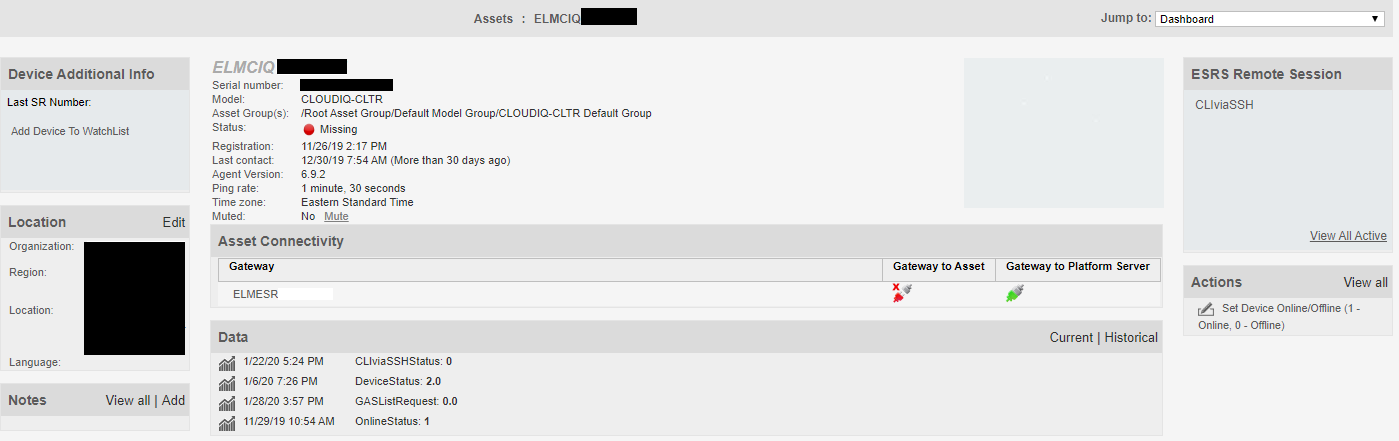
The CloudIQ Collector shows with a "Status" of "Missing" on its gateway.
The "Gateway to Asset" status (the CloudIQ Collector to gateway) connection is showing with a broken connection.
Cause
The gateway is listening on port 22. The CloudIQ Collector does not use port 22, it only uses port 9443 (bi-directionally) for communication with the gateway.
Resolution
As the CloudIQ Collector does not use port 22, while the gateway is still listening for traffic using port 22 coming from the CloudIQ Collector, the gateway always marks a properly and successfully connected CloudIQ Collector as "Missing" and the "Gateway to Asset" status connection with a broken connection. This is expected behavior and nothing to be concerned with.
Affected Products
CloudIQProducts
CloudIQArticle Properties
Article Number: 000081983
Article Type: Solution
Last Modified: 09 Mar 2023
Version: 3
Find answers to your questions from other Dell users
Support Services
Check if your device is covered by Support Services.