PowerStore: SSH를 통해 연결할 때 인증 방법 오류 발생
Summary: 이 문서에서는 PowerStore 노드에 대한 SSH 연결을 설정할 때 발생하는 문제에 대한 솔루션을 제공합니다.
This article applies to
This article does not apply to
This article is not tied to any specific product.
Not all product versions are identified in this article.
Symptoms
SSH를 사용하여 PowerStore 노드에 연결할 때 아래 오류 중 하나가 발생할 수 있습니다.
- No supported authentication methods available (server sent: publickey,gssapi-keyex,gssapi-with-mic)
- 사용 권한이 거부됨(publickey,gssapi-keyex,gssapi-with-mic)
예: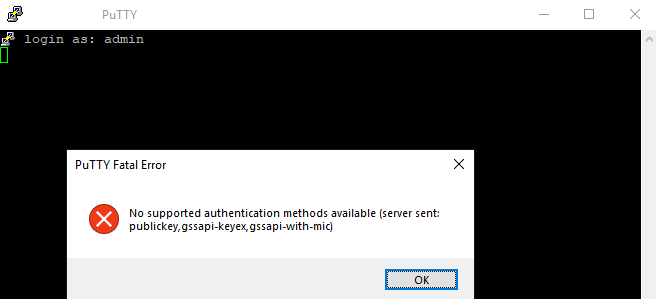
Cause
이는 서비스 이외의 사용자로 로그인할 때 예상되는 동작입니다.
Resolution
서비스 사용자를 사용하여 로그인합니다.
다른 사용자 이름을 사용하면 위의 오류가 발생합니다.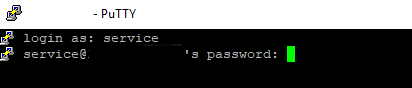
Additional Information
참고:
ssh를 통해 로그인하려고 할 때 발생하는 또 다른 일반적인 오류는 다음과 같습니다. 네트워크 오류: Connection timed out:
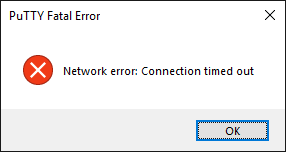
PowerStore에 대해 ssh가 비활성화된 경우 이 문제가 발생할 수 있습니다(기본적으로 비활성화됨).
PowerStore Manager에서 ssh를 활성화하는 작업은 SettingsSecuritySSH >>Management에서 수행할 수 있습니다.
- 서비스 사용자 암호는 시스템을 초기화하는 동안 정의되었을 것입니다.
- 이 비밀번호가 기억나지 않으면 admin 사용자와 동일한 비밀번호를 사용해 보십시오. 그렇지 않으면 시스템을 초기화한 사람에게 문의하거나 PowerStore Manager(GUI)의 SettingsSupportService >>Account에서 서비스 비밀번호를 재설정합니다.
ssh를 통해 로그인하려고 할 때 발생하는 또 다른 일반적인 오류는 다음과 같습니다. 네트워크 오류: Connection timed out:
PowerStore에 대해 ssh가 비활성화된 경우 이 문제가 발생할 수 있습니다(기본적으로 비활성화됨).
PowerStore Manager에서 ssh를 활성화하는 작업은 SettingsSecuritySSH >>Management에서 수행할 수 있습니다.
Affected Products
PowerStore, PowerStore 1000X, PowerStore 1000T, PowerStore Expansion Enclosure, PowerStore 3000X, PowerStore 3000T, PowerStore Rack, PowerStore 5000X, PowerStore 5000T, PowerStore 7000X, PowerStore 7000T, PowerStore 9000X, PowerStore 9000TArticle Properties
Article Number: 000132163
Article Type: Solution
Last Modified: 13 May 2025
Version: 6
Find answers to your questions from other Dell users
Support Services
Check if your device is covered by Support Services.