Alienware x15 R2 and x17 R2 Laptop Screens Tearing at Higher Panel Refresh Rates
Summary: The following article provides information about a Liquid Crystal Display (LCD) problem that happens when playing games. This is seen when the panel refresh rates are set to 120 Hz or higher. ...
Symptoms
LCD panel shows tearing on-screen while playing games
Alienware x15 R2 and x17 R2 gaming laptop owners may experience the screen tearing when playing the following types of game:
- League of Legends (LOL)
- Defense of the Ancients (DOTA) 2
Cause
Tearing like this is only seen when the Frames per Second (FPS) rate is not synchronized with the displays refresh rate.
Resolution
The following instructions take you through enabling the VSync option in games. It eliminates the display tearing.
Run the game and configure the game options to enable Vsync:
-
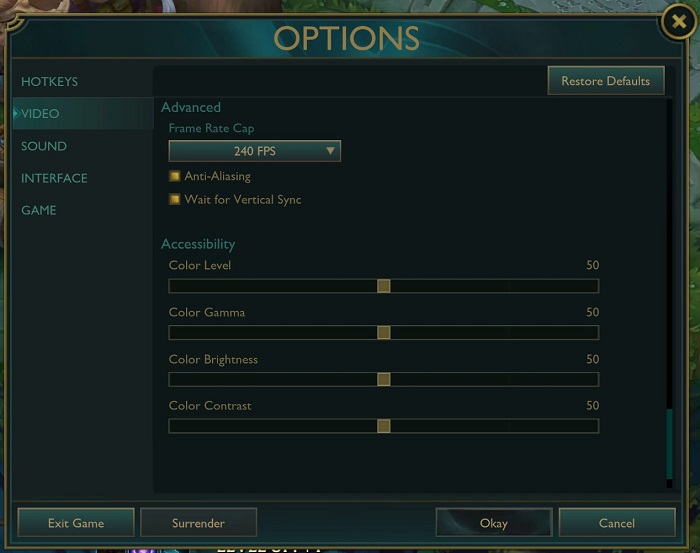
Click ESC on the keyboard to open the games options.
-
Select Video from the main menu.
-
Enable the Wait for Vertical Sync option.
-
Click Okay.
Run the game and configure the game options to enable Vsync:
-
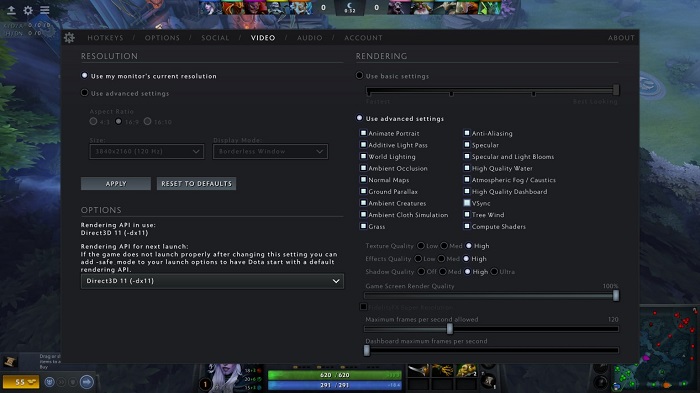
Click Setting in the game.
-
Select the Video tab from the main menu.
-
Click the VSync checkbox.
-
Save and exit the settings back into the game.