DFSR 오류 4612, 5002 및 5008로 인해 도메인 컨트롤러에서 SYSVOL 복제 실패
Summary: DFSR(분산 파일 시스템 복제) 오류 4612, 5002 및 5008이 있는 DC(Domain Controller)의 SYSVOL 복제 문제를 해결합니다. 복제 실패를 해결하고 SYSVOL 데이터 동기화를 위해 DC를 재구성하는 방법을 안내합니다. Windows Server 2016, 2019, 2022 등에 적용 가능
Symptoms
영향을 받는 DC의 net share 명령 출력에 SYSVOL 또는 NETLOGON 공유가 나열되지 않았을 수 있습니다.
영향을 받는 DC의 DFSR 이벤트 로그에 DFSR 오류 4612가 포함되어 있습니다.
The DFS Replication service initialized SYSVOL at local path [path] and is waiting to perform initial replication. The replicated folder will remain in the initial synchronization state until it has replicated with its partner [partner].
If the server was in the process of being promoted to a domain controller, the domain controller will not advertise and function as a domain controller until this issue is resolved. This can occur if the specified partner is also in the initial synchronization state, or if sharing violations are encountered on this server or the sync partner.
If this event occurred during the migration of SYSVOL from File Replication service (FRS) to DFS Replication, changes will not replicate out until this issue is resolved. This can cause the SYSVOL folder on this server to become out of sync with other domain controllers.
오류 5002 및 5008도 포함될 수 있습니다.
Error 5002:
The DFS Replication service encountered an error communicating with partner [partner] for replication group Domain System Volume.

Partner DNS Address: [partner FQDN]

Optional data if available:
Partner WINS Address: [partner hostname]
Partner IP Address: [partner address]

The service will retry the connection periodically.
Error 5008:
The DFS Replication service failed to communicate with partner [partner] for replication group Domain System Volume. This error can occur if the host is unreachable, or if the DFS Replication service is not running on the server.

Partner DNS Address: [partner FQDN]

Optional data if available:
Partner WINS Address: [partner hostname]
Partner IP Address: [partner address]

The service will retry the connection periodically.
오류에 표시된 파트너 서버는 더 이상 사용할 수 없는 DC입니다.
Cause
Resolution
시나리오 1: 영향을 받는 DC는 도메인에 있는 유일한 DC입니다.
이 시나리오에서는 SYSVOL 데이터를 복사할 다른 DC가 없습니다. 따라서 먼저 SYSVOL 데이터가 DC에 있는지 여부를 확인해야 합니다. 이렇게 하려면 파일 탐색기에서 %windir%\SYSVOL\domain\Policies 로 이동합니다. 이 폴더에는 긴 16진수 이름을 가진 하위 폴더가 두 개 이상 있어야 합니다. 이러한 각 하위 폴더에는 Machine 및 User라는 하위 폴더와 GPT.ini이라는 파일이 포함되어야 합니다. 유효한 SYSVOL 데이터의 예는 아래 스크린샷을 참조하십시오.
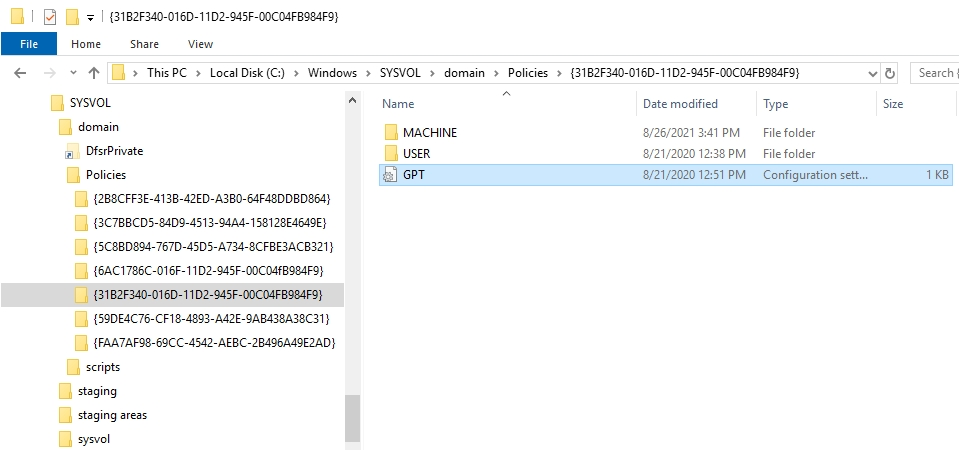
그림 1: 도메인 컨트롤러의 SYSVOL 데이터
SYSVOL 데이터가 있는 경우 ADSIEdit 콘솔을 사용하여 신뢰할 수 있는 데이터 동기화를 수행할 수 있습니다. 필요한 단계는 DFSR(분산 파일 시스템 복제)을 사용하여 SYSVOL 데이터의 신뢰할 수 있는 동기화를 수행하는 방법을 참조하십시오. 도메인에 DC가 하나만 있으므로 일부 단계를 건너뛸 수 있습니다.
SYSVOL 데이터가 없는 경우 백업이 있는 경우 다른 DC의 백업에서 가져와야 합니다. 이러한 백업을 찾을 수 있는 경우 SYSVOL 데이터를 복원하고 신뢰할 수 있는 동기화를 수행합니다.
SYSVOL 데이터의 백업이 없는 경우 dcgpofix 명령을 사용하여 기본 그룹 정책 개체를 다시 생성해야 합니다.
시나리오 2: 도메인에 유효한 SYSVOL 데이터가 있는 다른 DC가 있습니다.
이 시나리오에서는 다른 DC를 SYSVOL 데이터의 소스로 사용할 수 있습니다. 이를 활성화하려면 영향을 받는 DC에서 다음 단계를 수행합니다.
- DFSR 서비스를 중지합니다.
- Registry Editor를 시작하고 다음으로 이동합니다.
HKEY_LOCAL_MACHINE\SYSTEM\CurrentControlSet\Services\DFSR\Parameters\SysVols\Seeding SysVols\[Domain name].
- 이 키 내에서 Parent Computer 항목을 찾습니다. 사용할 수 없는 DC의 이름으로 설정되어 있을 수 있습니다. 이 항목을 수정하고 해당 값을 온라인 상태이고 SYSVOL 데이터의 최신 복사본이 있는 DC의 DNS 이름으로 설정합니다.
- Registry Editor를 닫습니다.
- DFSR 서비스를 시작합니다.
- 이벤트 뷰어를 시작하고 초기 복제가 완료되고 SYSVOL이 초기화되었음을 나타내는 이벤트 4604가 나타날 때까지 DFS 복제 이벤트 로그를 새로 고칩니다.
- 다음의
net share명령을 실행하여 SYSVOL 및 NETLOGON 공유가 있는지 확인합니다.
Additional Information
- SYSVOL 복제란 무엇입니까?
SYSVOL 복제 프로세스는 모든 DC가 도메인 관련 정책의 동일한 복사본을 갖도록 합니다. 이는 GPO 및 로그온 스크립트가 제대로 작동하려면 클라이언트가 DC 간에 이러한 파일 및 폴더에 액세스하고 동기화해야 하기 때문에 중요합니다.
- AD(Active Directory) SYSVOL 복제 상태를 확인하려면 어떻게 해야 합니까?
repadmin /replsum. 여기에는 도메인 전체의 SYSVOL 복제와 관련된 잠재적 오류나 이슈를 비롯한 복제 상태에 대한 요약이 표시됩니다.
자세한 내용은 Microsoft 문서 Active Directory 포리스트 복구 - 복제 확인을 참조하십시오.
