Slow Charger Message Displays on the Laptop When Connecting Dell Performance Dock WD19DC or WD19DCS
Summary: Learn about a message about slow charging that displays when a laptop is connected to Dell Performance Dock WD19DC or WD19DCS using dual USB-C connector.
This article applies to
This article does not apply to
This article is not tied to any specific product.
Not all product versions are identified in this article.
Symptoms
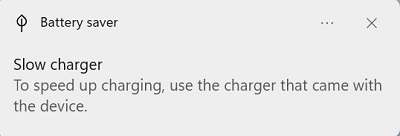
The following message may show on the laptop when connecting a Dell dock using a dual USB type-C connector.
"Battery saver"
"Slow charger"
"To speed up charging, use the charger that came with the device."
Check out some of these articles related to WD19 series docks:
- Dell Performance Dock WD19DC or WD19DCS Shut Down When Connected to the Laptop Using a Dual USB Type-C Connector
- Incorrect AC Adapter Power Shows in BIOS When Connect to Dell Performance Dock WD19DC or WD19DCS
For generic battery charging issues, see
Affected Models:
- Dell Performance Dock - WD19DC
- Dell Performance Dock - WD19DCS
- Latitude 5420
- Latitude 5421
- Latitude 5430
- Latitude 7310
- Latitude 7410
- Latitude 9330
- Latitude 9430
- Latitude 9520
- Precision 5470
- Dell Pro 13 Premium
Cause
The impacted laptops only support Dell Performance Dock WD19DC or WD19DCS when connected using a single USB-C connector.
Resolution
Follow the steps below to recover from the issue.
- Disconnect the dual USB Type-C connector from the computer.
- Disconnect the AC adapter from the 7.4 mm DC-in power input on the dock. Leave it for 30 seconds.
- Connect the AC adapter to the 7.4 mm DC-in power input on the dock.
- Connect the single USB Type-C connector to the computer.
Note: To learn more, see the Dell Commercial Docking Compatibility Guide located in the Hardware Requirements section of the User’s Guide.
Affected Products
Dell Pro 13 Premium PA13250, Dell Performance Dock - WD19DC, Dell Performance Dock – WD19DCS, Latitude 7310, Latitude 9330, Latitude 5421, Latitude 7410, Latitude 9430, Latitude 9520, Latitude 5420, Latitude 5430, Precision 5470Article Properties
Article Number: 000215318
Article Type: Solution
Last Modified: 18 May 2026
Version: 10
Find answers to your questions from other Dell users
Support Services
Check if your device is covered by Support Services.