Video Distortion Experienced in Windows 11 on Dell G15 5530
Summary: Learn about video distortion in Windows 11 on a Dell G15 5530. Distortion is seen after enabling automatic color management and restarting the computer.
Symptoms
A Dell G15 5530 laptop may experience video distortion on the LCD. This distortion appears similar in appearance to a 16-bit color standard. This distortion happens after enabling the automatic color management option in Windows 11 and then restarting the computer.
Automatic color management is enabled by following these steps:
- Select the Start button, then select Settings.
- Select System, then Display, and then Advanced display.
- Select your display near the top.
- Enable Automatically manage color for apps.
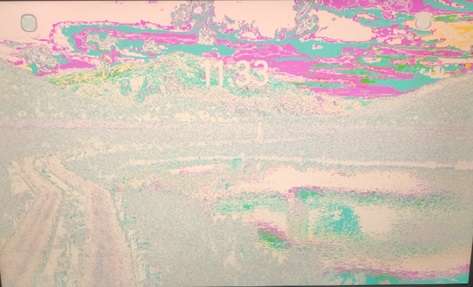
Figure 1: Example of LCD video distortion
Cause
Resolution
This issue has a Resolution of updating the NVIDIA GeForce driver. If you are unable to update the driver, there is a Workaround that can be followed instead until the driver can be updated.
Resolution
Updating to NVIDIA GeForce RTX 4070/4060/4050/3050 Graphics Driver version 31.0.15.4680, A07 or later on the computer resolves the issue. To download and install the driver, reference How to Download and Install Dell Drivers.
Workaround
Once video distortion is seen, disabling the automatic color management option causes the video distortion to go away.
- Select the Start button, then select Settings.
- Select System, then Display, and then Advanced display.
- Select your display near the top.
- Disable Automatically manage color for apps.