Dell Power Button Sync Not Working After Updating Firmware on the Dell U3223QE Monitor
Summary: Learn about the Dell Power Button Sync (DPBS) functionality not working after updating the firmware on the Dell U3223QE monitor.
This article applies to
This article does not apply to
This article is not tied to any specific product.
Not all product versions are identified in this article.
Symptoms
The Power Button Sync functionality on a Dell U3223QE monitor may not work after updating the firmware.
Affected Monitor:
- Dell U3223QE Monitor
Affected Firmware Version:
- M3T103 and later
Cause
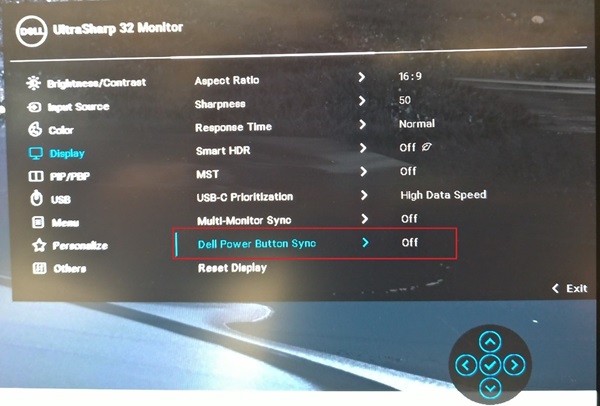
For any firmware release starting with M3T103 onwards, an option has been added to the monitor On-Screen Display (OSD) menu. This option allows a user to enable or disable the DPBS functionality. It was added to give the user additional flexibility to disable or enable DPBS and its default setting is OFF.
Resolution
To enable DPBS option like firmware versions prior to M3T103, go to OSD and enable DPBS feature. For how to use the OSD menu, see the manual.
Affected Products
Dell U3223QEArticle Properties
Article Number: 000227282
Article Type: Solution
Last Modified: 21 Oct 2025
Version: 3
Find answers to your questions from other Dell users
Support Services
Check if your device is covered by Support Services.