VxRail의 VCF: LDAP 상태를 확인할 때 NSX가 중단됨
Summary: NSX UI에서 LDAP(Lightweight Directory Access Protocol)를 통한 Active Directory 설정이 올바릅니다. NSX에서 LDAP 설정 확인을 완료할 수 없습니다. 이 상태로 인해 기능을 사용할 수 없게 됩니다.
This article applies to
This article does not apply to
This article is not tied to any specific product.
Not all product versions are identified in this article.
Symptoms
NSX UI에서 LDAP를 통한 Active Directory 설정이 올바릅니다. NSX에서 LDAP 설정 확인을 완료할 수 없습니다. 이 상태로 인해 기능을 사용할 수 없게 됩니다.
LDAP 설정이 올바르지만 새 사용자를 추가할 수 없습니다.
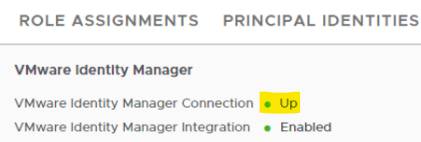
NSX UI의 VMware Identity Manager 탭에 연결 중단과 같은 비정상 표시가 있습니다.
로컬 호스트 액세스 로그: VIDM(VMware Identity Manager) 상태가 HTTP 코드 400을 반환합니다.
nsx-mgr> tail -f /var/log/proxy/localhost_access_log
2024-08-06T02:27:46.690Z - "GET /policy/api/v1/aaa/roles HTTP/1.1" 200 343 13 13
2024-08-06T02:27:46.738Z - "GET /favicon.ico HTTP/1.1" 200 5686 2 1
2024-08-06T02:27:46.811Z - "POST /policy/api/v1/search/aggregate?page_size=250 HTTP/1.1" 200 2026 105 105
2024-08-06T02:27:46.812Z - "POST /policy/api/v1/search/aggregate?page_size=50&cursor=0&sort_by=display_name&sort_ascending=true HTTP/1.1" 200 1306 113 113
2024-08-06T02:27:48.461Z - "GET /api/v1/node/aaa/providers/vidm/status HTTP/1.1" 400 135 1761 1760
Cause
NSX는 이행 전에 모든 ID 컨텍스트를 검색합니다.
VMware Identity Manager가 통합되고 NSX와 VIDM 간의 연결이 끊어지면 ID 검색이 중단됩니다.
Resolution
문제 해결 단계:
1. NSX Manager에서 이 오류의 자세한 원인을 확인합니다.
curl -k -u 'admin:<nsx admin password>' -X GET https://localhost/api/v1/node/aaa/providers/vidm/status
출력은 다음과 유사할 수 있습니다.
"error_message": "Invalid VMware Identity Manager thumbprint specified."
2. 현재 지문에서 VIDM을 확인합니다.

openssl s_client -connect <FQDN of vIDM host>:443 < /dev/null 2> /dev/null | openssl x509 -sha256 -fingerprint -noout -in /dev/stdin
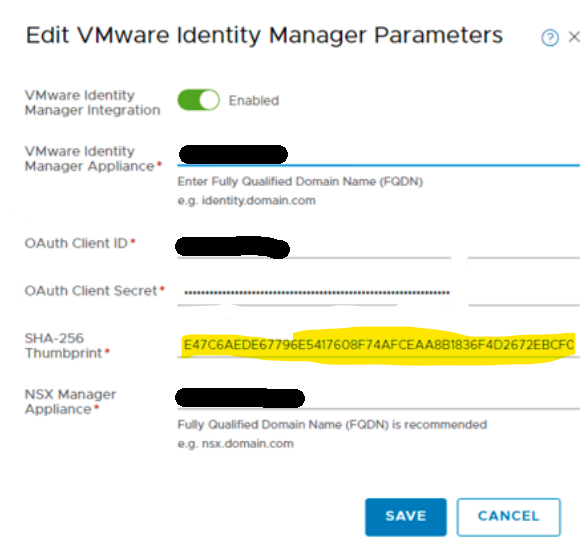
3. NSX UI에서 올바른 지문으로 교체하고 저장합니다.
4. 연결 상태가 복구되면 "Up"으로 표시됩니다.
Affected Products
VxRail, VxRail Appliance Series, VxRail E560 VCF, VxRail E560F VCF, VxRail E560N VCF, VxRail G560 VCF, VxRail G560F VCF, VxRail P570 VCF, VxRail P570F VCF, VxRail P580N VCF, VxRail S570 VCF, VxRail V570 VCF, VxRail V570F VCFArticle Properties
Article Number: 000227655
Article Type: Solution
Last Modified: 08 Nov 2025
Version: 3
Find answers to your questions from other Dell users
Support Services
Check if your device is covered by Support Services.