ECS:UI 和 REST API 之間的 ECS 容量單位不同 (GiB 與 GB)
Summary: 例如,svc_bucket顯示的 10 GB 的容量顯然直接計入 UI 計量輸出 (或相反),即只有 GiB 才會顯示相同的值。
This article applies to
This article does not apply to
This article is not tied to any specific product.
Not all product versions are identified in this article.
Symptoms
請注意 CLI 和 REST API 命令中的 GB 單位:
admin@ecsnode1:~> svc_bucket info chris-s3-bkt
svc_bucket v1.1.1 (svc_tools v2.20.0)                 Started 2024-11-22 15:51:33

Bucket ID                        chris-ns.chris-s3-bkt

  Name                             chris-s3-bkt
  Namespace                        chris-ns
  Owner User                       chris-s3-user
  Owner VDC Name                   VDC1
  Owner zone/VDC ID                urn:storageos:VirtualDataCenterData:8af5b9c3-9c0c-43b5-9402-14d181ade5bf
  Keypool Hash ID                  43344cc6ad534c4e600dc0a32d90e5104a8f718d99487938bf9f273f2100f248
  Bucket Deletion Status           None

  Replication Group (vpool) Name   local_vdc
  Replication Group (vpool) ID     urn:storageos:ReplicationGroupInfo:9eaa2c9d-4ed5-4f40-90f1-e347f8f3f3fd:global
  Bucket Creation Date             2024-11-22 15:13:33 (1732288413155)
  Temp Failed (TSO)                False

  API Type                         S3
  FS Access Enabled                False
  Encryption Enabled               False
  Versioning State                 Disabled
  ADO Enabled                      False
  ADO Read-Only                    False
  Object Lock Enabled              False
  Auto commit period (seconds)     None
  Enforce Retention                False
  Lifecycle Policy                 None

  Keypool Policy                   None

  Bucket ACL:
    Type       Affects    Name
    user       file/dir   chris-s3-user                       FULL_CONTROL

  Object count                     2
  Total Object Size                11 GB


admin@ecsnode1:~>
admin@ecsnode1:~> svc_rest_cmd /object/billing/buckets/chris-ns/chris-s3-bkt/info | xmllint --format -
svc_rest_cmd 1.0.17
<?xml version="1.0" encoding="UTF-8" standalone="yes"?>
<bucket_billing_info>
<total_size_deleted>0</total_size_deleted>
<total_objects_deleted>0</total_objects_deleted>
<name>chris-s3-bkt</name>
<uptodate_till>2023-06-15T18:25:45Z</uptodate_till>
<namespace>chris-ns</namespace>
<sample_time>2024-11-27T14:23:38Z</sample_time>
<TagSet/>
<total_mpu_parts>0</total_mpu_parts>
<total_mpu_size>0</total_mpu_size>
<total_objects>2</total_objects>
<total_size>11</total_size>
<total_size_unit>GB</total_size_unit>
<vpool_id>urn:storageos:ReplicationGroupInfo:9eaa2c9d-4ed5-4f40-90f1-e347f8f3f3fd:global</vpool_id>
</bucket_billing_info>
admin@ecsnode1:~> 但是檢查UI計量資訊,我們確實在GiB而不是GB中看到相同的讀數,這似乎不正確:
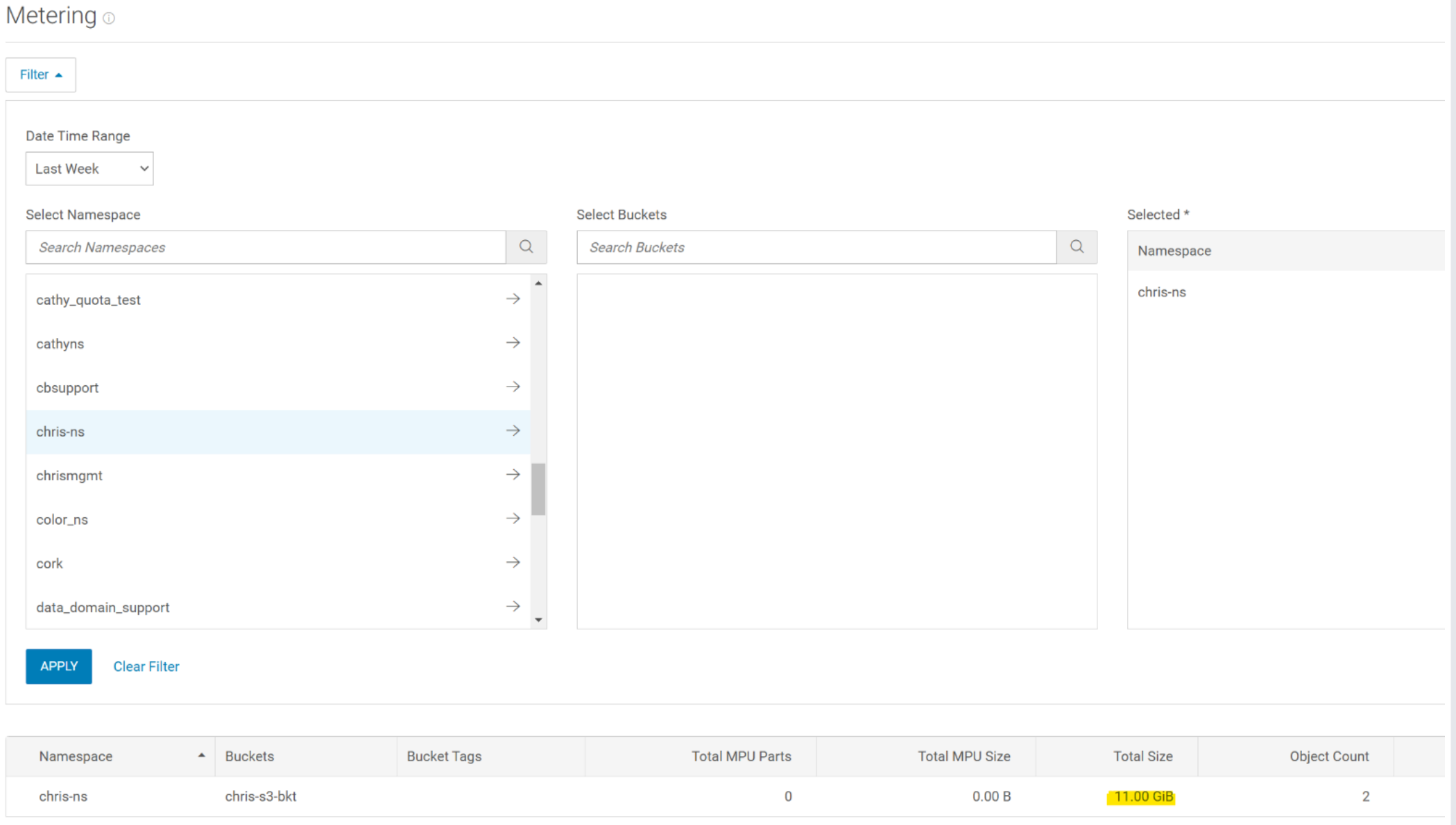
如果將滑鼠停留在 11.00 GiB 上,則會以位元組為單位顯示。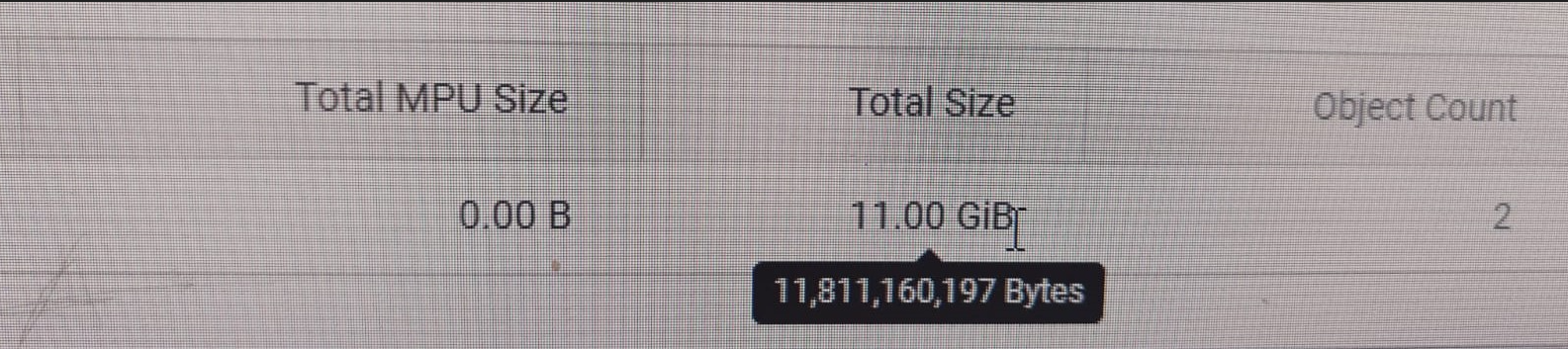
11 GB = 11 * 1000^3 = 1100000000 位元組
11 GiB = 11 * 1024^3 = 11811160064 位元組
Cause
UI 和命令列中傳回的值皆為 GiB。在命令列中,單位顯示為 GB 而非 GiB,這是錯誤的。
因此,計量頁中的 GiB 值是正確的。
Resolution
CLI 或 REST API 命令的容量讀取為 true,並且與 UI 計量讀數相符。未來的 ECS 程式碼版本會將 CLI/REST API 容量單位修正為 GB (GiB)。
Affected Products
ECSArticle Properties
Article Number: 000273649
Article Type: Solution
Last Modified: 20 Jan 2025
Version: 1
Find answers to your questions from other Dell users
Support Services
Check if your device is covered by Support Services.