SupportAssist "PCI BUS Fail" Error with an RTX505, RTX5060, or RTXA400 Card Installed
Summary: Information about the NVIDIA RTXA400, RTX5050, or RTX5060 video card causing a PCI BUS Fail error when scanning hardware in Dell SupportAssist for diagnosis.
This article applies to
This article does not apply to
This article is not tied to any specific product.
Not all product versions are identified in this article.
Symptoms
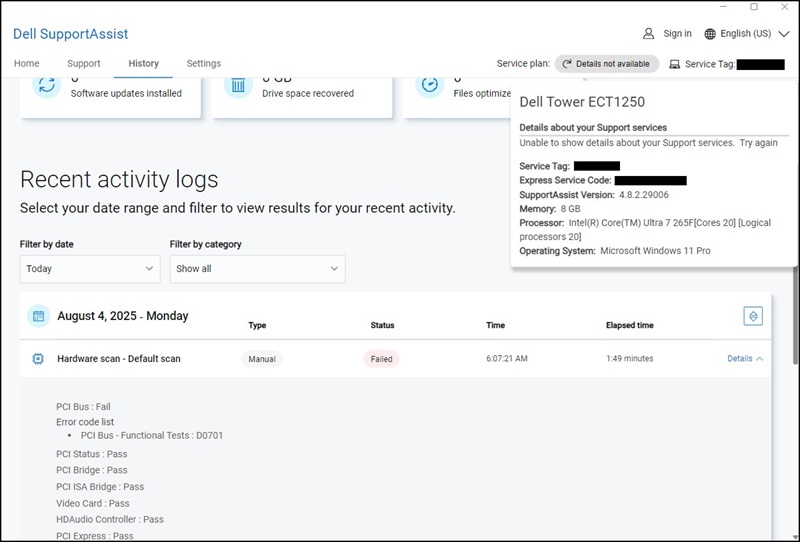
Desktops with the NVIDIA RTXA400, RTX5050, and RTX5060 graphics card installed experience an issue when booting to the Windows desktop. The diagnosis result shows a "PCI Bus: Fail" error message when opening SupportAssist and clicking "Scan Hardware" on the home page to run a quick scan.
Cause
This error is a false alarm. It appears when the PCIe connection is not fully detected, but it does not mean that there is a real problem with your graphics card.
Resolution
Note: This is a False Alarm, you can ignore this message, and there is no functional impact to the system.
To resolve this behavior, update Dell SupportAssist to version 4.10 from the Dell Support Site or click the "Update Now" button in Dell SupportAssist.
Note: SupportAssist version 5.0 (expected in February 2026 (subject to change)) is needed to resolve this issue with the Dell Pro Precision 7 T1 PW7T1260.
Affected Products
Alienware Aurora ACT1250, Dell Tower Plus EBT2250, Dell Tower ECT1250, Dell Pro Precision 7 T1 PW7T1260, Dell Pro Precision 7 T1 XE PW7T1260, Dell Pro Tower Plus QBT1250, Dell Pro Tower QCT1250, Dell Pro Slim Essential QVS1260
, Dell Pro Tower Essential QVT1260
...
Article Properties
Article Number: 000357237
Article Type: Solution
Last Modified: 23 May 2026
Version: 5
Find answers to your questions from other Dell users
Support Services
Check if your device is covered by Support Services.