FluidFS: Controller fails to boot with UNEXPECTED INCONSISTENCY RUN FSCK MANUALLY
Resumen: After a power outage, controller shutdown, or controller removal for maintenance, the possibility exists for the clock to revert to zero-time-value. This will cause the next controller boot to fail. ...
Síntomas
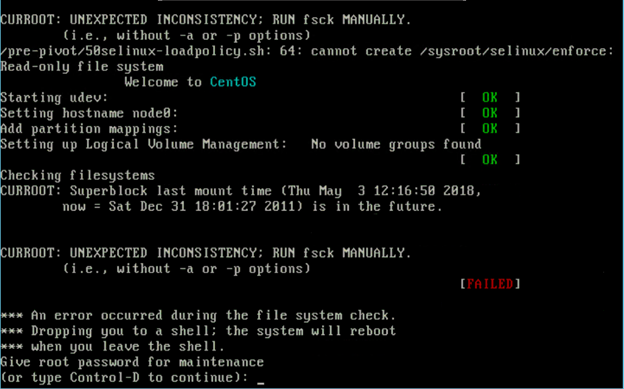
Following a power outage, reboot, shutdown, or removal for maintenance, if the Time of Day (TOD) clock battery is drained, the clock reverts to zero-time-value. The next controller boot fails the File System Check (FSCK) phase. During the boot-up sequence, errors such as this are presented:
UNEXPECTED INCONSISTENCY; RUN fsck MANUALLY
Checking filesystems
Superblock last mount time ( <time>,
Now = <time> ) is in the future.

Give root password for maintenance
(or type Control-D to continue):
Example of the error:
Causa
The issue occurs when the ToD clock battery is drained, causing the clock to revert to zero-time-value. The drained coin-cell battery results in the controller failing at the FSCK phase during the next boot.
Resolución
Temporary Workaround:
Reseat the controller or press Control-D from the prompt.
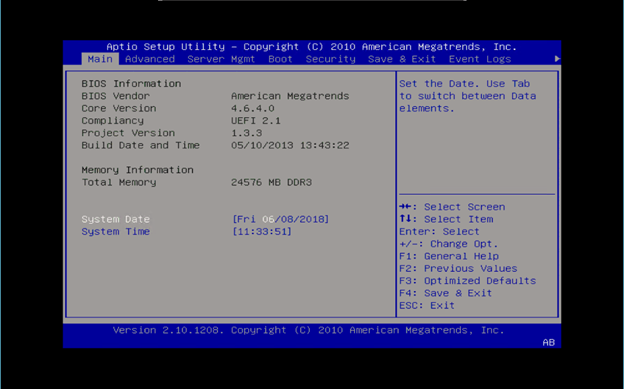
Enter the BIOS setup during Power On Self-Test (POST) and manually set the correct time.
If the BIOS displays only a black screen and is inaccessible, contact Dell Technical Support and reference internal article 000129279.
Example:
Permanent Solution:
Once the time is set correctly, the controller boots successfully. However, this change does not persist if the controller is rebooted again with a faulty coin-cell battery.
Dell Technical Support can help with replacing the faulty coin-cell battery and upgrading the FluidFS firmware.
Applicable Versions: This issue does not occur on the following versions:
- Dell Compellent FS8600: Version 6.0.110054 and Higher
- EqualLogic FS7600 and FS7610: Version 4.0.400005
Contact technical support and reference this article and internal article 000129279 for further details.