Dell Precision 5550 Visual Guide
Resumen: The following article provides a visual guide to your Precision Mobile Workstation 5550 and lists the external ports and features of your laptop.
Este artículo se aplica a
Este artículo no se aplica a
Este artículo no está vinculado a ningún producto específico.
No se identifican todas las versiones del producto en este artículo.
Instrucciones
NOTE: For a more detailed description of each location, go to the product manuals at: www.dell.com/support
Table of Contents:
- Front View
- Top View
- Bottom View
- Left-Hand Side View
- Right-Hand Side View
- AC Adapter View
- Additional Info:
Front View
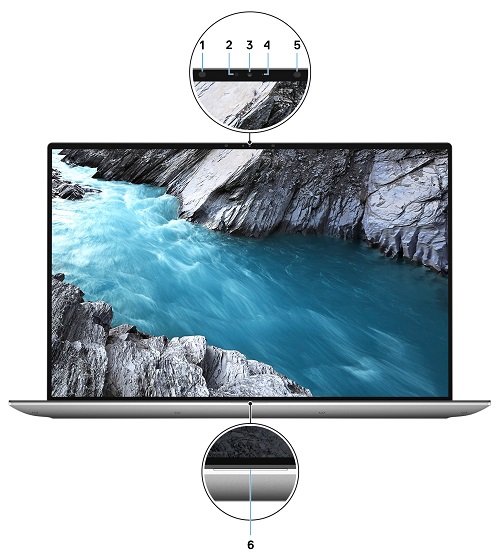
Figure 1: Front View
| 1 | Infrared emitter | 2 | Ambient-light sensor |
| 3 | Infrared camera (RGB) | 4 | Camera Status LED |
| 5 | Infrared emitter | 6 | Camera Status LED |
Top View
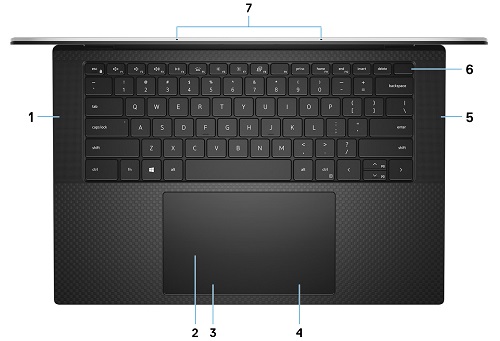
Figure 2: Top View
| 1 | Left speaker | 2 | Touchpad |
| 3 | Left-click area | 4 | Right-click area |
| 5 | Right speaker | 6 | Power button with Fingerprint Reader |
| 7 | Microphones (2) |
Bottom View
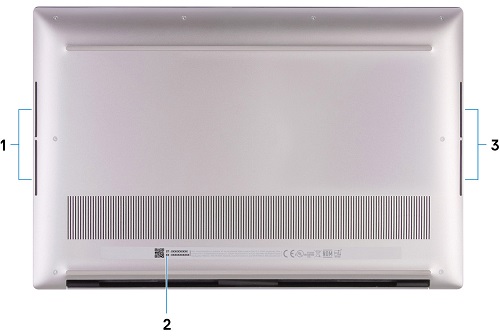
Figure 3: Bottom View
| 1 | Left Woofer | 2 | Service Tag Label |
| 3 | Right Woofer |
Left-Hand Side View

Figure 4: Left-hand Side View
| 1 | Wedge-shaped security slot |
| 2 | 2 x USB 3.2 Gen 2 Type-C port with Thunderbolt 3 (Power Delivery) |
Right Side View

Figure 5: Right-hand Side View
| 1 | USB 3.2 Gen 2 Type-C Display port |
| 2 | SD-card slot |
| 3 | Universal Audio port |
AC Adapter View
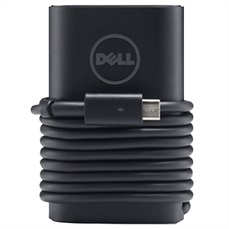
Figure 6: Power Adapter 90 W Type-C
| Description | Values | |
| Type | 90 W Type-C Connector | 130 W Type-C Connector |
| Input Voltage | 100 VAC to 240 VAC | 100 VAC to 240 VAC |
| Output Current | 20 V/4.5 A (Continuous) 15 V/3 A (Continuous) 9.0 V/3 A (Continuous) 5.0 V/3 A (Continuous) |
20 V/6.5 A (Continuous) 5.0 V/3 A (Continuous) |
| Output Power | 90 W | 130 W |
| Output Voltage | 20 VDC | 15 VDC | 9 VDC | 5 VDC | 20 VDC | 5 VDC |
Additional Info:
Productos afectados
Precision 5550Propiedades del artículo
Número del artículo: 000129447
Tipo de artículo: How To
Última modificación: 04 jun 2025
Versión: 5
Encuentre respuestas a sus preguntas de otros usuarios de Dell
Servicios de soporte
Compruebe si el dispositivo está cubierto por los servicios de soporte.