Dell ESA 7.0 PAK Manager PAK file DellEMCEnterpriseStorageAnalytics-7.0.0-build-2260_signed.pak is not in zip format.
Resumen: PAK Manager PAK file DellEMCEnterpriseStorageAnalytics-7.0.0-build-2260_signed.pak is not in zip format.
Este artículo se aplica a
Este artículo no se aplica a
Este artículo no está vinculado a ningún producto específico.
No se identifican todas las versiones del producto en este artículo.
Síntomas
In VMware vRealize Operations (vROps), when trying to upload this PAK file DellEMCEnterpriseStorageAnalytics-7.0.0-build-2260_signed.pak, keep seeing a message appear:
PAK Manager: PAK file DellEMCEnterpriseStorageAnalytics-7.0.0-build-2260_signed.pak is not in zip format.OR
PAK Manager: PAK file reservedTemp_2696460655826554461.pak is not in zip format

Causa
The downloaded pak file was corrupted.
Resolución
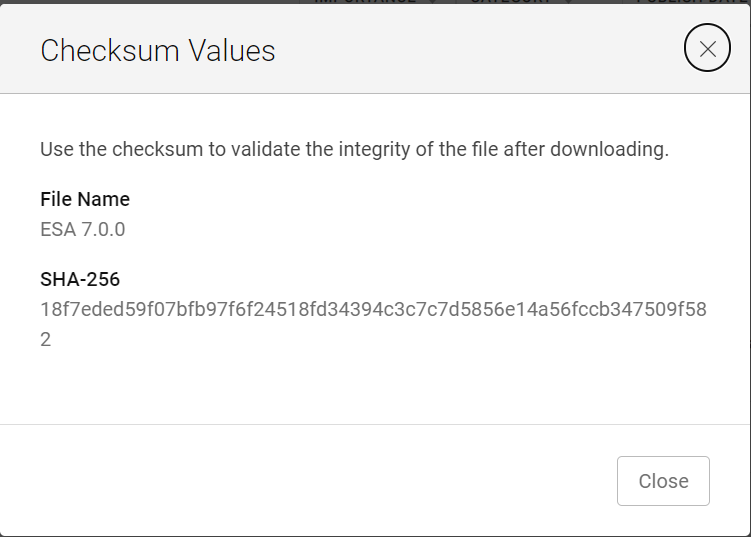
Before using the downloaded file, it is always good practice to run a checksum to confirm the integrity of the file.
1. Download the ESA 7.0 file (DellEMCEnterpriseStorageAnalytics-7.0.0-build-2260_signed.pak) and get its checksum value.
2. Invoke PowerShell
3. Run the checksum to verify that the alphanumeric checksum value of the downloaded file matches the one stated on its website.

4. Select a solution to install

5. Click "UPLOAD" and see that the validated file upload successfully.

1. Download the ESA 7.0 file (DellEMCEnterpriseStorageAnalytics-7.0.0-build-2260_signed.pak) and get its checksum value.
2. Invoke PowerShell
Input:
Press winkey+ R.
Type cmd.
The command prompt is opened.
Type PowerShell and press enter.
3. Run the checksum to verify that the alphanumeric checksum value of the downloaded file matches the one stated on its website.
4. Select a solution to install
5. Click "UPLOAD" and see that the validated file upload successfully.
Propiedades del artículo
Número del artículo: 000204311
Tipo de artículo: Solution
Última modificación: 12 mar 2024
Versión: 2
Encuentre respuestas a sus preguntas de otros usuarios de Dell
Servicios de soporte
Compruebe si el dispositivo está cubierto por los servicios de soporte.