Dell Unity: Replication transfers stop working (User Correctable)
Resumen: How to deal with an event in which Replication transfers stopped.
Este artículo se aplica a
Este artículo no se aplica a
Este artículo no está vinculado a ningún producto específico.
No se identifican todas las versiones del producto en este artículo.
Síntomas
Even though automatic synchronization by RPO is set in Replication, no transfer is being performed and the Last Sync Time is still out of date.
Although the transfer is not in progress, the Sync State is idle, and Health State is OK.
Although the transfer is not in progress, the Sync State is idle, and Health State is OK.
Causa
The following are possible causes.
(1) There is some problem with the Snapshot to be transferred.
(2) When clearing the task of a JOB in manual sync is performed.
(1) There is some problem with the Snapshot to be transferred.
(2) When clearing the task of a JOB in manual sync is performed.
Resolución
(1) Perform the following steps to delete the problematic snapshot from the Unisphere UI.
Pause replication > Delete a snapshot > Resume replication
(2) Pause and resume replication.
Pause replication > Delete a snapshot > Resume replication
NOTE: Contact Dell Technical Support if an error occurs during any of the steps.
(2) Pause and resume replication.
Información adicional
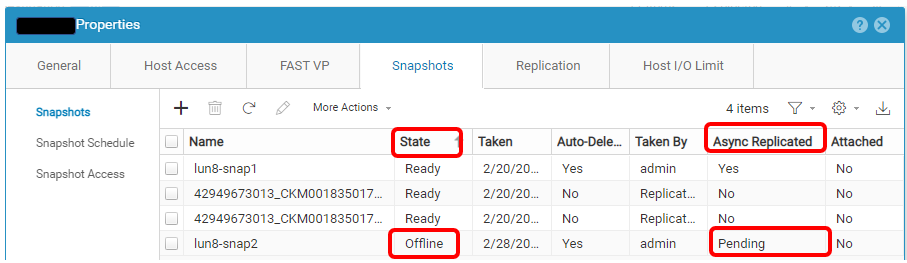
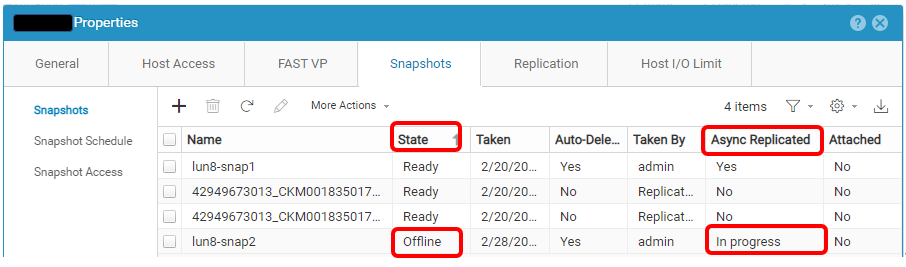
Here is an example of a problematic Snapshot.
Productos afectados
Dell EMC Unity, Dell Unity 300, Dell EMC Unity 300F, Dell EMC Unity 350F, Dell EMC Unity XT 380, Dell EMC Unity XT 380F, Dell EMC Unity 400, Dell EMC Unity 400F, Dell EMC Unity 450F, Dell EMC Unity XT 480, Dell EMC Unity XT 480F, Dell EMC Unity 500
, Dell EMC Unity 500F, Dell EMC Unity 550F, Dell EMC Unity 600, Dell EMC Unity 600F, Dell EMC Unity 650F, Dell EMC Unity XT 680, Dell EMC Unity XT 680F, Dell EMC Unity XT 880, Dell EMC Unity XT 880F, Dell EMC Unity Family |Dell EMC Unity All Flash, Dell EMC Unity Family, Dell EMC Unity Hybrid, Dell EMC UnityVSA Professional Edition/Unity Cloud Edition
...
Propiedades del artículo
Número del artículo: 000210066
Tipo de artículo: Solution
Última modificación: 29 mar 2023
Versión: 1
Encuentre respuestas a sus preguntas de otros usuarios de Dell
Servicios de soporte
Compruebe si el dispositivo está cubierto por los servicios de soporte.