Latitude 5500: Keyboard Function Key Guide
Resumen: This article lists the keyboard shortcuts available and the functions they perform on the Dell Latitude 5500 system
Este artículo se aplica a
Este artículo no se aplica a
Este artículo no está vinculado a ningún producto específico.
No se identifican todas las versiones del producto en este artículo.
Síntomas
The following guide lists the keyboard shortcuts available and the functions they perform on the Dell Latitude 5500 Notebook
Keyboard Shortcut Key Functions
The below table is a list of combination short-cut key functions available on the Latitude 5500 Notebook
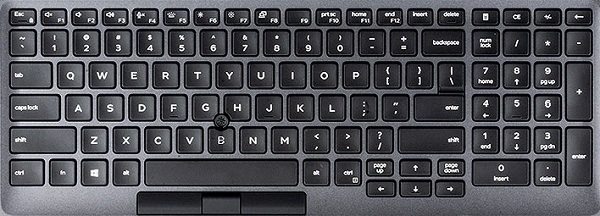
| Function key combo | Result |
|---|---|
| Fn + Esc | Toggle the Fn-Key Lock |
| Fn + F1 | Mute Audio |
| Fn + F2 | Decrease Volume |
| Fn + F3 | Increase Volume |
| Fn + F4 | Mute Microphone |
| Fn + F5 | Turn On/Off Keyboard Backlight |
| Fn + F6 | Decrease Brightness |
| Fn + F7 | Increase Brightness |
| Fn + F8 | Switch to External Display |
| Fn + F10 | Print Screen |
| Fn + F11 | Home |
| Fn + F12 | End |
| Fn + Ctrl | Open Application Menu |
 Visit our Keyboard knowledge base for additional resources and information.
 For additional articles and information visit our Touchpad support page.
 Additional articles and information can also be found on our Mouse support page.
Causa
N/A
Resolución
N/A
Productos afectados
Latitude 5500Propiedades del artículo
Número del artículo: 000128121
Tipo de artículo: Solution
Última modificación: 19 abr 2026
Versión: 6
Encuentre respuestas a sus preguntas de otros usuarios de Dell
Servicios de soporte
Compruebe si el dispositivo está cubierto por los servicios de soporte.