Avamar: Administrator shows erratic capacity forecast for Data Domain
Resumen: Avamar Administrator dashboard shows erratic capacity forecast for Data Domain.
Este artículo se aplica a
Este artículo no se aplica a
Este artículo no está vinculado a ningún producto específico.
No se identifican todas las versiones del producto en este artículo.
Síntomas
The following is observed when monitoring capacity of Data Domain from the Avamar Administrator dashboard.
The forecast information changes erratically over the course of a week rather than tracking the longer term capacity trend of Data Domain.
The dashboard shows an oscillation between a shorter forecast (for example, 3 months) followed by a much longer forecast (eg. 3 years).
The longer forecast aligns with the weekly 'cleaning' maintenance. By default, this occurs on Wednesday.
The screenshot below shows that the forecast for Data Domain #2 is ~3 years.
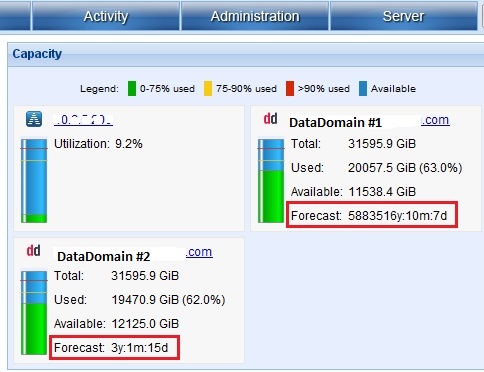
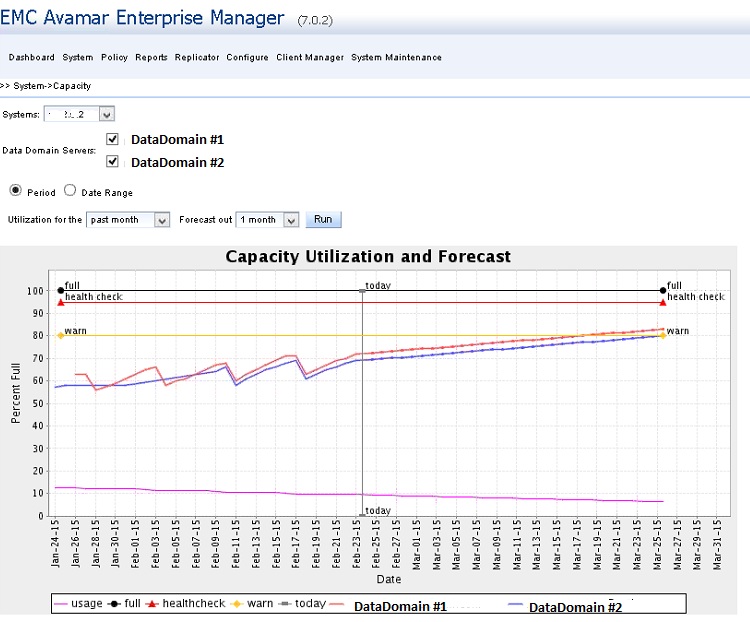
This forecast disagrees with the projected trend found in the Avamar Enterprise Manager capacity. It also disagrees with the Data Domain Enterprise Manager "File System - Consumption" graph.
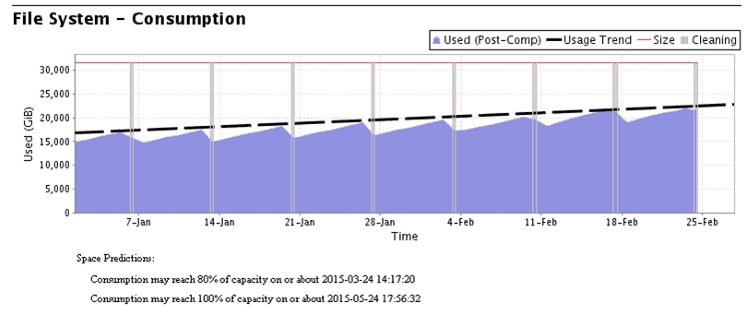
Both graphs agree that Data Domain #2 has around 3 months of remaining capacity following the current trend based on the weekly peaks. These occur before DD cleaning.
Data Domain Enterprise Manager graph is below.
The forecast information changes erratically over the course of a week rather than tracking the longer term capacity trend of Data Domain.
The dashboard shows an oscillation between a shorter forecast (for example, 3 months) followed by a much longer forecast (eg. 3 years).
The longer forecast aligns with the weekly 'cleaning' maintenance. By default, this occurs on Wednesday.
The screenshot below shows that the forecast for Data Domain #2 is ~3 years.
This forecast disagrees with the projected trend found in the Avamar Enterprise Manager capacity. It also disagrees with the Data Domain Enterprise Manager "File System - Consumption" graph.
Both graphs agree that Data Domain #2 has around 3 months of remaining capacity following the current trend based on the weekly peaks. These occur before DD cleaning.
Data Domain Enterprise Manager graph is below.
Causa
This is due to the sensitivity with which the Dashboard forecast figure is generated.
Resolución
Since Avamar and Data Domain cleaning cycles differ, the Avamar dashboard forecast algorithm may need tuning to take account of this to produce more accurate results which reflect longer term capacity trends.
Workaround:
1) Tune the mcserver.xml parameter.
a) Increase the value for the "capForecastDataDays" parameter in the /usr/local/avamar/var/mc/server_data/prefs/mcserver.xml file.
b) Restart the MCS service with the following commands (or see the system Administrator Guide).
dpnctl stop mcs
dpnctl start mcs
2) An alternative workaround would be to make use of the Data Domain Enterprise manager 'Space Prediction' comment at the base of the "File System - Consumption" graph shown earlier.
Workaround:
1) Tune the mcserver.xml parameter.
a) Increase the value for the "capForecastDataDays" parameter in the /usr/local/avamar/var/mc/server_data/prefs/mcserver.xml file.
b) Restart the MCS service with the following commands (or see the system Administrator Guide).
dpnctl stop mcs
dpnctl start mcs
2) An alternative workaround would be to make use of the Data Domain Enterprise manager 'Space Prediction' comment at the base of the "File System - Consumption" graph shown earlier.
Información adicional
The Data Domain forecast calculation mirrors the Avamar counterpart.
The forecast estimates the remaining number of days that the system has writable space. This is based on the average daily change rate over the defined range.
For example, if the current day is 3rd April 2015, to forecast the remaining days of capacity on a Data Domain system, the forecast queries the MC database. It checks for the maximum usage on each day over the previous 30 days.
The range of 30 days is configurable. It can be set by altering the capForecastDataDays parameter in /usr/local/avamar/var/mc/server_data/prefs/mcserver.xml.
To calculate the "average daily change rate", we take the previous maximum utilization which was recorded on the present day.
Subtract the first recorded maximum utilization (the default being 30 days prior, or 4th March).
The result is divided by length of the range (30 days) and used for future forecasting.
The "days until full" value is equal to (100 - current percent full) divided by the "average daily change rate" we have calculated.
The capacity forecast is the expected amount of time that each system component can consume storage at the current rate.
Below are forecast related parameters in the mcserver.xml file.
The forecast estimates the remaining number of days that the system has writable space. This is based on the average daily change rate over the defined range.
For example, if the current day is 3rd April 2015, to forecast the remaining days of capacity on a Data Domain system, the forecast queries the MC database. It checks for the maximum usage on each day over the previous 30 days.
The range of 30 days is configurable. It can be set by altering the capForecastDataDays parameter in /usr/local/avamar/var/mc/server_data/prefs/mcserver.xml.
To calculate the "average daily change rate", we take the previous maximum utilization which was recorded on the present day.
Subtract the first recorded maximum utilization (the default being 30 days prior, or 4th March).
The result is divided by length of the range (30 days) and used for future forecasting.
The "days until full" value is equal to (100 - current percent full) divided by the "average daily change rate" we have calculated.
The capacity forecast is the expected amount of time that each system component can consume storage at the current rate.
Below are forecast related parameters in the mcserver.xml file.
/usr/local/avamar/var/mc/server_data/prefs/>: grep -i cast mcserver.xml
              <entry key="capForecastWarnDays" value="90" />
              <entry key="capForecastErrDays" value="30" />
              <entry key="capForecastDataMinDays" value="14" />
              <entry key="capForecastDataDays" value="30" />
              <entry key="capForecastReachedDays" value="30" />
Productos afectados
AvamarProductos
AvamarPropiedades del artículo
Número del artículo: 000038484
Tipo de artículo: Solution
Última modificación: 06 feb 2025
Versión: 5
Encuentre respuestas a sus preguntas de otros usuarios de Dell
Servicios de soporte
Compruebe si el dispositivo está cubierto por los servicios de soporte.