Dell VxRail: Integrated Backup Fails
Resumen: VxRail Integrated Backup fails with "vCenter backup finished. Failed when uploading the backup file to the SFTP server."
Este artículo se aplica a
Este artículo no se aplica a
Este artículo no está vinculado a ningún producto específico.
No se identifican todas las versiones del producto en este artículo.
Síntomas
VxRail Integrated Backup performs a vCenter backup and a VxRail Manager backup. It then uploads the files to a remote SFTP server.
The vCenter backup AND VxRail backup are complete. The vCenter files are uploaded to the SFTP server, but the VxRail files are not uploaded.
UI reports: "vCenter backup finished. Failed when uploading the backup file to the SFTP server"
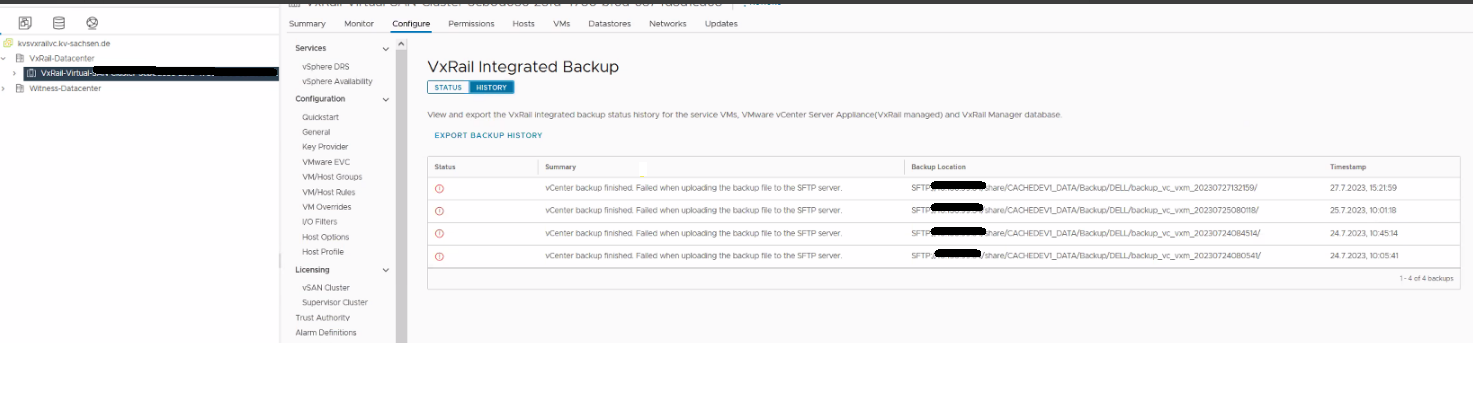
Figure 1: Screenshot of error message in VxRail UI
/var/log/mystic/VxRailBackupRestore.log shows the below message:
The vCenter backup AND VxRail backup are complete. The vCenter files are uploaded to the SFTP server, but the VxRail files are not uploaded.
UI reports: "vCenter backup finished. Failed when uploading the backup file to the SFTP server"
Figure 1: Screenshot of error message in VxRail UI
/var/log/mystic/VxRailBackupRestore.log shows the below message:
INFO Upload to sftp server, ret: 5, output: (b'', b'Permission denied, please try again.\r\n')
Causa
There is a special character ($) in the SFTP location password. The current VzRM Upload code does not handle it correctly.
An example of a bad SFTP location password is: "AB$cdefgh2"
An example of a bad SFTP location password is: "AB$cdefgh2"
Resolución
Dell VxRail Engineering team is working on a resolution for this issue. It was discovered in VxRail version 7.0.451.
Workaround:
Use a SFTP location password without any special characters.
Workaround:
Use a SFTP location password without any special characters.
Productos afectados
VxRail Appliance SeriesPropiedades del artículo
Número del artículo: 000216655
Tipo de artículo: Solution
Última modificación: 26 sept 2023
Versión: 1
Encuentre respuestas a sus preguntas de otros usuarios de Dell
Servicios de soporte
Compruebe si el dispositivo está cubierto por los servicios de soporte.