NetWorker Module for Databases and Applications: DB2 online backup fails with error "SQL2413N online backup is not allowed because database is not recoverable"
Resumen: NMDA DB2 online backup fails with error nsrdasv: unable to backup sample database due to backup request failure SQLCODE: -2413, SQL2413N online backup is not allowed because database is not recoverable. ...
Este artículo se aplica a
Este artículo no se aplica a
Este artículo no está vinculado a ningún producto específico.
No se identifican todas las versiones del producto en este artículo.
Síntomas
A NetWorker Module for Databases and Applications (NMDA) DB2 backup that is performed from either the NetWorker Management Console (NMC) or from the DB2 server fails with the following error:
"SQL2413N online backup is not allowed because database is not recoverable".
"SQL2413N online backup is not allowed because database is not recoverable".
Causa
Every DB2 database that is installed is in circular logging by default. Online backups are not possible in circular logging.
Resolución
Enable DB2 Archive logging.
Example steps that are shown below are for a DB2 database named 'Db4'.
Example steps that are shown below are for a DB2 database named 'Db4'.
1.Open DB2 command window on the client.
2.Check DB2 logging mode using command as shown in screenshot below:
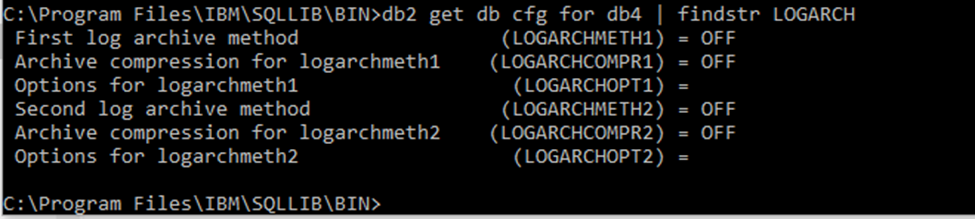
3. Update logarchmeth and logarchopt other than value "OFF." For example:

4. Using NMDA, DB2 transaction logs can be archived automatically to Data Domain storage. See NMDA administration guide for detailed steps.
2.Check DB2 logging mode using command as shown in screenshot below:
3. Update logarchmeth and logarchopt other than value "OFF." For example:
4. Using NMDA, DB2 transaction logs can be archived automatically to Data Domain storage. See NMDA administration guide for detailed steps.
Información adicional
The NetWorker Module for Databases and Applications Administration Guide is available from Dell Support at: https://www.dell.com/support/home/product-support/product/networker-module-for-databases-and-applications/docs.
Propiedades del artículo
Número del artículo: 000191364
Tipo de artículo: Solution
Última modificación: 09 mar 2022
Versión: 1
Encuentre respuestas a sus preguntas de otros usuarios de Dell
Servicios de soporte
Compruebe si el dispositivo está cubierto por los servicios de soporte.