NMC: Adding Data Domain system reports "The Data Domain System is already defined"
Resumen: Not able to see the Data Domain system in the NMC Enterprise tab, but able to see the Data domain system details in the Devices tab of NMC Administrator. Also, able to see the details of the Data Domain system in nsradmin. When trying to add the Data domain system in the NMC Enterprise tab, getting Error as "The Data Domain System is already defined". ...
Este artículo se aplica a
Este artículo no se aplica a
Este artículo no está vinculado a ningún producto específico.
No se identifican todas las versiones del producto en este artículo.
Síntomas
The NetWorker server is configured with one or more existing Data Domains.
The NetWorker Management Console (NMC) Enterprise tab does not list one (or more) of the Data Domain systems.
While adding the Data Domain in the NMC Enterprise tab, the following error appears.
The Data Domain System "DATA_DOMAIN_NAME" is already definedCausa
The cause of this symptom can vary. A common cause is that NetWorker was reinstalled with a fresh NMCDB. The NMC folder (or its subsequent nmcdb folder) was renamed/removed prior to reinstalling/upgrading NetWorker.
Linux: /nsr/nmc
Windows: <Install Drive>:\Program Files\EMC NetWorker\Management
Windows: <Install Drive>:\Program Files\EMC NetWorker\Management
Resolución
Follow the below steps to solve the issue:
- Log in to the NetWorker Management Console (NMC) using the default Administrator account (or another account with Application Administrator privileges).
- From the NMC Enterprise screen, connect to the NetWorker server.
- Go to the Devices->Devices tab.
- Right-click in the Devices window and select New Device Wizard.
- Create a new Data Domain type device using the existing Data Domain system:
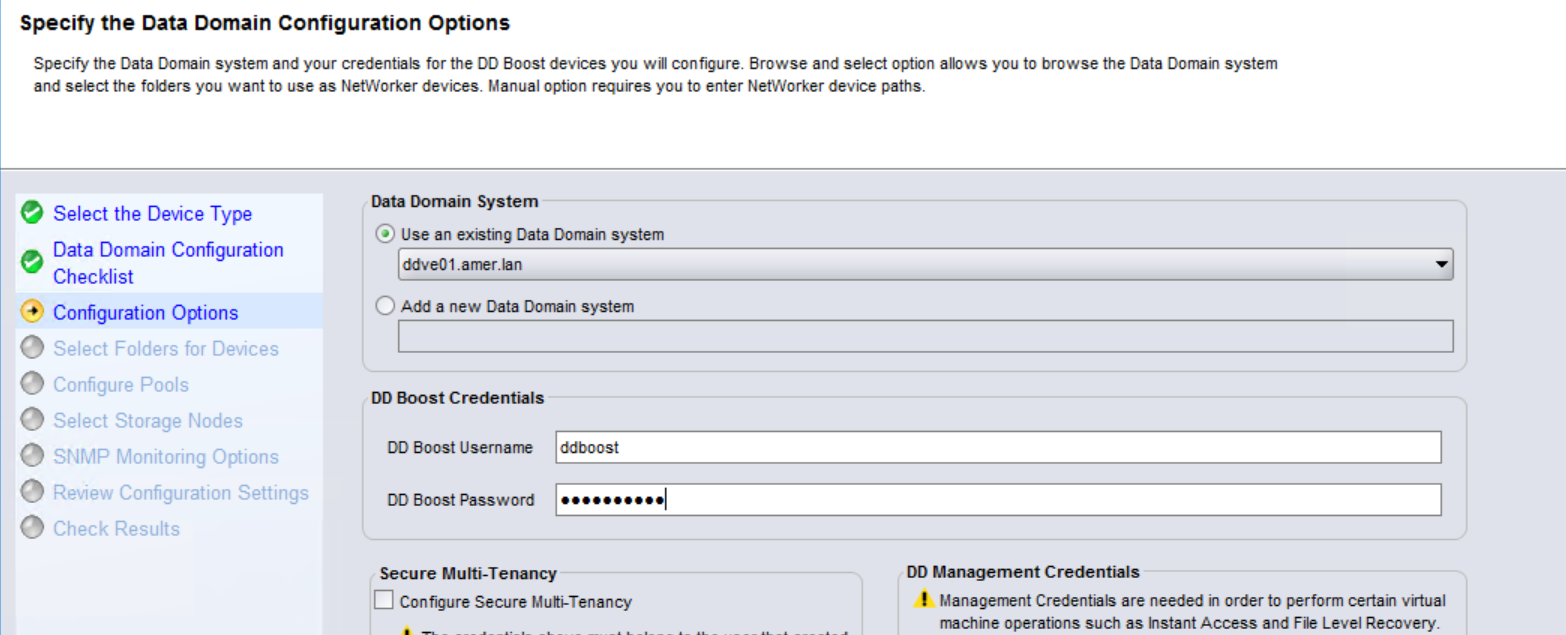
NOTE: The configuration of the device does not matter. You can configure this device for future use, or delete it after completing all the steps in this KB. The process is only needed to repopulate the NMC Enterprise tab with the Data Domain system. Repeat this same process for each Data Domain system that is missing from the NMC Enterprise tab, but exists on the NetWorker server.
- Restart the NMC server service:
Linux: sudo systemctl restart gst
Windows (Administrator PowerShell): net stop gstd ; net start gstd
- Launch the NMC and confirm that the Data Domain system is visible under the Enterprise tab.
Productos afectados
NetWorker Family, NetWorkerPropiedades del artículo
Número del artículo: 000227619
Tipo de artículo: Solution
Última modificación: 29 nov 2024
Versión: 1
Encuentre respuestas a sus preguntas de otros usuarios de Dell
Servicios de soporte
Compruebe si el dispositivo está cubierto por los servicios de soporte.