DBCC CHECKDB-feilsøking av skadet SQL Server-database
Resumen: DBCC CHECKDB, DBCC, databasereparasjon, database, skadet database
Síntomas
Causa
Resolución
DBCC er et innebygd verktøy for Microsoft SQL Server som er utviklet for å kontrollere og reparere Microsoft SQL Server-databaser. Denne artikkelen drøfter DBCC CHECKDB-kommandoen og -alternativene for å kontrollere logisk og fysisk integritet i databasen.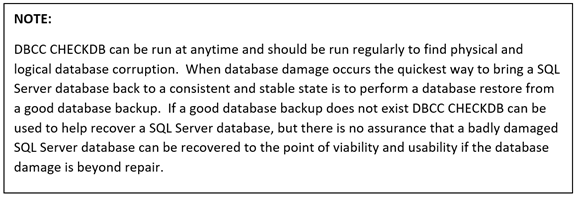
DBCC CHECKDB (Transact-SQL):

Fremgangsmåte for å kjøre DBCC CHECKDB:
- Åpne SQL Server Studio Management
- Åpne et spørringsvindu
- Skriv inn «DBCC CHECKDB (databasenavn)»
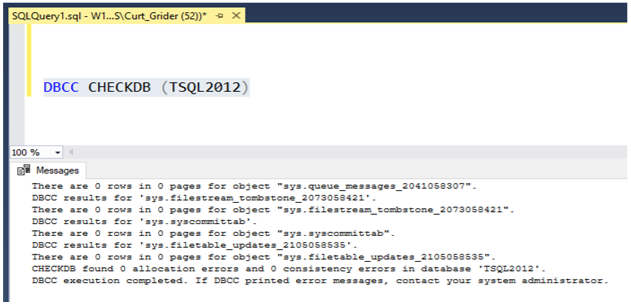
Alternativer for DBCC-reparasjon
- REPAIR_REBUILD: Kommandoen nedenfor setter databasen i en modus som tillater reparasjon.
USE Master;
GO
ALTER DATABASE TSQL2012
SET SINGLE_USER
WITH ROLLBACK IMMEDIATE;
GO
DBCC CHECKDB (TSQL2012, REPAIR_REBUILD)
GO
ALTER DATABASE TSQL2012
SET MULTI_USER;
GO
Kopier kommandoen nedenfor, og lim den inn i spørringsøkten med riktig databasenavn:
--Command below performs a Database repair not allowing Data loss

USE Master;
GO
ALTER DATABASE TSQL2012
SET SINGLE_USER
WITH ROLLBACK IMMEDIATE;
GO
DBCC CHECKDB (TSQL2012,REPAIR_REBUILD)
GO
ALTER DATABASE TSQL2012
SET MULTI_USER;
GO
2. REPAIR_ALLOW_DATA_LOSS: Kommandoen nedenfor utfører databasereparasjon og kan føre til tap av data for å fullføre reparasjonsprosessen.
--Command below performs a database repair that may result in data loss,
 --replace TSQL2012 with the database name of database being repaired
USE Master
GO
ALTER DATABASE TSQL2012
SET SINGLE_USER
WITH ROLLBACK IMMEDIATE
GO
DBCC CHECKDB (TSQL2012, REPAIR_ALLOW_DATA_LOSS)
GO
ALTERDATABASE TSQL2012
SET MULTI_USER
GO
Kopier kommandoen nedenfor, og lim den inn i spørringsøkten med riktig databasenavn:
Kommandoene nedenfor er nyttige hvis det er lite fysisk diskplass i databasen.
--Command below estimates the size TEMPDB must be to complete the DBCC CHECKDB job
USE Master;
GO
ALTER DATABASE TSQL2012
SET SINGLE_USER
WITH ROLLBACK IMMEDIATE;
GO
DBCC CHECKDB (TSQL2012, REPAIR_REBUILD)
WITH ESTIMATEONLY;
GO
ALTER DATABASE TSQL2012
SET MULTI_USER
GO
Kopier kommandoen nedenfor, og lim den inn i spørringsøkten med riktig databasenavn:
--Command below estimates the size TEMPDB must be to complete the DBCC CHECKDB job

USE Master;
GO
ALTER DATABASE TSQL2012
SET SINGLE_USER
WITH ROLLBACK IMMEDIATE;
GO
DBCC CHECKDB (TSQL2012, REPAIR_REBUILD)
WITH ESTIMATEONLY;
GO
ALTER DATABASE TSQL2012
SET MULTI_USER
GO
--Command below will run DBCC CHECKDB without using TEMDB and creating a DB
--snapshot. When not using TEMPDB with a DB snapshot all data will be checked in
-- the live database not not a database snapshot.

USE Master;
GO
ALTER DATABASE TSQL2012
SET SINGLE_USER
WITH ROLLBACK IMMEDIATE;
GO
DBCC CHECKDB (TSQL2012, REPAIR_REBUILD)
WITH TABLOCK;
GO
ALTER DATABASE TSQL2012
SET MULTI_USER
GO
Kopier kommandoen nedenfor og lim inn spørringsøkten, og angi riktig databasenavn:
--Command below will run DBCC CHECKDB without using TEMPDB and creating a DB
--snapshot. When not using TEMPDB with a DB snapshot all data will be checked in ---the live database not a database snapshot.

USE Master;
GO
ALTER DATABASE TSQL2012
SET SINGLE_USER
WITH ROLLBACK IMMEDIATE;
GO
DBCC CHECKDB (TSQL2012, REPAIR_REBUILD)
WITH TABLOCK;
GO
ALTER DATABASE TSQL2012
SET MULTI_USER
GO
