NVP vProxy: Failed to lock Virtual Machine for backup: Another vProxy operation is active on VM
Resumen: NetWorker VMware Protection (NVP) vProxy operations fail. The error returned is that it fails to local the virtual machine due to another active operation on the Virtual Machine (VM)
Este artículo se aplica a
Este artículo no se aplica a
Este artículo no está vinculado a ningún producto específico.
No se identifican todas las versiones del producto en este artículo.
Síntomas
vProxy backup failed with "Failed to lock Virtual Machine for backup: Another vProxy operation is active on VM XXX" when there is no active backup job running for the particular VM.
INFO: [@(#) Build number: ###] Another vProxy operation is active on VM vm-XXX: {Operation:Backup StartTime:2017-05-15T10:09:21Z Proxy:<vProxy>SessionId:4cf6f76c-ef6c-435d-880c-77fbaf49exxx}
ERROR: [@(#) Build number: ###] Failed to lock Virtual Machine for backup: Another vProxy operation is active on VM vm-XXX: {Operation:Backup StartTime:2017-05-15T10:09:21Z Proxy:<vProxy> SessionId:4cf6f76c-ef6c-435d-880c-77fbaf49e1xxx}. Session logs can be found on the NetWorker server under ..\nsr\logs\policy\POLICY_NAME\WORKFLOW_NAME
Causa
The VM was marked as "backup locked" due to previous backup error or interruption.
The vmconfig command can be used to verify if the VM is backup locked.
- Log in to vProxy as admin over SSH, then switch to root.
sudo su -
- Change to bin directory
cd /opt/emc/vproxy/bin
- Run below command to load library path:
source ../unit/vproxy.env
- Check if the backup is locked with 'vmconfig' tool using the MoREF value from the session log:
./vmconfig -c info -k "vm-MoRef" -l moref -v vCENTER_NAME -u "vCENTER_USERNAME" -p 'PASSWORD'
Example output
  Searching for virtual machine with MORef "vm-XXX" ...
            Querying vCenter for definition of virtual machine with MORef of "vm-XXX" ...
            Found virtual machine "VM_NAME" with MORef "vm-xxx".
            vm-145501: Name: "VM_NAME".
            vm-145501: CBT Enabled: true.
            vm-145501: Migration Enabled: false.
            vm-145501: Backup Locked: true.
Resolución
Option 1
Use the ProxyHC utility on the vProxy to cleanup: NVP-vProxy: How to use health check tool ProxyHC on vProxy appliance
The syntax required is:
./ProxyHC tasks cleanup
Option 2
- Log in vSphere client
- Select the affected VM
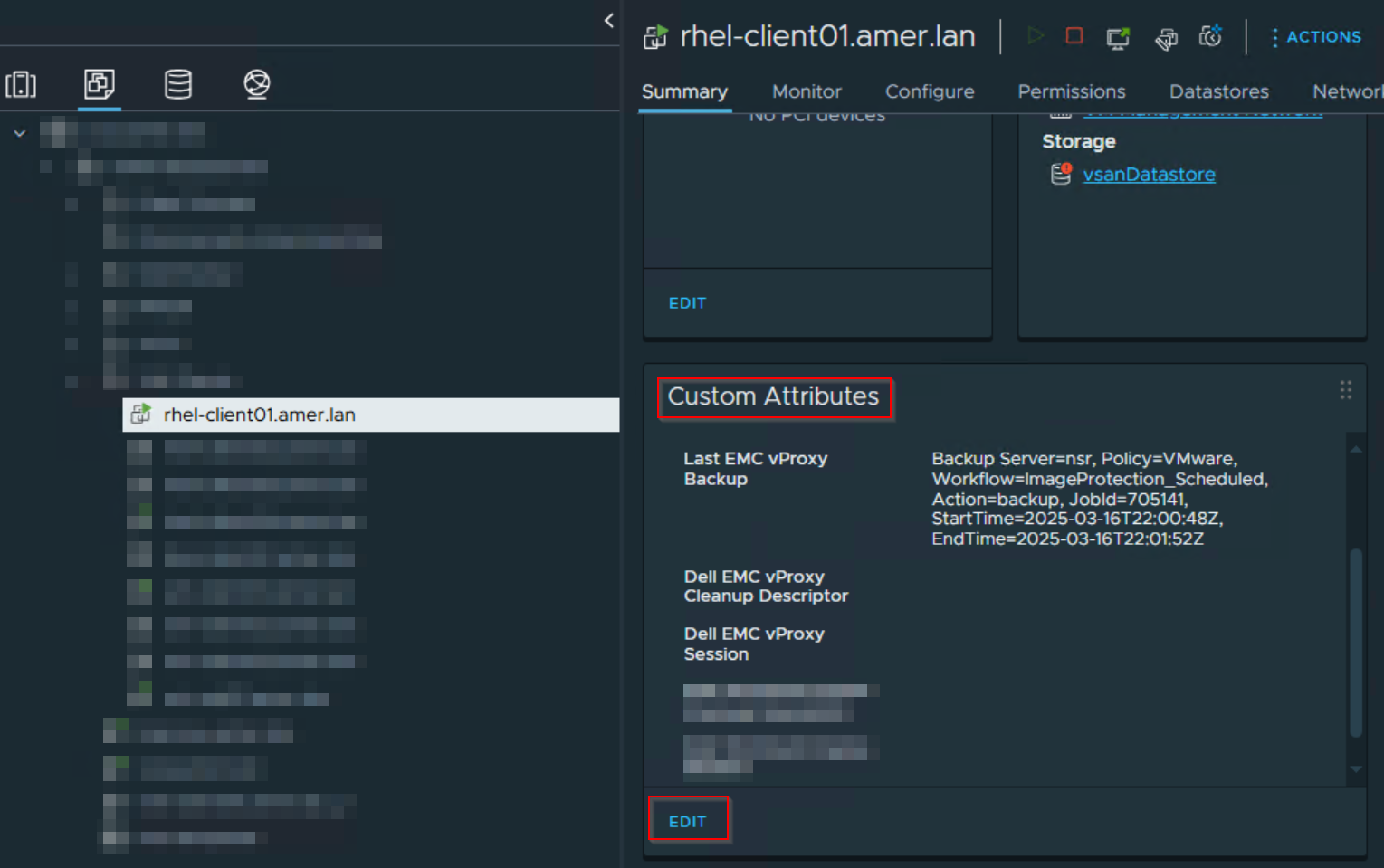
- In the General tab, go to Custom Attributes, click Edit:
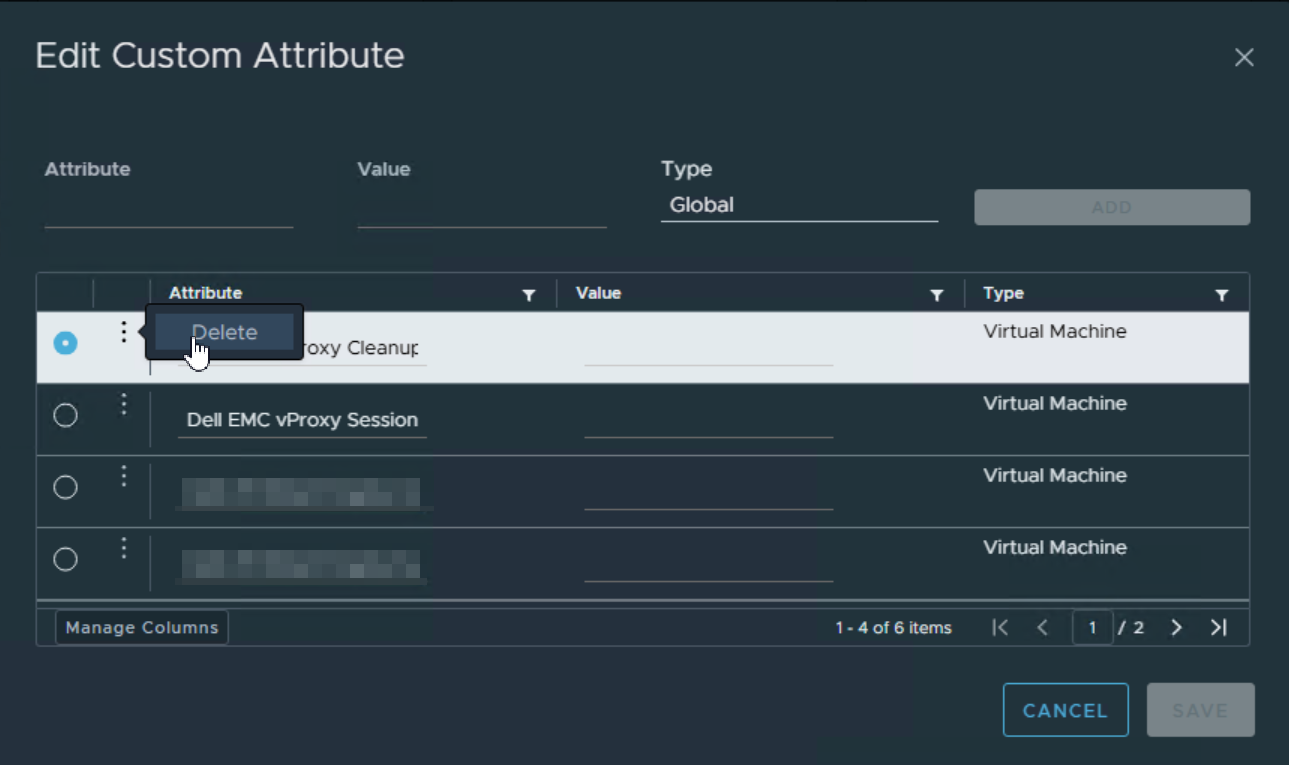
- Select each custom attribute that contains "Dell EMC vProxy," and Delete it:
Productos afectados
NetWorker SeriesProductos
NetWorker SeriesPropiedades del artículo
Número del artículo: 000057190
Tipo de artículo: Solution
Última modificación: 17 mar 2025
Versión: 7
Encuentre respuestas a sus preguntas de otros usuarios de Dell
Servicios de soporte
Compruebe si el dispositivo está cubierto por los servicios de soporte.