PowerVault ME5: No Base unit preference option available while creating a user through PowerVault Manager.
Resumen: There is no option to change the base unit preference while creating a user through PowerVault Manager on ME5 series arrays. The previous generation PowerVault Manager on ME4 series presented this option. Use PowerVault command line interface to change this value. ...
Este artículo se aplica a
Este artículo no se aplica a
Este artículo no está vinculado a ningún producto específico.
No se identifican todas las versiones del producto en este artículo.
Síntomas
In PowerVault ME5, creating a user in PowerVault Manager does not present the option "base preference.”
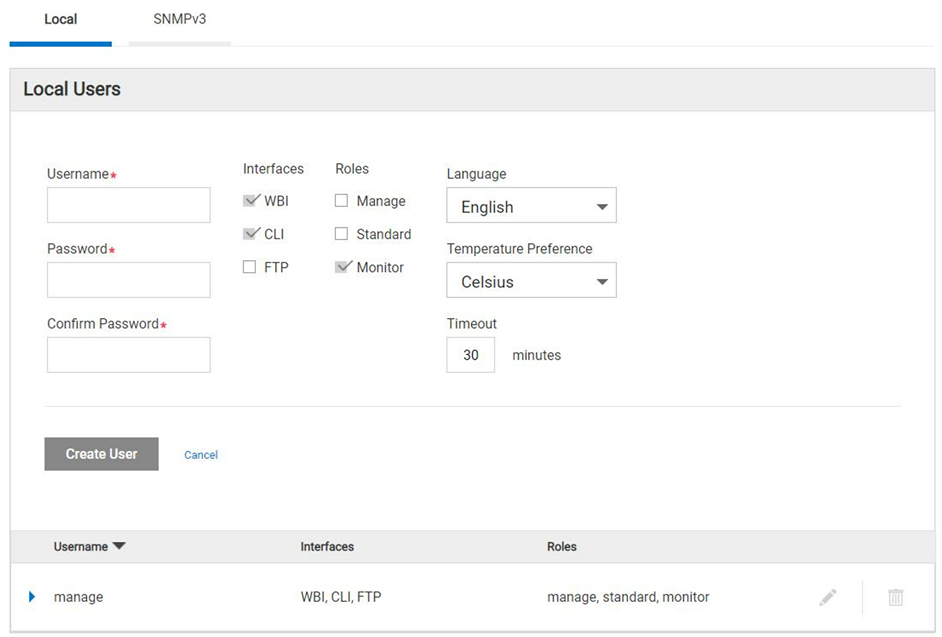
Figure 1 - PowerVault Manager create user dialog.
Causa
Dell engineering identified that this feature is not part of the PowerVault Manager web-based interface (WBI) in the ME5 product family and control base preference can only be set using CLI. This is by design.
NOTE: Most host operating systems measure volume capacity using base 2.
Resolución
-
Using command line interface (CLI) the base preference value can be set while creating a new user.
Here is an example showing how to create a user with base 2 preferences:
# create user base 2 interfaces wbi roles monitor Michael
Enter new password: ********
Re-enter new password: ********
Success: Command completed successfully. (Michael) - The new user was created. (2022-04-05 13:16:17)

# show users
Username             Roles                    User Type    User Locale            WBI   CLI   FTP   SNMP  Authentication Type Privacy Type
  Password                         Privacy Password                 Trap Host Address Trap Host Port
-------------------------------------------------------------------------------------------------------------------------------------------
John                 monitor                  Standard     English                x
  ********                         ********
Michael              monitor                  Standard     English                x
  ********                         ********
manage               manage, standard, monitor  Standard     English                x     x     x
  ********                         ********
-------------------------------------------------------------------------------------------------------------------------------------------
Success: Command completed successfully. (2022-04-05 13:16:29)
-
To verify what is the base preference created during user creation through CLI.
Below are the CLI reference commands:
# set CLI json
{
"status":[
  {
    "object-name":"status",
    "meta":"/meta/status",
    "response-type":"Success",
    "response-type-numeric":0,
    "response":"Command completed successfully. (2022-04-05 13:16:36)",
    "return-code":0,
    "component-id":"",
    "time-stamp":"2022-04-05 13:16:36",
    "time-stamp-numeric":1649164596
  }
]
}


# show users Michael
{
"users":[
  {
    "object-name":"user",
    "meta":"/meta/users",
    "username":"Michael",
    "roles":"monitor",
    "user-type":"Standard",
    "user-type-numeric":2,
    "user-locale":"English",
    "user-locale-numeric":0,
    "interface-access-WBI":"x",
    "interface-access-CLI":"",
    "interface-access-FTP":"",
    "interface-access-SMIS":"",
    "interface-access-SNMP":"",
    "storage-size-base":2,
    "storage-size-precision":1,
    "storage-size-units":"Auto",
    "temperature-scale":"Celsius",
    "timeout":1800,
    "authentication-type":"",
    "privacy-type":"",
    "password":"********",
    "default-password-changed":"True",
    "default-password-changed-numeric":1,
    "privacy-password":"********",
    "trap-destination":"",
    "trap-port":""
  }
],
"status":[
  {
    "object-name":"status",
    "meta":"/meta/status",
    "response-type":"Success",
    "response-type-numeric":0,
    "response":"Command completed successfully. (2022-04-05 13:16:44)",
    "return-code":0,
    "component-id":"",
    "time-stamp":"2022-04-05 13:16:44",
    "time-stamp-numeric":1649164604
  }

]
}

# set cli console
Success: Command completed successfully. (2022-04-05 13:19:50)
NOTE: Revert the CLI from *Json to *console.
Productos afectados
PowerVault ME5012, PowerVault ME5024, PowerVault ME5084Propiedades del artículo
Número del artículo: 000198077
Tipo de artículo: Solution
Última modificación: 31 may 2023
Versión: 4
Encuentre respuestas a sus preguntas de otros usuarios de Dell
Servicios de soporte
Compruebe si el dispositivo está cubierto por los servicios de soporte.