Avamar - Type plug-in wordt weergegeven als leeg in het AUI-dashboard
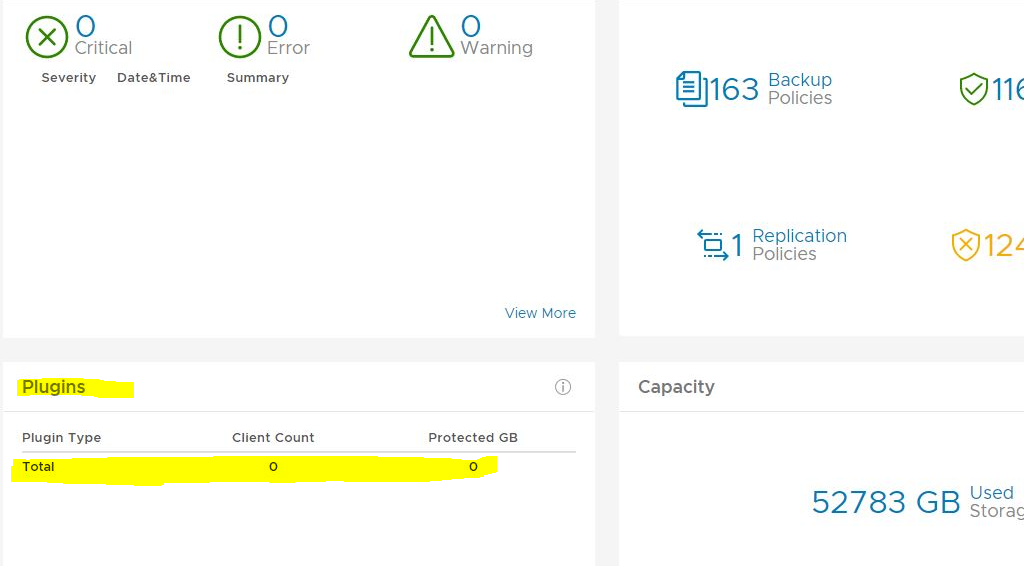
Resumen: In het Avamar AUI-dashboard in het scherm Plug-ins is het totale aantal voor de plug-ins nul.
Este artículo se aplica a
Este artículo no se aplica a
Este artículo no está vinculado a ningún producto específico.
No se identifican todas las versiones del producto en este artículo.
Síntomas
In het AUI-dashboard ziet u dat het vak plug-ins leeg is:
Causa
Er is geen vermelding in report_history tabel voor INIT_RPT_ACT_BYTES_PROT_PI rapport-ID. Het 'Dagelijkse schema' voegt dit toe zodra het wordt uitgevoerd.
Resolución
Voer in de Management Console UI (MCGUI) het activiteiten-plugin stats-rapport uit.
Ga in de gebruikersinterface naar --> Tools --> Manage Reports --> Activities-Plugin stats.
Controleer nogmaals de plug-in-details in het AUI-dashboard en deze moet correct zijn. Voorbeeld hieronder.

Ga in de gebruikersinterface naar --> Tools --> Manage Reports --> Activities-Plugin stats.
Controleer nogmaals de plug-in-details in het AUI-dashboard en deze moet correct zijn. Voorbeeld hieronder.
Propiedades del artículo
Número del artículo: 000212094
Tipo de artículo: Solution
Última modificación: 29 jun 2023
Versión: 2
Encuentre respuestas a sus preguntas de otros usuarios de Dell
Servicios de soporte
Compruebe si el dispositivo está cubierto por los servicios de soporte.