iSM Install Button Removed from iDRAC GUI Starting with Version 7.20.60.50
Resumen: Starting with iDRAC version 7.20.60.50, the Integrated Dell Remote Access Controller (iDRAC) GUI no longer includes the iSM Install button on the iSM setup page. This change reflects the deprecation of the feature that previously allowed installation of iDRAC Service Module (iSM) via iDRAC. ...
Este artículo se aplica a
Este artículo no se aplica a
Este artículo no está vinculado a ningún producto específico.
No se identifican todas las versiones del producto en este artículo.
Síntomas
After upgrading to iDRAC version 7.20.60.50, the iSM Install button is no longer visible on the iSM setup page within the iDRAC GUI. 
Previous iDRAC versions display the iSM Install button on the iSM setup page as shown below. 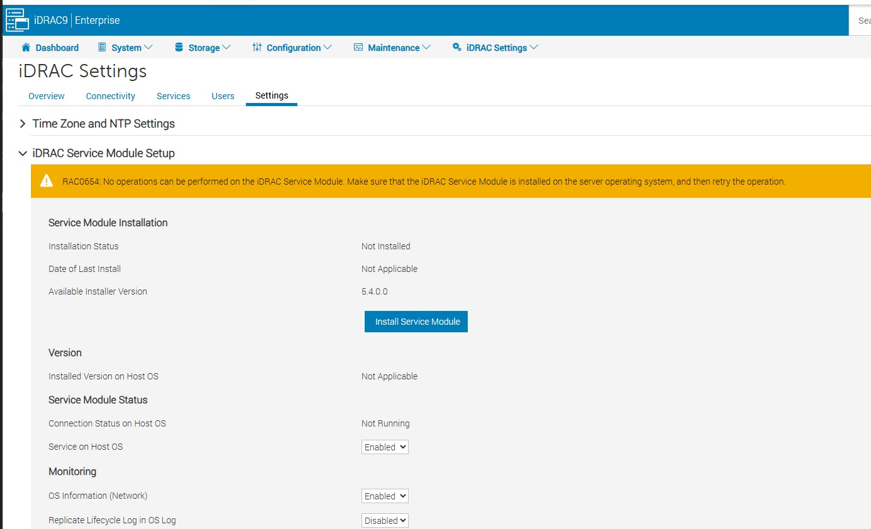
Causa
The development team has deprecated the functionality that utilizes the iDRAC storage partition to store the iSM DUP package. This change applies starting with iDRAC firmware version 7.20.60.50 and later. The feature is no longer supported in these versions.
Resolución
Use alternative installation methods for iSM:
-
- Operating System-based installation:
- For Linux environments, use the Dell Linux Repository:
- For Windows environments, use OS DUP or package manager.
- Remote deployment tools:
- OpenManage Enterprise or other supported management solutions.
- Operating System-based installation:
Review existing scripts or automation to ensure compatibility with updated iDRAC versions.
Productos afectados
iDRAC10 - 1.20.xx Series, iDRAC9 - 7.xx SeriesProductos
iDRAC9Propiedades del artículo
Número del artículo: 000396891
Tipo de artículo: Solution
Última modificación: 27 nov. 2025
Versión: 1
Encuentre respuestas a sus preguntas de otros usuarios de Dell
Servicios de soporte
Compruebe si el dispositivo está cubierto por los servicios de soporte.