How to Add VMware Carbon Black Cloud Administrators
Resumen: Learn step-by-step instructions to configure an administrator account for VMware Carbon Black Cloud by following these directions.
Este artículo se aplica a
Este artículo no se aplica a
Este artículo no está vinculado a ningún producto específico.
No se identifican todas las versiones del producto en este artículo.
Instrucciones
This article discusses how to add additional administrators to the VMware Carbon Black Cloud.
Affected Products:
- VMware Carbon Black Cloud Endpoint
Affected Operating Systems:
- Windows
- Mac
- Linux
VMware Carbon Black Onboarding Part 1: Product Overview, Users, and Roles
Duration: 03:10
Closed captions: Available in multiple languages
- In a web browser, go to [REGION].conferdeploy.net.
Note: [REGION] = Region of tenant
- Americas = https://defense-prod05.conferdeploy.net/
- Europe = https://defense-eu.conferdeploy.net/
- Asia Pacific = https://defense-prodnrt.conferdeploy.net/
- Australia and New Zealand = https://defense-prodsyd.conferdeploy.net
- Americas = https://defense-prod05.conferdeploy.net/
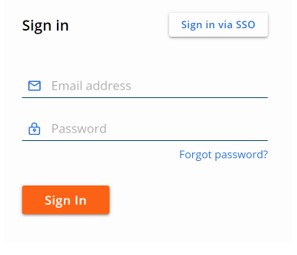
- Sign In to the VMware Carbon Black Cloud.
- In the left menu pane, expand Settings and then click Users.
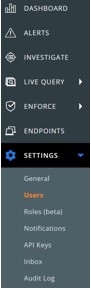 Note: The layout in the example may differ slightly from your environment.
 - In the upper right corner, click Add User.

- In the Add User menu:
- Optionally, populate the user’s:
- First name
- Last name
- Phone number
- Populate the user’s Email.
- Optionally, click Show role descriptions.
- Select a Role.
- Click Save.
 Note:
Note:- The administration access invite comes from noreply@carbonblack.com.
- Additional information about roles can be found in the User Guide under the User Role section.
- For information about creating custom roles, reference How to Create Custom VMware Carbon Black Cloud Roles.
- The examples that are used in the screenshot will differ in your environment.
- Optionally, populate the user’s:

To contact support, reference Dell Data Security International Support Phone Numbers.
Go to TechDirect to generate a technical support request online.
For additional insights and resources, join the Dell Security Community Forum.
Productos afectados
VMware Carbon BlackPropiedades del artículo
Número del artículo: 000126000
Tipo de artículo: How To
Última modificación: 06 jun. 2025
Versión: 14
Encuentre respuestas a sus preguntas de otros usuarios de Dell
Servicios de soporte
Compruebe si el dispositivo está cubierto por los servicios de soporte.