Dell Encryption Displays Sign-in Process Initialization Failure After Windows Updates
Résumé: When an endpoint is rebooted after Windows 10 Updates that are issued in July 2020 or later, devices with Dell Encryption and policies that encrypt executables within C:\Windows\System32, a message is displayed indicating a sign-in process failure may be seen. ...
Symptômes
Affected Products:
- Dell Encryption Enterprise
- Dell Encryption Personal
Affected Operating Systems:
- Windows 10 v1809 and Later
Cause
Upon rebooting after applying Windows 10 Feature Updates issued in July 2020 or later, devices may encounter an error. If Dell Encryption is installed, and policies are configured that encrypt executables within C:\Windows\System32, an error message may appear. The error appears on a black screen, stating Sign-in process initialization failure - Interactive sign-in process in initialization has failed:
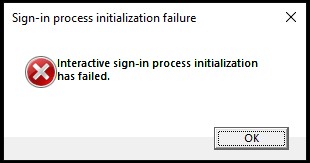
Figure 1: (English Only) Sign-in process initialization failure
This prompt prevents these devices from properly booting into Windows, and System Data Encryption recoveries How to Run the Dell Encryption Enterprise / Dell Encryption Personal Recovery Bundle How to Run the Dell Encryption Enterprise / Dell Encryption Personal Recovery Bundle do not resolve the failure.
Résolution
Older implementations of Dell Encryption (formerly Dell Data Protection | Encryption) may have had policy elements included that would encrypt executables within the System32 directory of Windows. Policies that reflect these encryption rules would look similar to the text:
^3@%ENV:SYSTEMROOT%\SYSTEM32\;exe
Dell Technologies recommends removing any policy elements that encrypt files with extensions of EXE, DLL, or SYS within C:\Windows\System32, or any of its subfolders.
These folders are protected system folders, which are only accessible by local administrators, or predefined accounts. Though these files remain decrypted, Dell Encryption validates that these files have not been tampered with between boots when the policy Secure Windows Credentials is enabled within the managing Dell Security Management Server.
Devices that are in a bad state must have the logonui.exe in C:\Windows\System32\ replaced with a copy from a known-good computer. Once this is complete, a System Data Encryption recovery How to Run the Dell Encryption Enterprise / Dell Encryption Personal Recovery Bundle must be performed. The endpoint should then boot correctly.
To contact support, reference Dell Data Security International Support Phone Numbers.
Go to TechDirect to generate a technical support request online.
For additional insights and resources, join the Dell Security Community Forum.