OptiPlex 7070 Ultra: Visual guide to your computer
Résumé: This article is a visual guide to the external ports and features on the various form factors of the Dell OptiPlex 7070 Ultra desktop.
Cet article concerne
Cet article ne concerne pas
Cet article n’est associé à aucun produit spécifique.
Toutes les versions du produit ne sont pas identifiées dans cet article.
Symptômes
The following article provides a visual guide to your OptiPlex 7070 Ultra Computer and lists the external ports and features of your PC.
 Note: For a more detailed description of each location, please go to the system manuals at www.dell.com/support
Table of Contents:
Front View

(Figure.1 Front View)
Rear View
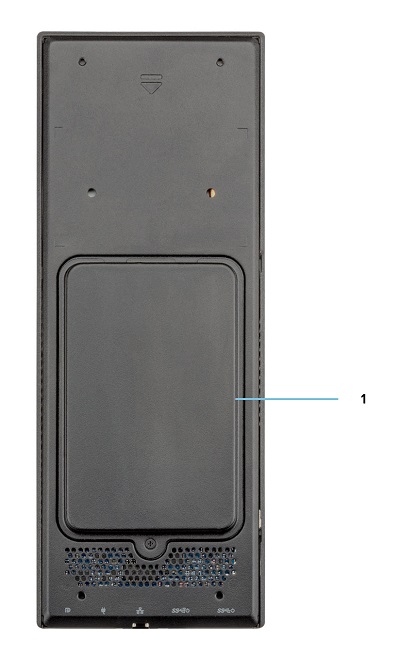
(Figure.2 Rear View)
| 1 | Hard Drive Bay |
Top View
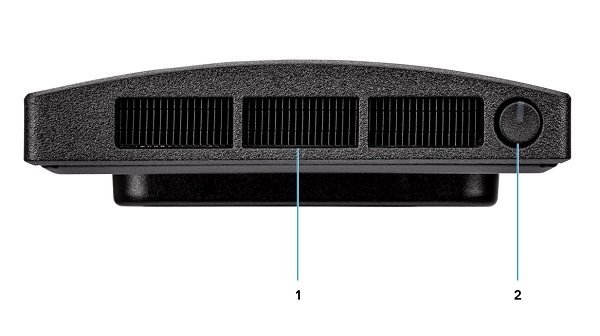
(Figure.3 Top View)
| 1 | Fan Vent | 2 | Power Button and Power LED |
Bottom View

(Figure.4 Bottom View)
| 1 | USB 3.1 Gen1 Type-A Connector w/SmartPower | 2 | USB 3.1 Gen2 Type-A Connector w/SmartPower |
| 3 | Network Ethernet (NIC) Connector | 4 | Power Adapter Connector |
| 5 | USB 3.1 Gen2 Type-C Connector w/DisplayPort Alt Mode/PowerDelivery |
Left-Hand Side View

(Figure.5 Left-Hand Side View)
| 1 | Service Tag Location | 2 | Universal Audio Connector |
| 3 | Vent | 4 | Hard Drive Status LED |
| 5 | USB 3.1 Gen2 Type-C Connector w/DisplayPort Alt Mode | 6 | USB 3.1 Gen2 Type-A w/PowerShare |
Right-Hand Side View
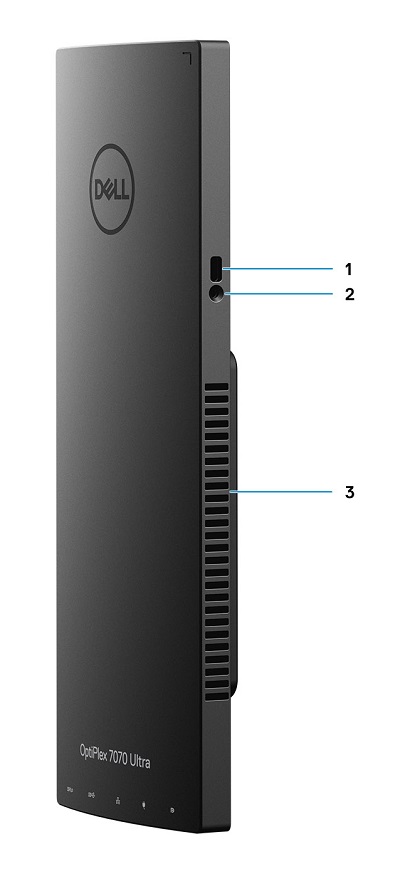
(Figure.6 Right-Hand Side View)
| 1 | Kensington Lock Slot | 2 | Security Screw Hole |
| 3 | Vent |
Additional Info:
- OptiPlex 7070 Ultra Online Manuals and Documents
- OptiPlex 7070 Ultra Customer replaceable unit (CRU) teardown guide
Cause
N/A
Résolution
N/A
Produits concernés
OptiPlex 7070 UltraPropriétés de l’article
Numéro d’article: 000138519
Type d’article: Solution
Dernière modification: 29 sept. 2023
Version: 7
Trouvez des réponses à vos questions auprès d’autres utilisateurs Dell
Services de support
Vérifiez si votre appareil est couvert par les services de support.