Latitude 3180: キーボード機能ガイド
Résumé: この文書では、Dell Latitude 3180ノートパソコンのキーボードのファンクション キーについて説明します。
Cet article concerne
Cet article ne concerne pas
Cet article n’est associé à aucun produit spécifique.
Toutes les versions du produit ne sont pas identifiées dans cet article.
Symptômes
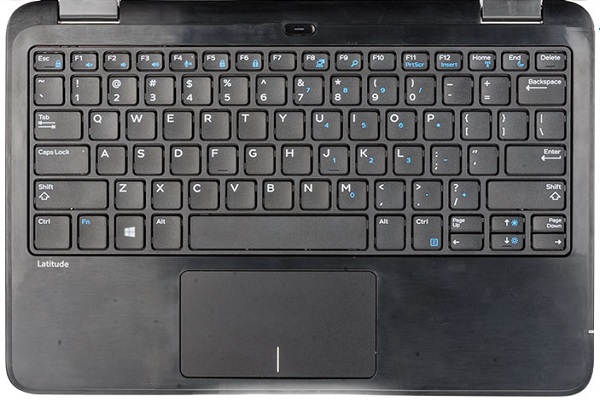
Cause
| ファンクション キーのコンボ | 結果 |
|---|---|
| Fn+ ESC | Fnロック切り替え |
| Fn + F1 | スピーカー ミュート |
| Fn + F2 | ボリュームダウン |
| Fn + F3 | ボリュームアップ |
| Fn + F4 | マイク。ミュート |
| Fn + F5 | Num Lock |
| Fn + F6 | Scroll Lock |
| Fn + F8 | ディスプレイの切り替え |
| Fn + F9 | 検索 |
| Fn + F11 | Prt Scr |
| Fn + F12 | 挿入 |
| Fn+ Home | ワイヤレスの切り替え |
| Fn+ End | スリープに移行 |
| Fn+ 上矢印 | Increase Brightness(輝度を上げる) |
| Fn+ 下矢印 | Decrease Brightness(輝度を下げる) |
Résolution
 関連資料や情報については、デル・テクノロジーズのキーボードのナレッジ ベースを参照してください。
 関連記事および情報については、デル・テクノロジーズのタッチパッドのサポート ページを参照してください。
![にある[マウス]をクリックし―](https://supportkb.dell.com/img/ka0Do0000002ALrIAM/ka0Do0000002ALrIAM_ja_3.jpeg) 関連記事および情報は、デル・テクノロジーズのマウスのサポート ページにも掲載されています。
関連記事および情報は、デル・テクノロジーズのマウスのサポート ページにも掲載されています。
Produits concernés
Latitude 3180Propriétés de l’article
Numéro d’article: 000140807
Type d’article: Solution
Dernière modification: 01 mai 2026
Version: 5
Trouvez des réponses à vos questions auprès d’autres utilisateurs Dell
Services de support
Vérifiez si votre appareil est couvert par les services de support.