Dell Management Server Virtual Core Server Does Not Exist Notifications
Résumé: 在将 Dell Management Server Virtual 部署或升级到 v11.4 并启用电子邮件通知时,电子邮件通知的收件人每小时都会收到错误通知。
Cet article concerne
Cet article ne concerne pas
Cet article n’est associé à aucun produit spécifique.
Toutes les versions du produit ne sont pas identifiées dans cet article.
Symptômes
受影响的产品:
- Dell Management Server Virtual
受影响的版本:
- v11.4
受影响的操作系统:
- Linux
收到的电子邮件示例:
Automatically generated alert from Dell Security Management Server Virtual – Service: Dell Core Server - HTTP / Event: Does not exist
Action: restart
Host: Server Hostname
Description: process is not running
Service: Dell Core Server - HTTP
Event: Does not exist
Cause
检查 Dell Management Server Virtual 组件状态的服务无法检测到核心服务器正在侦听,因为 netstat未安装 nettools 软件包的一部分。
Résolution
- 登录 到 Dell Management Server Virtual 管理控制台。
注:
- Dell Security Management Server Virtual 的默认凭据为:
- 用户名:
delluser - 密码:
delluser
- 用户名:
- 管理员可以更改产品的虚拟设备菜单中的默认密码。
- 从主菜单中,选择 Launch Shell ,然后按 Enter 键。
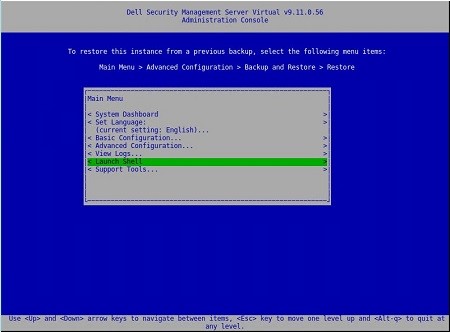
- 将用户更改为
dellsupport使用命令su dellsupport
 注:
注:- Dell Security Management Server Virtual 的默认凭据为:
- 用户名:
dellsupport - 密码:
dellsupport
- 用户名:
- 管理员可以更改产品的虚拟设备菜单中的默认密码。
- Dell Security Management Server Virtual 的默认凭据为:
- 确认以下项的密码:
dellsupport用户身份登录。

- 检查
netstat使用命令netstat --version。 - 如果
netstat未安装,您会看到以下错误。

- 运行命令
sudo apt install net-tools要安装 Net Tools。 - 运行
netstat --version再次验证netstat现已安装。

- 类型
exit并按 Enter 键注销dellsupport。

- 类型
exit并按 Enter 键从 shell 注销到主菜单。

Produits concernés
Dell EncryptionPropriétés de l’article
Numéro d’article: 000202891
Type d’article: Solution
Dernière modification: 14 sept. 2026
Version: 3
Trouvez des réponses à vos questions auprès d’autres utilisateurs Dell
Services de support
Vérifiez si votre appareil est couvert par les services de support.