How to Get Support for Dell Command Powershell Provider
Zusammenfassung: This article covers how to obtain support for Dell Command | Powershell Provider.
Dieser Artikel gilt für
Dieser Artikel gilt nicht für
Dieser Artikel ist nicht an ein bestimmtes Produkt gebunden.
In diesem Artikel werden nicht alle Produktversionen aufgeführt.
Weisungen
Affected Products:
- Dell Command | Powershell Provider
The Dell Command | PowerShell Provider module enables BIOS configuration for Dell enterprise client computers through the Windows PowerShell interface. It works for local computers, remote computers, and Windows Preinstallation Environment (WinPE).
Self-Help Options
Most technical information can be found by referencing the:
Self-Help Options
Most technical information can be found by referencing the Dell Knowledge Base.
To obtain support:
- Go to https://www.dell.com/support/home.
- To the right of the page, select Contact Support and then click either:
- Contact Technical Support: If you have a Dell service tag available
- Contact Order Support: If you do not have a Dell service tag, and need assistance gaining access to the software.

- Click Enter service tag.
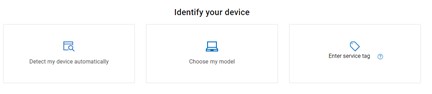
- Type your Client (not server) Service Tag and then click Submit.

- Confirm your model and Service Tag, and click Next.

- From the drop-down menu, select Software and 3rd party applications and then click Next.

- Select an available contact option.

- Type your Order Number and then click Find My Order.

- To the right of the page, click Contact Customer Support.

- From the drop-down, select Missing Items.

- Select an available contact option.

Note:
- Contact options may differ by your region.
- Reference this article (000189420) when contacting technical support.
Betroffene Produkte
Dell Command | Powershell ProviderArtikeleigenschaften
Artikelnummer: 000189420
Artikeltyp: How To
Zuletzt geändert: 16 juil. 2024
Version: 17
Antworten auf Ihre Fragen erhalten Sie von anderen Dell NutzerInnen
Support Services
Prüfen Sie, ob Ihr Gerät durch Support Services abgedeckt ist.