Dell Unity: NAS server reported Domain Controller servers not reachable (User Correctable)
Résumé: Customer receives alert on NAS server reporting domain controller not reachable when one or more Domain controllers configured are RODC (Read-Only Domain Controller)
Cet article concerne
Cet article ne concerne pas
Cet article n’est associé à aucun produit spécifique.
Toutes les versions du produit ne sont pas identifiées dans cet article.
Symptômes
The NAS server reported intermittent warning saying the domain controllers are not reachable.
The svc_cifssupport -pingdc command shows DC NETLOGON failure and DOWNGRADE_DETECTED
The svc_cifssupport -pingdc command shows DC NETLOGON failure and DOWNGRADE_DETECTED
spa:/service/user# svc_cifssupport cifs_test -pingdc -compname cifs_test -dc WIN2016 -verbose
cifs_test : done

PINGDC GENERAL INFORMATION

DC SERVER:
Netbios name  : WIN2016

CIFS SERVER:
Compname      : cifs_test
Domain        : peeps.lab

Error 13160939576: cifs_test :  PingDC failure: The compname 'cifs_test' could not successfully contact the DC 'WIN2016' because of NT errors (SUCCESS) at step Request Domain Sid. Details of the issue: origin=9000, '' DC='DC NETLOGON pipe failure'/'DOWNGRADE_DETECTED' This issue may prevent user authentication to this domain. Error 13160939579: cifs_test :  PingDC failure: The compname 'cifs_test' could not successfully contact the DC 'WIN2016'. Failed to access the pipe NETLOGON at step Open NETLOGON Secure Channel:  Action failed with status=DOWNGRADE_DETECTED
Cause
The Domain Controller that NAS server fails to connect is a RODC (Read-Only Domain Controller).
The RODC only stores users and computers passwords based on its “Password Replication Policy”. Only passwords for the accounts that are in the Allow groups and not in the Deny groups can be replicated to the RODC.
After NAS server is joined to the domain, its computer account and password are saved in the wirteable Domain controller and by default they will not be replicated to the RODC.
So when NAS server tries to establish the secure channel to the RODC, the RODC doesn’t have the computer password of the NAS server hence it will return “STATUS_NO_TRUST_SAM_ACCOUNT” and "DOWNGRADE_DETECTED"
The RODC only stores users and computers passwords based on its “Password Replication Policy”. Only passwords for the accounts that are in the Allow groups and not in the Deny groups can be replicated to the RODC.
After NAS server is joined to the domain, its computer account and password are saved in the wirteable Domain controller and by default they will not be replicated to the RODC.
So when NAS server tries to establish the secure channel to the RODC, the RODC doesn’t have the computer password of the NAS server hence it will return “STATUS_NO_TRUST_SAM_ACCOUNT” and "DOWNGRADE_DETECTED"
Résolution
To workaround the issue, customer will need to add the NAS server's computer account to the RODC's Password Replication Policy so that the NAS server's account passwords can be replicated to RODC.
1. Login to the Writeable Domain controller.
2. Open "active directory Usrs and Computers"
3. Go to "Domain controllers" OU
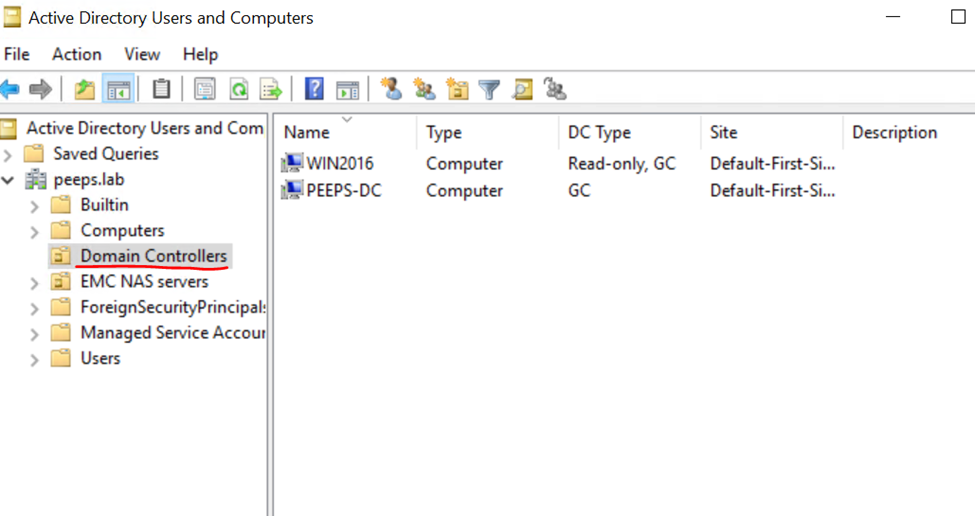
4. Select the RODC you need to configure "Passowrd replication Policy" and click on the properties.
5. Go to "Password replication Policy" tab and add the NAS server's computer account to the ALLOW group.
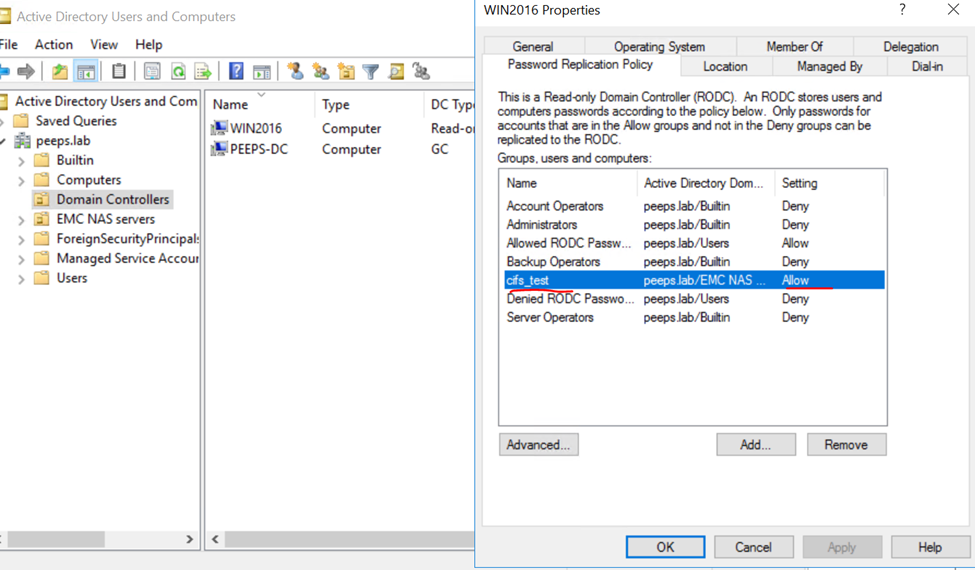
Now run the pingdc command again, this time the pingdc will complete without error.
1. Login to the Writeable Domain controller.
2. Open "active directory Usrs and Computers"
3. Go to "Domain controllers" OU
4. Select the RODC you need to configure "Passowrd replication Policy" and click on the properties.
5. Go to "Password replication Policy" tab and add the NAS server's computer account to the ALLOW group.
Now run the pingdc command again, this time the pingdc will complete without error.
spa:/service/user# svc_cifssupport cifs_test -pingdc -compname cifs_test -dc WIN2016 -verbose
cifs_test : done

PINGDC GENERAL INFORMATION

DC SERVER:
Netbios name  : WIN2016

CIFS SERVER:
Compname      : cifs_test
Domain        : peeps.lab
Informations supplémentaires
Reference:
https://www.rebeladmin.com/2014/10/password-replication-in-rodc/
https://www.rebeladmin.com/2014/10/password-replication-in-rodc/
Produits concernés
Dell EMC UnityPropriétés de l’article
Numéro d’article: 000204287
Type d’article: Solution
Dernière modification: 15 mai 2026
Version: 4
Trouvez des réponses à vos questions auprès d’autres utilisateurs Dell
Services de support
Vérifiez si votre appareil est couvert par les services de support.