Dell Security Management Server管理コンソールで多要素認証を管理する方法
Résumé: Dell Security Management Serverは、管理コンソールにログインするために二要素認証(2FA)を要求するように設定できます。
Cet article concerne
Cet article ne concerne pas
Cet article n’est associé à aucun produit spécifique.
Toutes les versions du produit ne sont pas identifiées dans cet article.
Instructions
対象製品:
- Dell Security Management Server
- Dell Security Management Server Virtual
影響を受けるバージョン:
- v11.4.0以降
多要素認証は、 ユーザー グループ または 個々 のユーザー レベルのいずれかで管理できます。詳細については、次の適切なセクションを選択してください。
ユーザー グループ
- アカウント管理者のロールを持つアカウントを使用して、Dell Data Security管理コンソールにログインします。詳細については、「 Dell Data Security Server管理コンソールへのアクセス方法 」を参照してください。
注:管理者ロールの詳細については、「マニュアルおよび文書」の『AdminHelp - Security Management Server』PDFの「Administrator Roles」セクションを参照してください。
- 左側のメニュー ペインから、[Populations]タブを展開し、次に[User Groups]をクリックします。
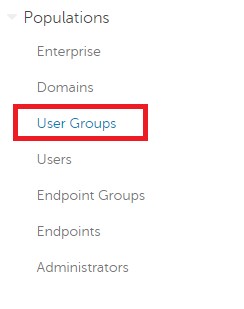
図1: User Groups
- リストから編集するユーザー グループを選択します。
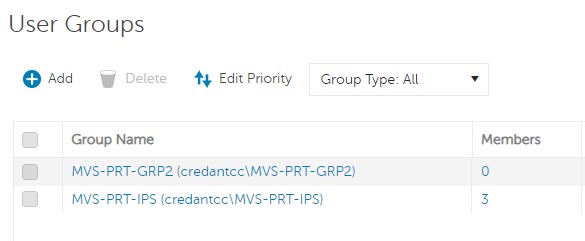
図2:ユーザー グループの選択
注:このリストのグループの位置は、グループの優先度を決定します。詳細については、「マニュアルおよび文書」の『AdminHelp - Security Management Server』PDFの「Edit User Group Priority」セクションを参照してください。
- [Admin]タブを選択します。
![[Admin]タブ](https://supportkb.dell.com/img/ka06P000000sndaQAA/ka06P000000sndaQAA_ja_3.jpeg)
図3:[Admin]タブ
- [MFA Configuration]で次を実行します。
- [Enabled]を選択します。
- [Email]または[Google Authenticator]のいずれかを選択します。
- [Update]ボタンをクリックします。
![[MFA Configuration]](https://supportkb.dell.com/img/ka06P000000sndaQAA/ka06P000000sndaQAA_ja_4.jpeg)
図4:[MFA Configuration]
個々のユーザー
- アカウント管理者のロールを持つアカウントを使用して、Dell Data Security管理コンソールにログインします。詳細については、「 Dell Data Security Server管理コンソールへのアクセス方法 」を参照してください。
注:管理者ロールの詳細については、「マニュアルおよび文書」の『AdminHelp - Security Management Server』PDFの「Administrator Roles」セクションを参照してください。
- 左側のメニュー ペインから、[Populations]タブを展開し、次に[Users]をクリックします。
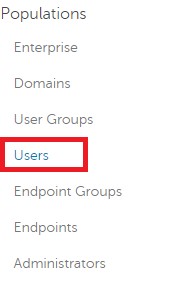
図5:ユーザー
- リストから編集するユーザーを選択します。
- [Admin]タブを選択します。
![[Admin]タブ](https://supportkb.dell.com/img/ka06P000000sndaQAA/ka06P000000sndaQAA_ja_6.jpeg)
図6:[Admin]タブ
- [MFA Configuration]で次を実行します。
- [Enabled]を選択します。
- [Email]、[Google Authenticator]、または[Inherited Configuration from User Group]のいずれかを選択します。
- [Update]ボタンをクリックします。
![[MFA Configuration]](https://supportkb.dell.com/img/ka06P000000sndaQAA/ka06P000000sndaQAA_ja_7.jpeg)
図7:[MFA Configuration]
サポートに問い合わせるには、「Dell Data Securityのインターナショナル サポート電話番号」を参照してください。
TechDirectにアクセスして、テクニカル サポート リクエストをオンラインで生成します。
さらに詳しい情報やリソースについては、「デル セキュリティ コミュニティー フォーラム」に参加してください。
Produits concernés
Dell EncryptionPropriétés de l’article
Numéro d’article: 000200440
Type d’article: How To
Dernière modification: 22 nov. 2023
Version: 6
Trouvez des réponses à vos questions auprès d’autres utilisateurs Dell
Services de support
Vérifiez si votre appareil est couvert par les services de support.