Stationära NVIDIA RTX Manager håller skrivbordet öppet
Résumé: Den här artikeln innehåller information om det nyskapade problemet med NVIDIA RTX Desktop Manager Det går inte att stänga skrivbordet.
Cet article concerne
Cet article ne concerne pas
Cet article n’est associé à aucun produit spécifique.
Toutes les versions du produit ne sont pas identifiées dans cet article.
Symptômes
Dell-datorer med separat NVIDIA GPU kan uppleva att den stationära datorn NVIDIA RTX Desktop Manager inte stänger det nyskapade skrivbordet.
- Öppna NVIDIA RTX Desktop Manager och klicka på ENABLE RTX DESKTOP MANAGER, programmet skapar Desktop 1 som standard.
- Klicka på knappen Nytt skrivbord för att skapa ett andra skrivbord.
- Klicka på X-ikonen i det övre högra hörnet av Skrivbord 2 men upptäcker att den inte kan stängas.
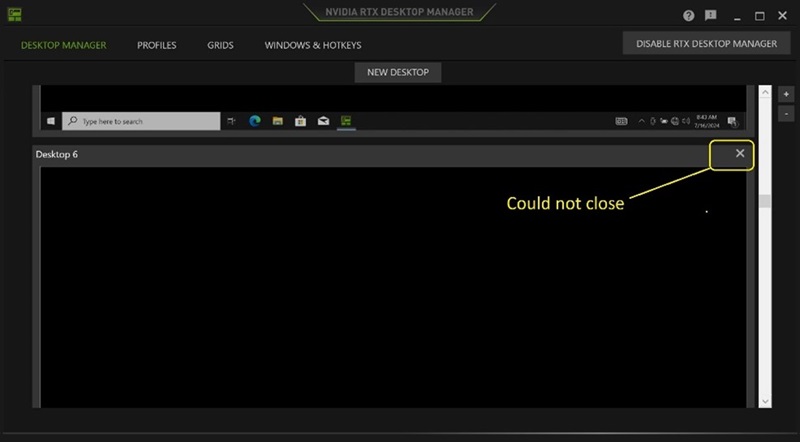
(Bild 1 – NVIDIA RTX Desktop Manager)
Berörda plattformar:
- Precision 7780
- Precision 7680
- Precision 7770
- Precision 7670
- Precision 7560
- Precision 7760
- Precision 7550
- Precision 7750
- Precision 7540
- Precision 7740
- Precision 7530
- Precision 7730
- Precision 7520
- Precision 7720
- Precision 5480
- Precision 5490
- Latitude 3490
- Latitude 3480
- Latitude 3470
- Latitude 3550
- Latitude 3530
- Latitude 3520
Cause
Ej tillämpligt
Résolution
Lös problemet genom att uppdatera NVIDIA Graphics Driver till version 552.84 eller senare på datorn. Information om hur du laddar ner och installerar drivrutinen finns i Ladda ner och installera Dell-drivrutiner.
Produits concernés
Dell Latitude 3480/3488, Latitude 3490, Latitude 3520, Latitude 3530, Latitude 3550, Latitude 3470, Precision 5480, Precision 5490, Precision 7520, Precision 7530, Precision 7540, Precision 7550, Precision 7560, Precision 7670, Precision 7680
, Precision 7720, Precision 7730, Precision 7740, Precision 7750, Precision 7760, Precision 7770, Precision 7780
...
Propriétés de l’article
Numéro d’article: 000227614
Type d’article: Solution
Dernière modification: 21 May 2026
Version: 3
Trouvez des réponses à vos questions auprès d’autres utilisateurs Dell
Services de support
Vérifiez si votre appareil est couvert par les services de support.