Identifiera versionen av huvudinstallationsprogrammet för Dell Data Security
Résumé: Ta reda på hur du identifierar versionen av huvudinstallationsprogrammet för Dell Data Security (tidigare Dell Data Protection) genom att följa dessa stegvisa instruktioner.
Cet article concerne
Cet article ne concerne pas
Cet article n’est associé à aucun produit spécifique.
Toutes les versions du produit ne sont pas identifiées dans cet article.
Instructions
Obs!
- Från och med december 2022 har Dell Endpoint Security Suite Enterprise nått slutet av sin försäljningscykel. Den här produkten och dess artiklar uppdateras inte längre av Dell.
- Från och med december 2019 har Dell Endpoint Security Suite Enterprise nått slutet av sin försäljningscykel. Den här produkten och dess artiklar uppdateras inte längre av Dell.
- Mer information finns i Policy för produktlivscykel (slut på support/slut på livscykel) för Dell Data Security. Om du har några frågor om alternativa artiklar kan du antingen kontakta ditt försäljningsteam eller endpointsecurity@dell.com.
- Mer information om aktuella produkter finns i Endpoint Security.
Versionen av huvudinstallationsprogrammet för Dell Data Security (tidigare Dell Data Protection) kan användas för att
- upptäcka kända problem
- förstå ändringar i arbetsflödet
- kontrollera systemkraven.
Berörda produkter:
- Dell Encryption Enterprise
- Dell Data Protection | Enterprise Edition
- Dell Personal-kryptering
- Dell Data Protection | Mobile Edition
- Dell Endpoint Security Suite Enterprise
- Dell Endpoint Security Suite Pro
Berörda operativsystem:
- Windows
- [MASTER INSTALLER] måste laddas ned innan versionen kan identifieras.
- Produktnamnet för [MASTER INSTALLER] varierar beroende på program:
DDSSetup.exeDDSSetup.exe för Dell Encryption EnterpriseDDSSetup.exeDDSSetup.exe för Dell Encryption PersonalDDSSuite.exeDDSSuite.exe för Dell Endpoint Security Suite EnterpriseDDSSuite.exeDDSSuite.exe för Dell Endpoint Security SuiteDDPSetup.exeDDPSetup.exe för Dell Data Protection | Enterprise EditionDDPSetup.exeDDPSetup.exe för Dell Data Protection | Personal EditionDDPSuite.exeDDPSuite.exe för Dell Data Protection | Endpoint Security SuiteDDPSuite.exeDDPSuite.exe för Dell Data Protection | Endpoint Security Suite Enterprise
Information om nedladdning av DDSSetup eller DDPSetup finns i Ladda ner Dell Encryption Enterprise eller Dell Encryption Personal.
- Högerklicka på [MASTER INSTALLER] och välj Egenskaper.
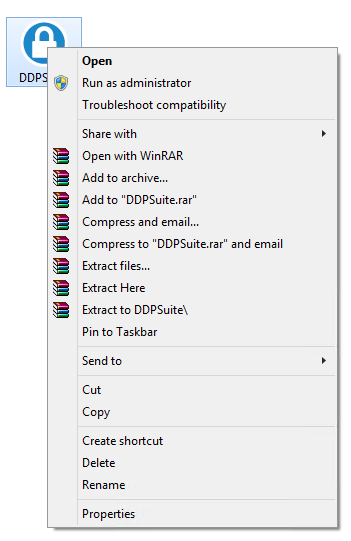
- Klicka på fliken Information.

- Anteckna produktversionen.
 Produktversionen av din klient behöver inte vara densamma som i skärmbilden ovan.
Informations supplémentaires
Vidéos
Produits concernés
Dell Encryption, Dell Endpoint Security Suite Pro, Dell Endpoint Security Suite EnterprisePropriétés de l’article
Numéro d’article: 000124917
Type d’article: How To
Dernière modification: 06 Aug 2026
Version: 12
Trouvez des réponses à vos questions auprès d’autres utilisateurs Dell
Services de support
Vérifiez si votre appareil est couvert par les services de support.