如何识别 Dell Data Security 服务器/Dell Data Protection 服务器前端版本
Résumé: 了解有关识别 Dell Data Security(以前称为 Dell Data Protection)服务器前端版本的分步说明。
Cet article concerne
Cet article ne concerne pas
Cet article n’est associé à aucun produit spécifique.
Toutes les versions du produit ne sont pas identifiées dans cet article.
Instructions
务必要了解 Dell Data Security(以前称为 Dell Data Protection)服务器前端的版本,以便执行以下操作:
- 识别已知问题
- 了解工作流程更改
- 验证系统要求
受影响的产品:
- Dell Security Management Server
- Dell Data Protection | Enterprise Edition Server
受影响的操作系统:
- Windows
本文介绍如何识别 Dell Security Management Server 或 Dell Security Management Server Virtual 的前端服务器版本。要识别后端的版本,请参阅如何识别 Dell Data Security/Dell Data Protection 服务器版本(英文版)。
可通过以下方面来确定版本:
- 安装程序
- Windows 用户界面
单击相应的过程以了解更多信息。
安装程序
- 解压 Security Management Server .zip。
- 转至
[LOCATION]\Security Management Server\x64。注:[LOCATION]= 解压的.zip文件的位置 - 右键单击
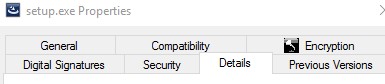
setup.exe然后选择 属性。

- 单击详细信息选项卡。
- 记下产品版本。在此示例中,产品版本为 9.9.2。
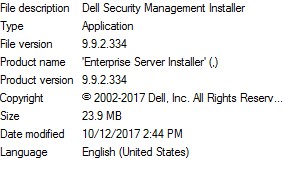 该文件的版本可能与以上屏幕截图中的版本不同。
Windows
- 以管理员身份登录,右键单击 Windows 开始菜单,然后单击运行。

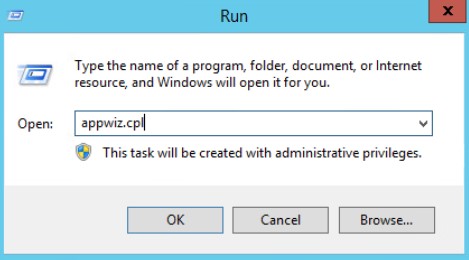
- 在“运行”UI中,键入
appwiz.cpl然后按 OK。
- 在“程序和功能”中,找到 Dell Security Management Server x64。
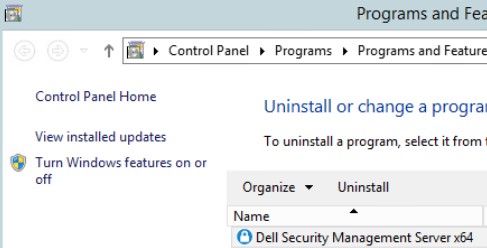 某些服务器版本可能会显示“Dell Enterprise Server”(而非 Dell Security Management Server)。
 - 记录版本。在此示例中,产品版本为 10.2.3。
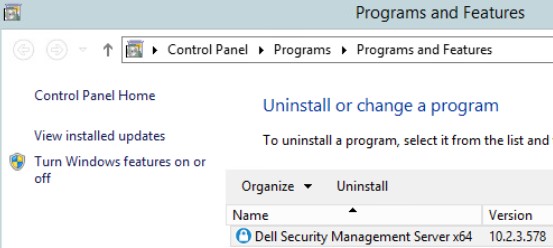 该版本可能与以上屏幕截图中的版本不同。
Informations supplémentaires
Vidéos
Produits concernés
Dell EncryptionPropriétés de l’article
Numéro d’article: 000130588
Type d’article: How To
Dernière modification: 10 Aug 2026
Version: 12
Trouvez des réponses à vos questions auprès d’autres utilisateurs Dell
Services de support
Vérifiez si votre appareil est couvert par les services de support.