Identyfikacja wersji trybu front-end serwera Dell Data Security Server/Dell Data Protection Server
Résumé: Ważne jest, aby znać wersję trybu front-end serwera Dell Data Security (uprzednio Dell Data Protection) w celu:
Cet article concerne
Cet article ne concerne pas
Cet article n’est associé à aucun produit spécifique.
Toutes les versions du produit ne sont pas identifiées dans cet article.
Instructions
Ważne jest, aby znać wersję trybu front-end serwera Dell Data Security (uprzednio Dell Data Protection) w celu:
- Identyfikowania znanych problemów
- Zrozumienie zmian przepływu pracy
- Weryfikacji wymagań systemowych
Dotyczy produktów:
- Dell Security Management Server
- Serwer Dell Data Protection | Enterprise Edition
Dotyczy systemów operacyjnych:
- Windows
ten artykuł określa wersję serwera typu front-end dla serwera Dell Security Management Server lub Dell Security Management Server Virtual. Informacje na temat identyfikacji wersji serwera typu back-end można znaleźć w artykule Identyfikacja wersji serwera Dell Data Security/Dell Data Protection.
Wersję można sprawdzić poprzez:
- Instalator
- Interfejs użytkownika systemu Windows
Kliknij odpowiedni proces, aby uzyskać więcej informacji.
Instalator
- Wyodrębnij pliki Security Management Server.zip.
- Przejdź do witryny
[LOCATION]\Security Management Server\x64.Uwaga:[LOCATION]= Lokalizacja wyodrębnionego pliku .zip - Kliknij prawym przyciskiem myszy
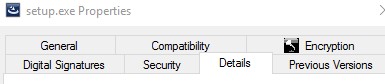
setup.exe, a następnie wybierz pozycję Właściwości.

- Kliknij kartę Szczegóły.
- Zapisz wersję produktu. W tym przykładzie wersja produktu to 9.9.2.
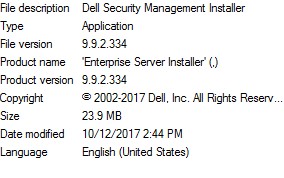 wersja pliku może różnić się od wersji widocznej na powyższym zrzucie ekranu.
Windows
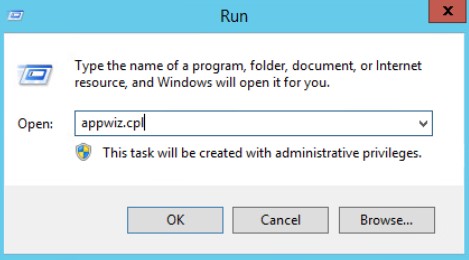
- Jako administrator, prawym przyciskiem myszy kliknij menu Start systemu Windows, a następnie kliknij opcję Uruchom.

- W oknie Uruchom wpisz
appwiz.cpli naciśnij OK.
- W oknie Programy i funkcje odszukaj Dell Security Management Server x64.
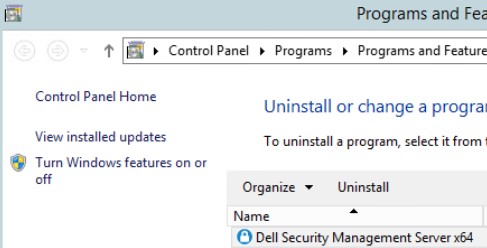 niektóre wersje serwera mogą nosić nazwę Dell Enterprise Server zamiast Dell Security Management Server.
 - Zapisz wersję. W tym przykładzie wersja produktu to 10.2.3.
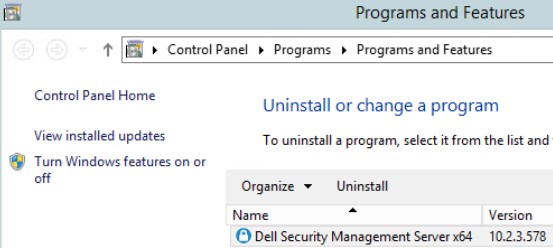 wersja może różnić się od tej przedstawionej na powyższym zrzucie ekranu.
Informations supplémentaires
Vidéos
Produits concernés
Dell EncryptionPropriétés de l’article
Numéro d’article: 000130588
Type d’article: How To
Dernière modification: 10 Aug 2026
Version: 12
Trouvez des réponses à vos questions auprès d’autres utilisateurs Dell
Services de support
Vérifiez si votre appareil est couvert par les services de support.