Dell Command | Configure Toolkit Returns an Error When Setting Secure Boot Mode to Audit Mode
Résumé: This article provides information about Dell Command | Configure Toolkit returning an error when setting Secure Boot Mode to Audit Mode by Dell Command | Configure Toolkit.
Cet article concerne
Cet article ne concerne pas
Cet article n’est associé à aucun produit spécifique.
Toutes les versions du produit ne sont pas identifiées dans cet article.
Symptômes
Dell Command | Configure Toolkit Returns an Error
The Dell Command | Configure Toolkit (CCTK) cannot set the Secure Boot Mode to Audit Mode and returns an error log.
XXXX/XX/XX XX:XX:XX cctk - Option : SecureBootMode
XXXX/XX/XX XX:XX:XX cctk - Error in Setting the Value
Cause
Résolution
Go to BIOS setup to Enable Custom Mode and Delete All Keys first then CCTK can set the Secure Boot Mode.
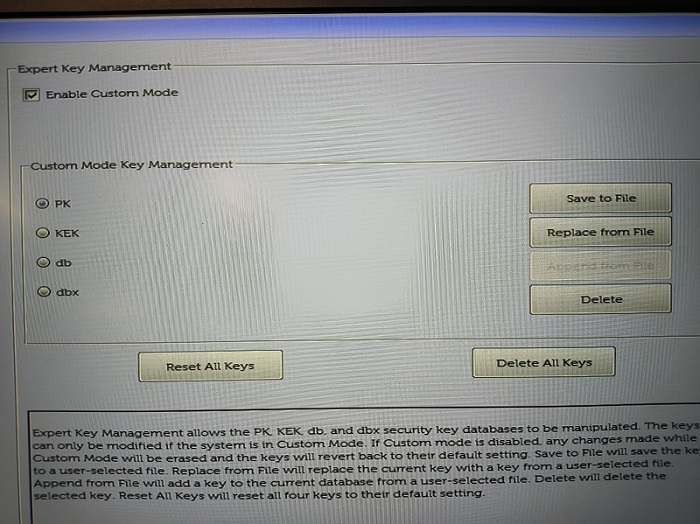
(Figure 1 - BIOS Setup)
Produits concernés
OptiPlex, Latitude, Dell Command | ConfigurePropriétés de l’article
Numéro d’article: 000205212
Type d’article: Solution
Dernière modification: 24 avr. 2025
Version: 9
Trouvez des réponses à vos questions auprès d’autres utilisateurs Dell
Services de support
Vérifiez si votre appareil est couvert par les services de support.