如何安裝 Dell 用戶端裝置管理員
Résumé: 本文提供安裝 Dell 用戶端裝置管理員 (DCDM) 的相關資訊。
Cet article concerne
Cet article ne concerne pas
Cet article n’est associé à aucun produit spécifique.
Toutes les versions du produit ne sont pas identifiées dans cet article.
Instructions
受影響的產品:
- Dell 用戶端裝置管理員
- 下載 和解 壓縮:
- 請參閱如何 下載 Dell Client Device Manager
- 請參閱 如何解壓縮 Dell 用戶端裝置管理員。
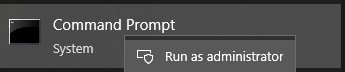
- 以系統管理員身分執行命令提示字元。
- 將目錄 (cd) 變更為 DCDM 解壓縮的位置。

- 根據您的需求,使用以下參數或範例執行 PowerShell script
powershell.exe -executionpolicy Bypass -windowstyle hidden -noninteractive -nologo -file "dcdm_deployment.ps1" -action -modules

| 參數 | 說明 |
|---|---|
| -help | 選用:顯示參數說明 |
| -動作 | 強制:指定要執行的動作 (安裝或解除安裝) |
| -模組 | 選用:指定要包含的模組。預設值 (DCDMCS、DCDMU、DCDMS) |
| -logpath | 選用:預設值為 C:ProgramData\Dell\ClientDeviceManager。指定記錄檔的路徑 |
| -詳細日誌 | 選用:啟用主控台記錄顯示 (True or False) |
| -調試等級 | 選用預設值為全部。指定除錯資訊的層級 |
| -遙測同意 | 可選預設值為 true。表示遙測同意 |
| 模組 | 說明 | 模組取決於 |
|---|---|---|
| DCDMCS | Dell Client Device Manager Core Services (先前稱為 Dell Core Service (DCS)) | 需要 N/A 核心元件 |
| DCDMS | Dell 用戶端裝置管理員安全性 (先前稱為 Dell 受信任裝置 (DTD)) | DCDMCS |
| 德德穆 | Dell 用戶端裝置管理員更新 (先前稱為 Dell Command Update (DCU)) | DCDMCS、DCDMS |
範例:
安裝或更新所有模組,並傳送 DCDMU 遙測資料
powershell.exe -executionpolicy Bypass -windowstyle hidden -noninteractive -nologo -file "dcdm_deployment.ps1" -action "install"
在不進行遙測的情況下安裝或更新所有模組
powershell.exe -executionpolicy Bypass -windowstyle hidden -noninteractive -nologo -file "dcdm_deployment.ps1" -action "install" -telemetryconsent "false"
安裝或更新 Dell 用戶端裝置管理員 |安全性 (DCDMS)
powershell.exe -executionpolicy Bypass -windowstyle hidden -noninteractive -nologo -file "dcdm_deployment.ps1" -action "install" -modules "DCDMS"
解除安裝 Dell 用戶端裝置管理員 |安全性 (DCDMS)
powershell.exe -executionpolicy Bypass -windowstyle hidden -noninteractive -nologo -file "dcdm_deployment.ps1" -action "uninstall" -modules "DCDMS"
解除安裝所有模組
powershell.exe -executionpolicy Bypass -windowstyle hidden -noninteractive -nologo -file "dcdm_deployment.ps1" -action "uninstall"
Produits concernés
Dell Client Device ManagerPropriétés de l’article
Numéro d’article: 000299185
Type d’article: How To
Dernière modification: 22 mai 2026
Version: 3
Trouvez des réponses à vos questions auprès d’autres utilisateurs Dell
Services de support
Vérifiez si votre appareil est couvert par les services de support.