Dell Unity: How to add SMTP server settings for Unity array
Résumé: Dell Unity: How to add SMTP server settings for Unity array.
Cet article concerne
Cet article ne concerne pas
Cet article n’est associé à aucun produit spécifique.
Toutes les versions du produit ne sont pas identifiées dans cet article.
Instructions
- From the "Update system setting" on the upper right corner, choose "Alerts" tab, then email and SMTP option.
- Add the required list of mails that would like to receive system alerts.
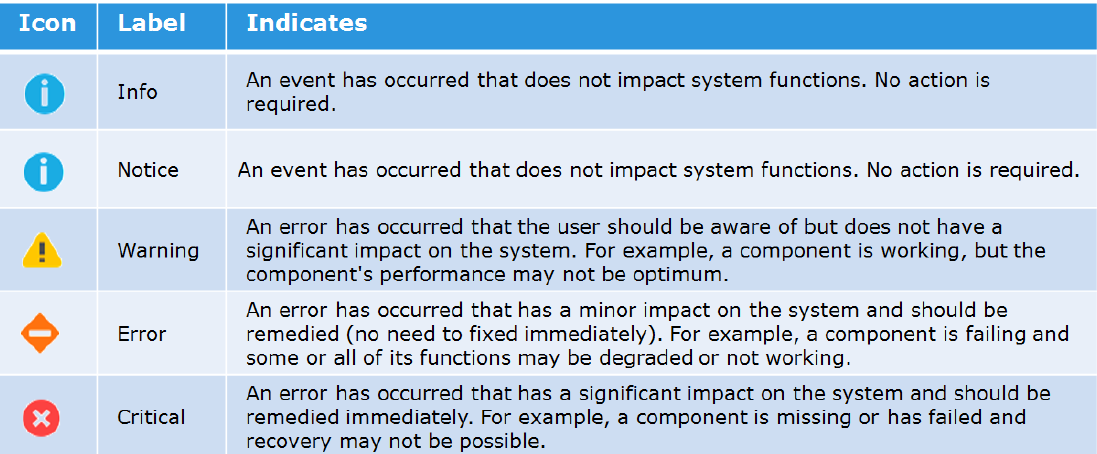
- Add the severity level of the alerts to send.
Here is the figure of the different severity levels:
- Then type the IP address or hostname of the Simple Mail Transport Protocol (SMTP) server required to send emails.
Changing the default port for SMTP (25) is not supported with Unity OE version older than Nighthawk (4.5.0).
From Nighthawk onward, unity starts to support customize of SMTP port:06:34:56 service@Peggy spa:~/user> uemcli /net/smtp -hStorage system address: 127.0.0.1Storage system port: 443HTTPS connection
Manage SMTP server settings. Use SMTP to have system alerts emailed to specified addresses.
Actions:[Show]/net/smtp [ -id <value> ] show [ -output { nvp | csv | table [ -wrap ] } ] [ { -brief | -detail | -filter <value> } ][Set]/net/smtp -id <value> set -addr <value> [ -port <value> ] [ -encryptLevel { none | startTLS | ssl } ] [ -authType { none | plain | login | cram_md5 | digest_md5 } ] [ -user <value> { -passwd <value> | -passwdSecure } ] [ -bypassProxy { yes | no } ]
Produits concernés
Dell EMC Unity FamilyProduits
Dell EMC Unity FamilyPropriétés de l’article
Numéro d’article: 000022531
Type d’article: How To
Dernière modification: 22 oct. 2025
Version: 4
Trouvez des réponses à vos questions auprès d’autres utilisateurs Dell
Services de support
Vérifiez si votre appareil est couvert par les services de support.